This is the second post of a two-parter. Please read part 1 for context and additional information. 3rd Party Libraries As mentioned in part 1, Scala is not binary backwards-compatible between major releases. Although code compiled with 2.10 may work properly with libraries compiled against 2.9.x, this is hardly recommended and may result in a lot of subtle error conditions at runtime that are hard to track down. As a result, the recommended practice is to upgrade all Scala dependencies to versions compiled against 2.10. Fortunately the Scala ecosystem is very active, so most common libraries had 2.10 builds on announcement day, but you are still likely to encounter libraries that need to be upgraded because: - They're lagging behind the Scala release schedule and simply haven't released 2.10-compatible binaries (fortunately, this seems to be extremely rare; in practice all our dependencies were otherwise resolved);
- The specific version you're using does not have a 2.10-compatible release and likely never will (Squeryl 0.9.5-2);
- A 2.10-compatible official release is out but hasn't yet been published to the central repository (Scalatra 2.0.5).
My experience shows that with a bit of dilligence, practically all our (myriad) dependencies were fairly easy to migrate to 2.10. In most cases this simply entails switching to the appropriate artifact ID suffix (_2.10 instead of _2.9.2, see part 1 for associated rant), in other cases I had to upgrade to a later official release and in rare cases I had to dig in and replace a dependency with an appropriate fork or snapshot version. Here is a list of migration notes for some of our dependencies: | Library | Previous | New version | Comments | | Scala-Time | 0.6 | nscala-time 0.2 | The original library appears to be abandoned and was forked on GitHub.
The package changed from org.scala-tools.time to com.github.nscala-time.time | | ScalaMock | 2.4 | 3.0.1 | The 3.x series runs natively on Scala 2.10 without proxy factories and the like. Syntax is a bit odd but works like a charm.
The ScalaTest integration is compiled against ScalaTest 2.0-M5b, which forced us to upgrade. | | ScalaTest | 1.8 | 2.0-M5b | Minor API changes: Spec→FunSpec, parameters changed in Suite.run() | | Squeryl | 0.9.5-2 | 0.9.5-6 | | | Argot | 0.4 | 1.0.0 | | | Scala I/O | 0.4.1-seq | 0.4.2 | | | Lift JSON (+ext) | 2.4 | 2.5-M4 | | | Lift Facebook | 2.4 | 2.5-SNAPSHOT | Had to exclude net.liftweb:lift-webkit_2.10 to avoid dependency conflicts | | Akka | 2.0.4 | 2.1 | Scheduling now requires an implicit ExecutionContext. See migration guide for details. | | Scalatra | 2.0.4 | 2.0.5-SNAPSHOT | Official 2.0.5 is out, but has not yet shown up on the central repository, so I ended up going with the (frozen) 2.0.5 snapshot artifacts | | Scalatra | 2.1.1 | 2.2.0 | scalatra-akka module has been folded back into the core artifact as of 2.2.0. | | Graph for Scala | 1.5.1 | 1.6.1 | | Scala Library Changes The Scala class library itself has a number of changes you ought to be aware of before migrating to 2.10. The really big change is that Scala actors are deprecated in favor of Akka. You can still use them by importing the scala-actors artifact from the Scala 2.10 distribution, but it is recommended to migrate fully to the new actor system as this is also likely to be obsoleted by 2.10.1. The gentle folk at Typesafe have provided a very comprehensive migration guide to assist your efforts. The less prevasive API changes we ran into include: - List.elements is deprecated in favor of List.iterator;
- TraversableOnce.toIndexedSeq no longer takes a type argument. This was actually quite pervasive in our codebase, causing plenty of compilation errors, and is easily worked around by removing the type parameter (which is extraneous to begin with);
- Scala actors' Actor.receive method is now public (previously protected). This had to be rectified in pretty much all of our existing actors by removing the protected modifer;
- Occasional subtle API changes requiring minor code fixes. For example, see this question on StackOverflow.
Summary
Opinions differ among members of our team - some predicted that the migration process will be much more complex whereas personally, given the relatively high level of maturity I've come to depend on in the 2.9 series, the migration process actually ended up being significantly harder than I anticipated. Particularly disconcerting were the occasional compiler failures which took a lot of time to track down. Practically speaking, though, the whole migration process took less than 3 days (including documentation), did not involve additional teammates, and all problems were either resolved or worked around rather quickly. The Typesafe compiler team has been very helpful in analyzing and resolving the single bona-fide compiler bug we've run into, and the community as a whole (on Stack Overflow, Google Groups and elsewhere) was also extremely supportive and helpful. On the whole, am I happy with the process? So-so. There is nothing here an experienced Scala developer should have serious trouble with, but it will take a lot more stability and predictability for Scala to gain mainstream acceptance in the industry, and that includes a much easier and more robust migration path to upcoming releases (yes, that includes migrating from 2.10 to 2.11 when it comes along). That being said, Scala has been a terrific language to work with in the last couple of years, and the new features in 2.10 (particularly reflection, macros and string interpolation) should make this an extremely worthwhile upgrade. We still have a lot of regression testing to do on the new version, and if anything interesting pops up I'll be sure to post about it separately (or bitch about it on Twitter...)
I just spent a few days migrating our codebase from Scala 2.9.2 to Scala 2.10. A quick search found very little in the way of migration guides and studies, so it seemed appropriate to document my experiences and offer what tips I managed to collect on the way. General Observations This process should not be undertaken lightly, and its implementation inevitably depends on your resources and team composition. The group (or person) charged with migrating the codebase should, at the very least, consist of an experienced Scala developer not afraid to get his or her hands dirty. The migration is not an entirely smooth process - there are plenty of (fortunately fairly minor) breaking changes in the Scala APIs, and since Scala does not yet feature binary backwards compatibility between major versions (2.9→2.10→2.11...), so expect some inevitable library upgrades and the potential complexities inherent in any such update. The specific issues I encountered are documented in their respective sections below. Unfortunately there is not much I can offer in the way of preparation; these are the obvious steps: - Familiarize yourself with Scala 2.10. Make sure you know what you’re getting in exchange for investing time and effort on the migration process and early-bird issues;
- Work in an isolated branch and pull changes from the master branch often;
- Commit early, commit often. Try to keep your commits small and well-documented, so you have good revert checkpoints for when things go wrong;
- Keep the affected code to a minimum. The fewer changes, the easier it will be to isolate problems down the road.
If you’ve read so far and still can’t wait for 2.10.1, I hope the next few sections will save you some time and pain. Toolchain To start things off I switched the build to use Scala 2.10. Our project runs on Maven in lieu of SBT (topic for another post), and we use David Bernard’s excellent scala-maven-plugin, which deduces the Scala version from the scala-library dependency. The convention for the Scala version suffix has changed between 2.9 and 2.10: for example, argot2.9.2 is now argot2.10 - no revision for the 2.10 series. This rendered the suffix macro we employ useless, because annoyingly the Scala librariesthemselves (e.g. scalap or scala-compiler) actually use the full version number, so we ended up needing two macros (a “raw” Scala version and a suffix). Fortunately, at least as far as Maven is concerned the rest was smooth sailing. I next turned my attention to IntelliJ IDEA - I wanted to make sure an existing workspace can be reused with the migrated codebase, otherwise my entire team will have to undergo the inconvenience of starting from scratch on a clean working copy. Fortunately the process turned out to be quite painless (on IDEA 12.0.3 with Scala plugin build 0.7.121), with the following caveats: - Code analysis appears to miss some cases of stricter compilation compared to 2.9.x (see below);
- Code analysis occasionally identifies relative import statements as erroneous (e.g. import util.Random);
- Project FSC settings had to be manually changed to use the 2.10 compiler bundle (it remained on the default 2.9.2). This proved to be a moot point, because:
- The much-touted IDEA external build mode finally works consistently for the first time (and it uses the significantly better SBT compiler)!
- On the negative side, IDEA does not seem to handle compiler failures (as opposed to compilation errors) gracefully, missing a lot of detail in the output. As I ran into quite a few of these (details below), I ended up doing most of the compilation tests with Maven directly.
Beyond setting up a build job for the new branch, Jenkins posed no issues.
To summarize, from a toolchain standpoint, this was actually a fairly smooth process. Language/Compiler I was surprised and somewhat disheartened to find that, after some initial compilation attempts, it became evident that I missed every single mark in my code risk predictions. Where I expected most language-level headaches I encountered none, and seemingly simple and risk-free code ended up taking most of the time working on this process. First off, the Scala 2.10 compiler is much stricter than the earlier 2.9.x series. It has a few new heuristics that ended up triggering very often on our codebase; some are simply the result of messy code or design, but most are new best practices adopted by the compiler team at Typesafe: - “warning: This catches all Throwables. If this is really intended, use `case _ : Throwable` to clear this warning.”
We wrap-and-throw or swallow a lot of exceptions, and for brevity’s sake often use the shorter catch { case _ => }. A catch block is analogous to a partial function from Throwable, and there are undoubtedly cases where the distinction matters. We’ll clean these up iteratively by qualifying that we’re only catching Exceptions.
- “non-variable type argument B[T] in type A[B[T]] is unchecked since it is eliminated by erasure”
The 2.10 compiler is actually quite helpful in warning you when generic code may not behave as expected. This is just one example of such a warning.
- “error: overloaded method methodName needs result type”
The 2.10 compiler requires you to specify result types on most (all?) types of method overloading. Not much work here. - Case classes can no longer derive from other case classes, which makes a whole lot of sense if you consider the typesystem; 2.9.x had a whole variety of bugs and edge-cases relating to case class inheritance and companion objects, including some unwieldy constructor syntax. 2.10 simply does away with the complexity and potential ambiguity, which will break existing code. Since such class hierarchies are inherently problematic, I see this as an opportunity to refactor them properly; extractor objects were often useful for that task.
- In one case we ran into stricter cyclic dependency analysis on the part of 2.10 - an object extended a class and passed a member of another object as a constructor parameter. The second object referenced the first, which compiled fine under 2.9.2 but resulted in a cyclic dependency error with 2.10. As the original design was hard to understand I refactored the code to be a bit simpler, which resolved the problem satisfactorily.
- Manifests are deprecated in favor of TypeTags and the new reflection library built into 2.10 (certainly one if its most anticipated and celebrated features), but are still functional. We haven’t migrated to the new APIs yet, and that process will likely deserve a post all on its own; read this excellent answer on Stack Overflow for an introduction to TypeTags.
Beyond these and the occasional minor syntax change, the 2.10 compiler proved a somewhat difficult beast to tame: - Ran into crazily-detailed compiler failures that clearly (though long-windedly) indicated that I need to manually add scala-reflect to the classpath;
- Missing or conflicting dependencies, typically due to mishandling POMs, resulted in what I ended up dubbing the Spontaneous Compiler Combustion phenomenon: a cryptic compilation failure, complete with what appears to be an AST dump and full-blown debug information. Tracking the occasional familiar type name in the compiler log can be helpful in tracking down the dependency at fault (this was the case in all but one of the occurrences), but the error itself is completely inscrutable.
- The one case was, unfortunately, a proper compiler bug logged as SI-7109, which has to do with consuming a package-protected (or -private) trait/class from another trait/class with the same accessibility. Jason Zaugg of Typesafe (@retronym) was extremely helpful in analysing the compiler output and producing a reproduction case, which I haven’t been able to do on my own. Until a fix is included and released, I’ve worked around this by temporarily commenting out the problematic qualifiers.
- Update (2013-02-12): Ran into another compiler bug that causes a runtime ClassFormatError. We've managed to identify, reproduce and work around the problem; see SI-7120 on the Typesafe JIRA.
Lastly, it’s worth noting that the 2.10 compiler is significantly heavier than the older 2.9.x series: it appears to require 50-100% more permgen space, and compile times are up x2 on average and up to x10 on a clean, fresh build. This seems consistent on both my laptop and the build server, which use different CPUs and OS. A quick check (top and jstat -gcutil) showed the compiler process to be single-threaded and CPU-bound, as it consistently utilizes 100% of a single core. GC activity was low to the point of negligible, so it appears the new compiler is actually a step back in terms of compilation throughput. I hope subsequent 2.10.x releases focus primarily on compilation stability and performance. That’s it for today; next post will be up in a day or two is up and focuses on the Scala library, dependencies and miscellanea.
This post attempts to summarize and clarify a lecture given at the Botzia (Israeli Java user group) meeting on May 3rd, 2012. You can view the presentation in its entirety on SlideShare:
What is Scala?
Scala is a modern, statically-typed language designed to run on the Java platform. It's commonly perceived as an "evolutionary Java" and with good reason: Scala adds powerful features while significantly reducing Java's verbosity. It is a highly practical language in that it offers a very straightforward migration path for developers on existing platforms: Java developers will feel right at home with Scala, and a .NET developers will not have to give up on a lot of the advantages C# has over Java.
For organizations with a preexisting codebase Scala offers an excellent balance between power and feature set, as well as perfect interoperability with existing Java code: although you certainly don't have to, you can freely use familiar libraries without a hitch, call into existing code and, for the most part, use your existing tool-chain with little or no impact.
Why did we pick Scala?
As mentioned above, Scala offers a very compelling migration path from an existing Java codebase. When we were setting up the new R&D center at newBrandAnalytics, we were already serving paying customers via a complex codebase. A complete rewrite was out of the question as we had contractual obligations, and we had to keep improving the existing product in order to maintain the competitive edge; it became very clear that we needed to maintain the existing codebase and refactor it incrementally.
An additional data point was that our core team members were highly experienced with Java development and quite comfortable with the platform; we also had a distinct preference for statically typed languages, which ruled several alternatives (particularly Clojure) right out. Scala seemed like a great compromise in that it allowed us to maintain and extend the existing codebase while enjoying advanced language features and improved veracity at little or no risk to the product itself.
How should I "sell" Scala to my boss?
"Safe" choice with proven track record: Scala is not an entirely new language, and has reached a maturity tipping point at 2.8; over the last two years the language has been gaining significant momentum, and has a number of strong advocates and success stories, including Twitter, Foursquare, LinkedIn and a whole host of others.
Scala as a better Java: You don't have to go all-in on Scala's advanced feature set, but can instead think of Scala as an improved Java with type inference, closures, advanced collection framework, traits and pattern matching; these features alone will increase your developers' happiness by an order of magnitude, and productivity will see a corresponding improvement.
Less code ⇒ less bugs: Scala code is far more concise than corresponding Java code, an helps the developer focus on the "what" instead of the "how". The resulting code is usually much shorter, clearer and simpler, which in turn helps lower bug count.
Helps hire better engineers: Great engineers not only love working with the latest technologies, but also love practical, incremental improvements to well-respected technologies. Merely saying "we use Scala" will help attract the sort of seasoned, reliable and professional engineers that you most want to hire.
Where does Scala put you at risk?
Learning curve: Although Scala largely derives from Java, it's a whole new language with a lot of features that takes time to master. Don't expect your developers to be productive from day one; instead, provide opportunities for experimentation and encourage iterative development (and yes, give your developers time and mandate to throw away badly written early code and redo their work if necessary). There is actually a lot of material on Scala and an active and vibrant community; specifically, your developers can easily find help (and answers) on StackOverflow.
Rough edges: Scala is fairly new, and consequently a lot of things that you take for granted with Java are not as mature or robust with Scala. IDE support is a moving target: Eclipse and IntelliJ IDEA both have actively developed Scala plugins and both have occasional issues (spurious error highlighting, lackluster performance, wonky debuggers). The common build tools support Scala, but don't play as nicely; for example, only the native build tool (sbt) support incremental compilation. Even the compiler itself is not entirely bug-free, although these are getting very rare indeed. Bottom line: expect occasional problems, and be patient while working around them; even better, encourage your engineers to participate in the community, file bugs and even offer patches where possible.
Production characteristics: While it runs on the JVM, Scala is not Java; there are subtle differences that you should be aware of when maintaining large-scale or highly-available software. Scala generates a great deal of synthetic code, which puts additional pressure on the PermGen space; synthetic stack frames may also exhibit significantly increased stack usage. Scala also creates a lot of intermediate objects at runtime, which results in added eden generation churn. You may want to profile your applications and tune the GC accordingly.
What's the bottom line?
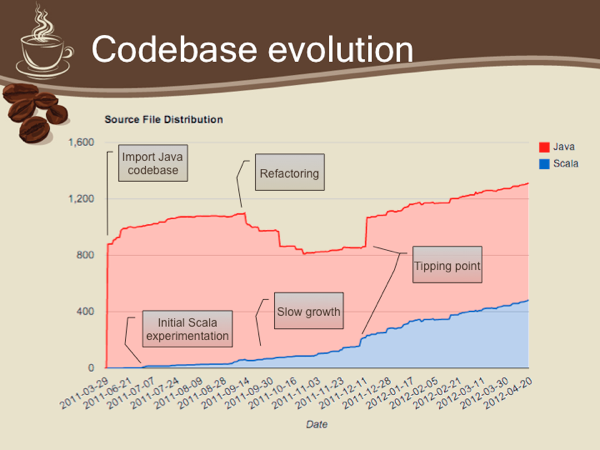
Scala is fantastic. Our team at newBrandAnalytics is remarkably happier with Scala despite the occasional hitches, and I doubt any of us will consider going back to Java given the option. As long as you keep in mind that on the bleeding edge you may get cut, I definitely recommend taking the plunge, with contractors and die-hard traditional enterprises the possible exceptions.
(Cross-posted on the Delver Blog) A little while ago I posted a job opening for the application engineer position at Delver, and one of the replies caught my interest: “so it’s a DevOps position?” A Google search later and I was astounded to find what I tried to explain has since grown into a fully fledged industry trend. I’ve learned to be mistrustful of such trends; in my experience they tend to inflate and deflate regularly, and if you try to keep abreast of all the proposed improvements to the development process you’re going to drown in overhead. Still, a critical percentage of these trends have a valid rationale driving them: unit testing, concurrency constructs, event-driven application servers, RESTful interfaces – all of these have very solid theoretical and/or practical reasoning and have had significant impact on the software development field. An additional commonality is: each took several years to gain acceptance in leading R&D teams, and several more to become ingrained methodology. The key word here is risk management, which is typically avoided or ignored altogether by the common developer. Don’t get me wrong: I come from a purely R&D background, and have shared that trait for years. What started me on a different line of thinking was the distinct pleasure of being woken up, once too often, by some poor NOC operator in the middle of the night, and getting mad enough to do something about it. Like most R&D personnel I was largely oblivious to the pains of deployment, availability, scaling, production troubleshooting and customer support, and had to learn my lessons the hard way. I believe most R&D people aren’t more minded of the pains inherent in each of these domains because of the simplest of reasons: they’ve never been challenged to do so. This is where “DevOps” comes in. An application engineer (app engineer or “devops guy” if you will) has two primary objectives: - Guide the R&D team in risk assessment. Having a software-savvy operations team member participating in design reviews is a huge boon to risk management; a better app engineer will want to participate in the design process itself, not necessarily designing the actual feature†, but even a quick overview of the proposed design is usually enough to provide operational feedback. This, without fail, results in a better design: clearer error-handling semantics, better monitoring and configuration facilities, high availability baked into the design, and induction into the deployment/administration toolchain concurrently with development efforts. This in turn leads to much better overall estimates and reduced failure rate.
- Keep the system up and running! This entails more than just observing the monitoring system (in my opinion, the less time you spend that way the less you are likely to have to, ad vitam aut culpam). The application engineer is in the relatively unique position of being both the consumer and producer of his or her own tools; this is where the wheat is separated from the chaff: a great app engineer will forever strive to improve and automate every nonfunctional aspect of the system, diligently working towards that asymptotic 100% uptime‡. DevOps personnel are the go-to people for getting systems off the ground; they’ll sketch the solution out, provide short- and long-term plans for deployment, monitoring and administration solutions both system-wide and component-specific. They’ll devise automatic tools to identify problems and anomalies, they’ll work ever-more-specific endpoints into their monitoring system, and they’ll be happy doing it because contrary to nearly any other position in the industry their interests and the business’s inherently converge.
Both DevOps and management would like nothing more than a clean, orderly universe in which systems do not fail, no data is ever lost and the system performs optimally on as little hardware as possible. Management’s business is budget and revenue; app engineers simply do not want to be woken up in the middle of the night. Next up: Growing a DevOps organization, stay tuned! † While not mandatory by any means, some design cycles can significantly benefit from an operational perspective; examples include static content management for websites; high availability for various system components; and any subsystem with external dependencies. ‡ A DevOps position is inherently multidisciplinary; for example, R&D background can significantly assist in troubleshooting. design reviews and in rolling your own tools. Strong system analysis skills, however, may be even more important, as they enable the two most important functions of the application engineer: spotting subtle holes in the design phase, and under-fire troubleshooting (which often requires the elusive ability to rapidly - but accurately - jump to conclusions).
When a company is acquired by another, some sort of restructuring is inevitable. As Delver’s acquisition by Sears Holdings became reality, it was also obvious that significant changes were required to how we operate. The first and most pronounced of these changes was that our social (or socially-connected, if you’re picky) search engine, the first product of its kind – we have enough ego to kick ourselves hard now that Google’s version is out – was scrapped, and the entire team was put to work on a new product for Sears Holdings. This, of course, meant restructuring the R&D team. One of our tenants at Delver was that everything is open to interpretation, critique and improvement. As an R&D team we were always relentlessly self-improving; I believe my two years at Delver were perhaps the best I have ever experienced professionally. I’m happy to say that this approach still prevails under Sears Holdings, and we’ve taken the first few months under the new management for some serious introspection, trying to learn everything we can from the mistakes we made while still working under the Delver banner. I believe the organization has improved across the board with these sessions, resulting in significant improvements to everything from recruiting, HR and managerial processes to source control, configuration and release management. But as a developer I felt I was hitting a professional plateau. As the new product’s specs took shape I was initially meant to take charge of the search engine implementation, continuing my original position at Delver. After nearly two years of working on search it became obvious to me that it is a very broad and nontrivial domain, and that to do a good job I will have to truly specialize in search. While I knew I did not want to continue working on the search engine, I also knew that the other developer positions would not satisfy me. While the product was being specified I kept busy with tasks that were not directly related with the product itself: setting up an integration testing framework (not trivial with a system comprising both Java and .NET components, and which integrates a significant number of 3rd party products), defining various development processes like version and branch guidelines, and finally implementing a proper Java build system that still drives our builds today. The common ground here is that, for the most part, the greatest enjoyment was derived from doing stuff that’s “horizontal”, that crosses components and teams and sort of binds the entire development effort together. With this in mind I approached my bosses at Sears and, after prolonged discussions, we came up with the title of Application Engineer: An application engineer, in Sears parlance at any rate, bridges the gap between R&D and IT (or rather, the support, deployment and administrative teams). Essentially, where R&D (and QA) ends, the app engineer’s role begins: the app engineer is directly responsible for the smooth operation of the production system. This means that the app engineer must not only be fully versed in the system architecture and inner workings, but must also be an active participant in defining it. Wherever there is an overlap between R&D and IT is where you will find the app engineer: front-end server farms, logging and profiling requirements, log aggregation and reporting, system monitoring (which suddenly not only includes health, but applicative counters that must be correctly specified and monitored), deployment and troubleshooting processes etc. Having been assigned this role for the past few months I’ve reached the conclusion that an app engineer is a cross between IT-oriented system architect and system administrator, walking a fine line between a developer and a system adminstrator. I certainly hope I don’t fall off!
Download ant-intellij-tasks-1.0-b1.zip A great but oft-ignored feature of Visual Studio 2005 and up is the inherent consolidation of an important developer tool: the build system. With a Visual Studio solution you can simply run MSBuild and you get accurate, automated builds. This is an invaluable capability: continuous integration is ridiculously easy to set up, as are nightly builds and automated deployment tools. Since I started working for Delver (now Sears) I’ve been switching back and forth between C# (2.0 and later 3.0) and Java 1.6, and though the ecosystems share many similarities there are also several glaring differences. The first of these differences is that, in the Java world, it is perfectly acceptable – even traditional – to maintain a dual project structure, one using the IDE (usually Eclipse or IntelliJ IDEA) and one using one of the build tools (commonly Ant or Maven). The build scripts need to be continuously synchronized with the project structure, and output parity between the two separate build systems is almost unheard-of. Because I had been a complete Java newbie when I started, I had never had the time to really sit down and set up a continuous integration server for our Java codebase, a mistake I did not intent to repeat when Sears took over. The first item on my agenda was to do away with the dual project structure; we originally used Eclipse, so I built a custom Ant script (my first, actually) around ant4eclipse and managed to come up with a semi-satisfactory solution. This also gave us invaluable insight when it was time to revisit our IDE choice; the lackluster project structure offered by Eclipse, along with firm positive comments on IntelliJ IDEA from several team members, tipped the balance and led us to switch to the alternative IDE, while also creating the necessity for a revamped build system can that work on top of the IntelliJ IDEA project structure. Out of necessity, a project was born. ant-intellij-tasks is the result of several months of all-night itch-scratching on my part. While not directly affiliated with the company, we’ve been dogfooding the project at Sears for over a month now, and while there are certainly rough edges it finally seems stable enough for release! From the project website: ant-intellij-tasks is a self-contained build system for IntelliJ IDEA projects based around Apache Ant. In essence, ant-intellij-tasks comprises three components: - An Ant task library that can extract and resolve the IntelliJ IDEA project and module files (.ipr and .iml respectively), and provides a set of tasks and conditions around the project structure;
- A common build script which provides the four major build targets for modules: clean, build, test and package (see the quickstart guide);
- A master build script which extends these targets to the entire project.
The build system is designed to be extensible (e.g. by adding targets), customizable (e.g. by overriding a target's behavior for a specific module) and self contained in that it's a drop-in solution that should not require any significant modifications to the code base. This project is fully open source (distributed under an Apache license) and hosted at Google Code. Please report any bugs or issues on the project issue tracker. ant-intellij-tasks makes use of, and redistributes, the ant-contrib task library.
Apparently Java has quite a few known but practically undocumented issues with its handling of UNC paths under Windows. I’ve specifically encountered this bug albeit in a slightly different scenario: @Test
public void test() throws URISyntaxException {
final URI uri = new URI( "file://c:/temp/test/ham.and.eggs" );
new File( uri ); // IllegalArgumentException thrown here
} Apparently the two slashes after file: are misinterpreted as the authority part of the URI; this thread on StackOverflow may give a few starting points if want to delve deeper. It seems Java implements an older RFC for URIs which has slightly different tokenization rules.
At any rate, so far the only sensible solution I’ve managed to come with is to manually remove or add (depending on your tastes…) a slash:
/**
 * Resolves the specified URI, and returns the file
 * represented by the URI.
 *
 * @param uri The URI for which to return an absolute path.
 * @return The {@link File} instance represented by the
 *    specified URI.
 * @throws IllegalArgumentException <ul><li>The URI cannot
 *    be null.</li><li>Wrong URI scheme for path resolution;
 *    only file:// URIs are supported.</li></ul>
 */
public static File getFile( URI uri )
    throws IllegalArgumentException {
    if ( uri == null )
        throw new IllegalArgumentException(
            "The URI cannot be null." );

    if ( !"file".equals( uri.getScheme() ) )
        throw new IllegalArgumentException( "Wrong URI " +
            "scheme for path resolution, expected \"file\" " +
            "and got \"" + uri.getScheme() + "\"" );
    // Workaround for the following bug:
    // http://bugs.sun.com/bugdatabase/view_bug.do?bug_id=5086147
    // Remove extra slashes after the scheme part.
    if ( uri.getAuthority() != null )
        try {
            uri = new URI( uri.toString().replace(
                "file://", "file:/" ) );
        } catch ( URISyntaxException e ) {
            throw new IllegalArgumentException( "The specified " +
                "URI contains an authority, but could not be " +
                "normalized.", e );
        }

    return new File( uri );
}
This is definitely a workaround, but according to newsgroup and forum posts these bugs have been around forever. If anyone has a more elegant solution I’d love to know.
It seems nothing to do with maintaining this website is as easy or as simple as it should be. Whenever I switch hosts it’s an uphill struggle to get the site up and running again; whenever I upgrade dasBlog to a newer version I have to learn a lot about how it works, how ASP.NET works, how IIS is configured etc. It’s enough to make me seriously consider hosting my blog elsewhere and/or moving to another blogging platform, but the truth is I love dasBlog so much I simply forget how complex and volatile it can be and have to go through the same frustrating process whenever something changes. The way I update my site is usually this: - Ensure I have an up-to-date local mirror of the website. dasBlog keeps all of its data in XML files, so backing up the website is simply a question of wget –-passive-ftp –m ftp://user:password@website.com; I have a daily scheduled task to take care of this.
- Copy the latest mirrored version to a working directory; set the directory up as an IIS website/virtual directory.
- Test the new working copy to make sure it works.
- Perform whatever modifications are required.
- Test again to make sure that the website works with multiple browsers (this time I tested with Chrome 2.0.170.0, Firefox 3.1 Beta 3 and IE 8)
- Upload the website over FTP using the FileZilla client. I always verify that the relevant configuration files and binaries are overwritten and nothing else.
This process generally allows me to test upgrades before uploading them to the “production” website, as well as provides an easy rollback path if something goes wrong. Thing is, something always goes wrong. In this case, although nothing’s changed in the site configuration I started getting SecurityExceptions just after the upgrade: Request for the permission of type 'System.Security.Permissions.SecurityPermission, mscorlib, Version=2.0.0.0, Culture=neutral, PublicKeyToken=b77a5c561934e089' failed. This is one of the least informative error messages I have ever seen. All it tells me is that a request for some permission is denied; it doesn’t say what permission was requested, nor by whom (the stack trace seemed to indicate the permission was asserted from within System.Diagnostics.Trace, which doesn’t make much sense). A quick web search brought me to this page, which deals specifically with installing dasBlog on a GoDaddy-hosted website. Because GoDaddy runs ASP.NET applications under a modified medium trust that allows file-system access only to the virtual directory hierarchy, the site recommends adding a virtual directory for each of dasBlog’s writable directories (content, siteconfig, logs); I tried this out and the problem was not resolved. At this point I was getting desperate, and was willing to try just about anything to get the site up and running again. Eventually I ran a diff between the site backup and the newly modified version, and found a new openidConsumerTrace.txt file in the site root. I’ve never seen that one before; where'd it come from? A quick search showed the following section in the web.config file: <system.diagnostics>
<assert assertuienabled="false"/>
<switches>
<add name="OpenID" value="4"/>
</switches>
<trace autoflush="true" indentsize="4">
<listeners>
<add name="fileLogger" type="System.Diagnostics.TextWriterTraceListener"
initializeData="openidConsumerTrace.txt" traceOutputOptions="None"/>
</listeners>
</trace>
</system.diagnostics>A-ha! So the OpenID activity trace log is written to the virtual root, which is not writable (I set the ACLs to only allow writes to the above three directories). I tried changing the trace file path to ~/logs/openidConsumerTrace.txt (which is a virtual directory and has the appropriate write ACL), but this did not resolve the problem. At this point I was ready to roll back to the previous version and work on switching to another (perhaps hosted) blogging platform, and in my despair I simply commented out the whole system.diagnostics section; oddly enough, this resolved the problem…
Now I know dasBlog is free and there’s little or no point complaining, so I hope this post helps someone handle the problem. And if anyone from the dasBlog team is reading this… please be a little more careful with undocumented dependencies?
Update (8 May 2009): Eli Ofek pointed out in the comments a little-known but effective tool called the Managed Stack Explorer. Although it features a basic GUI, it can effectively be a .NET equivalent of jstack if you add to the path; then it’s just a question of typing mse /s /p <pid>. It’s a little slower than jstack but worlds better than the alternative suggested below. I’ve been working mostly with Java over the last year, and the .NET code I write is usually limited to interface code between our .NET-based and Java-based components. A long while away from production-grade code on Windows means I need to brush up on my production debugging skills. On today’s menu: thread dumps, or per-thread stack traces if you will. With Java code (at least starting with Java 5) this is as easy as jstack <pid>; with .NET it turns out to be quite a bit more complicated: - Download and install the appropriate Debugging Tools for Windows version for your architecture (x86/x64/Itanium)
- If you need information about Windows function calls (e.g. you want to trace into kernel calls), download and install the appropriate symbols. This isn't strictly necessary if you just want a thread dump of your own code.
- If you need line numbers or any other detailed information, make sure to place your assemblies' PDB files where the debugger can find them (normally you just put them next to your actual assemblies).
- Start->Programs->Debugging Tools for Windows [x64]->windbg
- Attach the debugger to your running process using the menu
- Load the SOS extension with ".loadby sos mscorwks" for .NET 2.0 (".load sos" for .NET 1.0/1.1)
- Take a thread dump using "!eestack"
- Detach using ".detach"
Quite a bit of work for something as trivial as a thread dump. I hope .NET diagnostic and debugging tools improve with time (Process Explorer is definitely a step in the right direction).
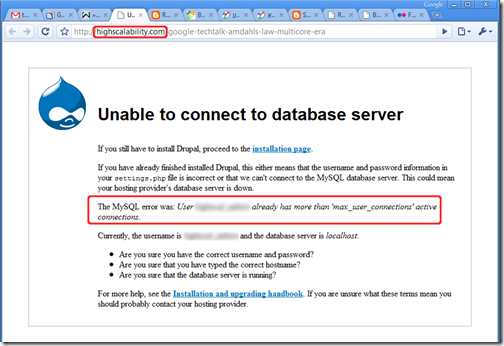
Don’t ya think?
I was making modifications to one of our components, and running all of the unit tests revealed that all database-dependant integration tests were failing: com.mysql.jdbc.exceptions.jdbc4.CommunicationsException: Communications link failure Last packet sent to the server was 0 ms ago.
<snip> (cut for brevity’s sake)
at com.mysql.jdbc.ConnectionImpl.createNewIO(ConnectionImpl.java:2104)
at com.mysql.jdbc.ConnectionImpl.<init>(ConnectionImpl.java:729)
at com.mysql.jdbc.JDBC4Connection.<init>(JDBC4Connection.java:46) Strange error message, but as it turns out the inner exception was far more revealing: java.net.ConnectException: Connection refused: connect As can be expected, the local MySQL server was up and running, and I was able to connect with the command line tool as well as with SQLYog, so it was obviously not a problem with MySQL or the local firewall. Next up I tried to telnet to the appropriate port (the easiest way I know to check port-level connectivity) without success: 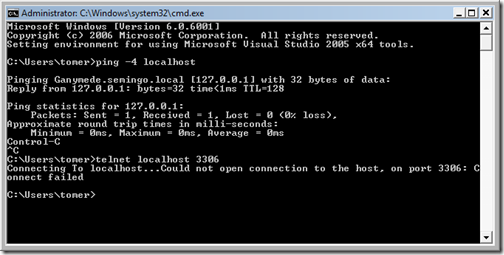
I next tried to connect to the loopback IP (127.0.0.1), and experienced a major WTF moment when the connection succeeded. I use Windows Server 2008 and, as it turns out, it supports IPv6 out of the box. localhost has a slightly different meaning under IPv6 (it maps to ::1), and as I understand it traditional IPv4 traffic is tunneled over the looback IPv6 connection; I’m not yet familiar enough with IPv6 to draw any conclusions on why the above shouldn’t work, but the bottom line is there are several ways of resolving the problem: - Edit your hosts file (it’s hidden under Windows Server 2008, but you should be able to Start->Run->notepad %SYSTEMROOT%\System32\Drivers\etc\hosts) and change the mapping for localhost from “::1 localhost” to “127.0.0.1 localhost”. This does resolve the problem, although I can’t say what impact this will have on IPv6-enabled applications.
- Set the TCP stack to prefer IPv4 to IPv6 when attempting to connect (it’s the reverse by default). According to this forum post, this entails setting the registry value HKEY_LOCAL_MACHINE\SYSTEM\CurrentControlSet\Services\tcpip6\Parameters\DisabledComponents to the DWORD value 0x20.
- Disable IPv6 altogether for your network connection: remove the IPv6 protocol from your network connection component list. At this point in time IPv6 is still very rare so I doubt this will cause any significant issues, but YMMV.
For me, changing the hosts file was the quickest solution because it works and is easy to revert. I’ll have to keep a very careful eye on the behavior of my machine though.
If you've ever tried to develop using PHP on IIS7 (Vista), you'll find that errors in your script result in the default IIS7 "friendly" HTTP 500 error page, which is useless for debugging. This happens in both FastCGI and ISAPI modes. To save you hours of crawling through the 'net, the solution (found on this forum post) is very simple: - Start a command prompt;
- Copy-paste the following: %windir%\system32\inetsrv\appcmd.exe set config -Section:system.webServer/httpErrors -errorMode:Detailed
- Run iireset
- Enjoy.
Update: I was wrong, and private setters do not appear to work (strange, I’m sure I verified this in my test code, but it didn’t work in practice). See below. It’s been ages since I used XmlSerializer, or even written meaningful amounts of code in C# for that matter, which is why I was utterly stumped by this problem. Try running this code: [XmlRoot( "test" )]
public class Test
{
private readonly string _string1;
private readonly string _string2;
public Test( string string1, string string2 )
{
_string1 = string1;
_string2 = string2;
}
[XmlAttribute( "attr" )]
public string String1 { get { return _string1; } }
[XmlElement( "element" )]
public string String2 { get { return _string2; } }
}
/// ...
XmlSerializer xs = new XmlSerializer( typeof( Test ), "" );
XmlSerializerNamespaces xsn = new XmlSerializerNamespaces();
xsn.Add("", ""); // Gets rid of redundant xmlns: attributes
StringWriter pw = new StringWriter();
xs.Serialize( pw, new Test( "1", "2" ), xsn );
Console.WriteLine( pw.GetStringBuilder().ToString() );
You’ll get an InvalidOperationException stating that “Test cannot be serialized because it does not have a parameterless constructor.” A quick look at the documentation (or a search which may lead you to this post on StackOverflow) will get you the answer: add a parameterless constructor and mark it private. Run the test code again and this time no exception will be thrown; however, you probably won’t be expecting this result:
<?xml version="1.0" encoding="utf-16"?>
<test />
The solution? Add a setter to each of your serializable properties. Don’t need a setter because the class is immutable? Mark it as private and you’re good to go. Tough – you’re going to need one anyway, private/internal/protected setters don’t appear to work. If you must use XmlSerializer you should throw a NotImplementedException from these setters, but in my opinion the resulting contract clutter implies you should simply avoid XmlSerializer altogether.
Although this behavior makes sense in light of how XmlSerializer can be used for both serialization and de-serialization, what threw me off was that no exception is thrown – the contract doesn’t require a setter property, and the serializer output is corrupt. Beware!
(Cross-posted on Stack Overflow) Update (17-Sep-08): Corrected the answer to an integer arithmetic question ("rotate to the right" was obviously incorrect - I was careless when I wrote this. Thanks, Kuperstein!) and some formatting adjustments. Preparation I never interview the applicant on the first phone call. This doesn't give me the time to go over the candidate's CV and consider if there are points I'd like to bring up on the interview, such as specific work experience or glaringly missing skills. Additionally, setting up a specific time for the phone interview allows the candidate time to mentally prepare, drink a coffee and settle down in a quiet spot somewhere. Just puts everyone at their ease. When first calling the candidate I always take the time to introduce the company I work for, a synopsis of what we do and a general description of how the company operates. I then proceed to inquire if the applicant sees this as a potentially interesting place to work in and whether or not they have any questions; you'd be surprised at the time this can save, for example it's not always obvious whether or not the applicant is interested in working for a start-up company, or alternatively may not find the problem domain engaging. Getting to Know The Candidate To start the interview off, I usually skim over the candidate's CV and select two or three interesting projects that the candidate was involved in. I ask the candidates to describe their involvement (sometimes, but not often, going into a bit of detail if the domain is familiar to me), their specific contribution to the project, whether or not they had fun and why. This usually gives me a sense of what the candidates are looking for; are they heavily into design? Are they enthusiastic about a specific technology, and if so, do they have a sound reason for it? Were they frustrated by administrative issues, did they try to improve their working environment? Technical Questions Once those formalities and niceties are out of the way, I turn to my ever-growing collection of interview questions and select a small subset to present to the candidate. For example, a typical interview may include the following questions: Integer Arithmetic Does the candidate have a decent grasp of bits and bytes? I consider this a must-have; a candidate that fails this part has no chance in hell of tackling even the most trivial native code. - "Take an integer. How do you turn the 7th least significant bit off?" This question alone removes about half of the applicants from the equation. Some people tell you "you need to apply bitwise AND, but I can't remember the number you need to AND with" -- this isn't what you're looking for. A good answer would be something like "x &= ~(1 << 6)".
- "How would you quickly divide an integer by eight (8)?" A good answer is, you shift right by three. A better answer would be "is the integer signed or unsigned?", with a bonus for Java developers who know the difference between >> and >>>.
Pointers and Pointer Arithmetic This really depends on what your company does. Most developers today don't need to know in practice the particulars of pointers and pointer arithmetic optimizations, but if you're developing a highly scalable system and/or one with serious performance considerations, this is a very good measure of how likely the candidate will be able to tackle such challenges. - "How big is a pointer?" The only correct answer is, "depends on the architecture". 32-bit operating systems will have 32-bit pointers, 64-bit systems will have 64-bit pointers. Anything that doesn't fall into these two categories is not relevant for my purposes, and likely yours as well. If the candidate fails this question I usually mark this section as "failed" and move on.
Floating Point Numbers - "What is NaN?" A programmer who can't answer this question has never really worked with floating point numbers.
- "How are floating point numbers represented in a typical modern architecture?" Failing this question is not a deal-breaker, but answering it correctly will score the candidate a lot of points. "sign, exponent, mantissa/fraction/significand" is a sufficient answer.
Essential Data Structures and Algorithms This is the bread-and-butter of programming. A candidate should exhibit robust familiarity with commonplace data structures (hashtables, linked lists, trees etc.) and algorithms (sorting, graph traversal). - "Describe how quicksort works. Elaborate on its performance characteristics." Any professional developer should be able to explain quicksort in a few minutes, know its average- and worst-case complexity, and recognize pathological cases (typical school-level quicksort implementations exhibit horrible performance on pre-sorted data).
- "How are hashtables commonly implemented?" A candidate should be able to describe the concept of a hashing function (uniform distribution) and how it relates to the internal data structure (normally an array of buckets).
- "What backing data structure would you choose for a simple text editor?" The classic answer is arope, but it's unlikely that a candidate will be familiar with this data structure. A more likely response would be a "linked-list of strings", in which case you should ask about the complexity of various editing operations (deleting a line, inserting a line, deleting a character etc.) This question typically takes slightly longer to answer but I've found that it gives me a good measure of the candidate's intuition in choosing/analyzing data representations.
Threading and Sychronization This is fast becoming the most important subject with which to distinguish the truly brilliant candidates from the merely competent; the ubiquity of multithreaded code nowadays also means that these questions can be used to quickly weed out the unworthy candidates. - "Describe one common way of synchronizing access to a shared resource." This is just a starter question, and if the candidate takes more than a few seconds to come up with an answer (mutex, semaphore, monitor or "synchronized" for Java developers, "lock" for C# developers) it's usually a good sign that they don't have any reasonable experience with multithreaded development.
- "You have a shared cache with a very good hit ratio. How would you synchronize access to the cache with as little performance overhead as possible?" The answer is trivially a read-write lock which can accomodate multiple readers and a single, exclusive writer. Where appropriate, ask how the candidate would implement such a lock.
- "Describe a nontrivial problem that you've had with threaded code." Responses usually fall into one of three categories: either (1) a reasonably experienced multithreaded developer would never make the same mistakes, in which case the candidate obviously isn't one; (2) a classic race-condition/deadlock/etc. scenario, which merely tells you that the candidate has some experience with multithreaded code and appears capable of tackling such challenges; or (3) rarely, a candidate may have a genuinely interesting "war story," in which case you'll probably want to hire them right away.
Peripheral Technologies Approach this section with caution. A canditate that's familiar with a great deal of today's hot technologies may prove completely incompetent, whereas it's quite possible to find brilliant programmers that have never touched COM in their lives. I still like to get a sense of how "in touch" the developer is with contemporary technologies; familiarity with tools and technologies can definitely be a tie-breaker between two promising candidates. - "Are you familiar with COM? Describe an interface which any COM object must implement and its methods." Anyone who's even a bit familiar with Windows software development should be able to answer this question fully. For those unfamiliar with COM, describe it in a few words and ask the canditate to guess what the required methods of IUnknown are.
- "What is a well-formed XML file? Give two examples of errors in an XML file which would render it non-well-formed." XML is prevalent in almost every software development domain. A candidate which cannot answer these questions (and doesn't have a very good excuse) will not go past this interview.
- "What's XPath? Explain what a predicate is and how it's used." This is not most-have. I'd expect serious developers to at least have an idea of what XPath is. The second question is there to differentiate those who profess to know XPath from those who've actually done work with XPath and/or XSLT.
- "If you had to verify the input of an e-mail address field, how would you go about it?" There are only two valid answers to this question: "I would use a regular expression," or "I'd like to use a regular expression, but I know that fully matching e-mails according to the RFC is insanely complex, which is why I'd get a proven library to do it for me." If the canditate is being a smart-ass you can always ask them about the performance characteristics of commonplace regex engines (which have pathological cases).
- I also like to just toss buzzwords (Ruby, Boo, JSON, Struts, J2EE, WCF) around and examine the candidate's responses. It may also provide an interesting subject to ask about in a personal interview later on.
Concluding the Interview The previous section usually takes between 10 and 15 minutes. At this point I normally ask the candidate if there are any questions they'd like answered, or anything I should know before we conclude the interview. Once that'd done, I thank them for their time and tell them (even if they've failed miserably) that I will call them back in a day or two with an answer. Hope this helps, comments are welcome.
Because the Java language lacks delegates, anonymous classes are prevalent as a syntactic replacement. Non-static nested classes are also often used in the language, a feature which is conspicuously absent from C#, albeit far less necessary with that language. This brings me to the following language caveat. This may seem a contrived example, but it's a simplification of an actual issue I've encountered in the last few days. Suppose you have a generic base class, call it BaseClass<U>, which you extend with an anonymous class. Lets also assume that the extended class spawns a thread that needs to access the BaseClass<U> state: class BaseClass<U> {
void getState() {}
}
class Test {
public void test() {
final BaseClass<String> instance = new BaseClass<String>() {
public void invokeStatefulThread() {
// Create our runnable
final Runnable threadCode = new Runnable() {
public void run() {
/* 1 */ getState();
/* 2 */ this.getState();
/* 3 */ super.getState();
/* 4 */ BaseClass.this.getState();
/* 5 */ BaseClass<String>.this.getState();
}
};
new Thread( threadCode ).start();
}
};
instance.invokeStatefulThread();
}
}
I'll spare you the guessing game. Here's what happens with each of the five invocations of getState():
- Compiles and behaves as expected.
- Obviously won't compile; this points to the Runnable.
- Obviously won't compile; the superclass of a Runnable is Object.
- Although this is the correct raw class, it won't compile because "No enclosing instance of the type BaseClass<U> is accessible in scope", even though the raw type should still be accessible and U can be inferred.
- Although this appears to be the correct fully-qualified form, this does not compile with a "Syntax error on token(s), misplaced construct(s)" error.
The Java language specification section on "qualified this" is very brief and does not mention generics at all (does "class name" include bounded type parameters?). Oddly enough, moving the class declaration outside of the test method actually lets 4 compile -- if there's a clue there, I haven't figured it out yet.
I still haven't found a syntactically-correct way to access BaseClass<string>.this, other than placing it in a temporary variable outside of the Runnable declaration. I searched yesterday for a couple of hours with no obvious solution in sight. Ideas are more than welcome!...
Among a lot of other tools and technologies we use Lucene here at Delver. Lucene is a very mature, high-performance and full-featured information retrieval library, which in simple terms means: it allows you to add search functionality to your applications with ease. I could spend an entire day talking about Lucene, but instead I'd like to show you how to write scripts for Lucene with Python on Windows (and thus differs from Sujit Pal's excellent instructions on the same subject matter). First, make sure you have your Python environment all set up -- at the time of writing this I use the Python 2.5.1 Windows installer. Next you'll need Python bindings for the library, so go and grab a copy of PyLucene; to make a long story short I suggest you use the JCC version for Windows which is downloadable here. Grab it and install it, no fussing necessary. Finally you'll need the Java VM DLL in your path, and this depends on which type of JRE you're using: - If you're using the Java JDK, add the mental equivalent of C:\Program Files\Java\jdk1.6.0_03\jre\bin\client to your path;
- If you're using a JRE, add C:\Program Files\Java\jre1.6.0_03\bin\client to your path.
(As an aside, you should probably be using %JAVA_HOME% and %JRE_HOME% and indirecting through those.) Now you can quickly whip down scripts in Python, like this one which took about two minutes to write: #!/usr/bin/python
#
# extract.py -- Extracts term from an index
# Tomer Gabel, Delver, 2008
#
# Usage: extract.py <field_name> <index_url>
#
import sys
import string
import lucene
from lucene import IndexReader, StandardAnalyzer, FSDirectory
def usage():
print "Usage:\n"
print sys.argv[ 0 ] + " <field_name> <index_url>"
sys.exit( -1 )
def main():
if ( len( sys.argv ) < 3 ):
usage()
lucene.initVM( lucene.CLASSPATH )
term = sys.argv[ 1 ]
index_location = sys.argv[ 2 ]
reader = IndexReader.open( FSDirectory.getDirectory( index_location, False ) )
try:
for i in range( reader.maxDoc() ):
if ( not reader.isDeleted( i ) ):
doc = reader.document( i )
print doc.get( term )
finally:
reader.close()
main()
Note the VM initialization line at the beginning -- for the JCC version of PyLucene this is a must, but even like so using the library is extremely painless. Kudos to the developers responsible!
The Java implementation for generics is radically different from the C# equivalent; I won't reiterate issues that have been thoroughly discussed before, but suffice to say that Java generics are implemented as a backwards-compatible compiler extension that works on unmodified VMs. The implications of this are considerable, and I'd like to present one of them. Lets fast forward a bit and consider a relatively new language feature in Java (introduced, I believe, with J2SE 5.0): autoboxing. A thoroughly overdue language feature, autoboxing allows the seamless transition from regular value types (e.g. the ubiquitous int) to object references (Integer); before autoboxing you couldn't simply add a value to an untyped ArrayList, you had to box (wrap) it in a reference type: ArrayList list = new ArrayList();
list.add( 3 ); // Compile-time error
list.add( new Integer( 3 ) ); // OK
Eventually Java caught up with C# (which introduced autoboxing in 2002), and with a modern compiler the above code would be valid.
With the introductions out of the way, here's a pop-quiz: what does the following code print?
HashMap<Integer, Integer> map = new HashMap<Integer, Integer>();
map.put( 4, 2 );
short n = 4;
System.out.println( Integer.toString( map.get( n ) ) );
As a long-time C# programmer I was completely befuddled when the code resulted in a NullPointerException. Huh? Exception? What? Why?
It took me a while to figure it out: because Java generics are compile-time constructs and are not directly supported by the VM, what actually happens is that the underlying container class accepts regular Object instances (reference types); the compile-time check merely asserts that n can be promoted from short to int, whereas the actual object passed to the container class (via autoboxing) is a Short! Since the container doesn't doesn't actually have a runtime generic type per se, the collection merely looks up the reference object in the map, fails to find it (I guess the Object.hashCode implementation for value types simply returns the reference value as the hash code as in C#) and returns null. Doh! *slaps forehead*
A few ReSharper tips for your viewing pleasure (according to rumors it can extend your penis too!): Alt+Shift+L locates the current file in the Solution Explorer (at least with the IDEA-style keyboard bindings we all know and love). This is particularly useful for extremely file-heavy solutions where you often want to Get Latest (or Undo Check Out) the current file. Note: you can get this behavior automatically through Tools->Options->Projects and Solutions->Track Active Item in Solution Explorer, but in my opinion it's annoying as hell. Easier unit testing: you can bind shortcuts to run or debug unit tests by context. Context means that the behavior is exactly as expected: using the shortcut with the cursor on a test will run just that test, using it on a class will run it as a whole fixture, and using it on a directory in the Solution Explorer will run all tests that reside in that directory. This is easily accomplished by going to the Tools->Options->Keyboard menu and binding: - ReSharper.ReSharper_UnitTest_ContextDebug to whichever shortcut you wish for debugging purposes (my favourite is Ctrl+T, Ctrl+D)
- ReSharper.ReSharper_UnitTest_ContextRun to whichever shortcut you'd like to use in order to just run tests (my favourite is Ctrl+T, Ctrl+T)
Note: You can get the same behavior with the ubiquitous TestDriven.net, but it makes no sense to me to pay twice for the same functionality.
Quick link: download In my work at Semingo I often encounter situations where it's impossible to unit- or integration-test a component without accessing the web. This happens in one of two cases: either the component itself is web-centric and makes no sense in any other context, or I simply require an actual web server to test the components against. Since I firmly believe that tests should be self-contained and rely on external resources as little as possible, a belief which also extends to integration tests, I wrote a quick-and-dirty pluggable web server based on the .NET HttpListener class. The unit-tests for the class itself serve best to demonstrate how it's used; for instance, the built-in HttpNotFoundHandler returns 404 on all requests: [Test]
[ExpectedException( typeof( WebException ) )]
[Description( "Instantiates an HTTP server that returns 404 on all " +
"requests, and validates that behavior." )]
public void VerifyThatHttpNotFoundHandlerBehavesAsExpected()
{
using ( LightweightWebServer webserver =
new LightweightWebServer( LightweightWebServer.HttpNotFoundHandler ) )
{
WebRequest.Create( webserver.Uri ).GetResponse().Close();
}
}The web server randomizes a listener port (in the range of 40000-41000, although that is easily configurable) and exposes its own URI via the LightweightWebServer.Uri property. By implementing IDisposable the scope in which the server operates is easily defined. Exceptions thrown from within the handler are forwarded to the caller when the server is disposed: [Test]
[ExpectedException( typeof( AssertionException ) )]
public void VerifyThatExceptionsAreForwardedToTestMethod()
{
using ( LightweightWebServer webserver = new LightweightWebServer(
delegate { Assert.Fail( "Works!" ); } ) )
{
WebRequest.Create( webserver.Uri ).GetResponse().Close();
}
}The handlers themselves receive an HttpListenerContext, from which both request and response objects are accessible. This makes anything from asserting on query parameters to serving content trivial: [Test]
public void VerifyThatContentHandlerReturnsValidContent()
{
string content = "The quick brown fox jumps over the lazy dog";
using ( LightweightWebServer webserver = new LightweightWebServer(
delegate( HttpListenerContext context )
{
using ( StreamWriter sw = new StreamWriter( context.Response.OutputStream ) )
sw.Write( content );
} ) )
{
string returned;
using ( WebResponse resp = WebRequest.Create( webserver.Uri ).GetResponse() )
returned = new StreamReader( resp.GetResponseStream() ).ReadToEnd();
Assert.AreEqual( content, returned );
}
}
We use this class internally to mock anything from web services to proxy servers. You can grab the class sources here -- it's distributed under a Creative Commons Public Domain license, so you can basically do anything you want with it. If it's useful to anyone, I'd love to hear comments and suggestions!
So you want a web project, a build system and a reasonable IDE to take care of the annoying details for you, right? The good news are that it's actually quite possible and there're many ways to do this. The bad news are that it's nigh impossible to get them to play along if you don't already know how to do that. It took me days to find a solution that finally seems to work, and I'd like to share it with you. I'm probably missing a few important details or did something really really stupid along the way (I'd appreciate comments!), but this process does seem to work. I'm not going into essentials of Java-based web development here -- if you want a more basic explanation of the terminology, post a comment and I'll see what I can do... 1. Goal I want to: - Use a common, standard and powerful IDE to edit and debug my Java code, and preferably provide a usable GUI interface for dependency and project management;
- Use a common, standard servlet container to host my servlet and still be able to control and debug everything from the same IDE;
- Have a convenient way to handle internal-and-external dependencies without worrying too much about the details;
- Be able to quickly compile, test and package my servlet for deployment;
- Understand as little as possible about the dependency stack of the tools involved
I'm going to tell you how to achieve most of these goals, with two glaring omissions: I won't show you how to do testing (I haven't successfully managed servlet unit testing so far -- different post on that) and I can't help but delve into some of the more annoying details involved with these tools and their dependencies. Sorry about that. Additionally, some of the information here applies even if you use different tools, but you're bound to face issues not covered here; don't assume I know more than you do -- seek the answers, post them somewhere, and maybe the next person will actually find what they're looking for! 2. Tools The tools used are: - J2SE JDK is an obvious must-have. Version used: JDK 6 update 3;
- Eclipse (but please don't download it just yet) for code editing, debugging and project management;
- Web Tools Platform: this is the Eclipse plug-in that adds web development capabilities to the IDE, including J2EE dependency management, hosting and running servlets from within the Eclipse workspace etc. This would be a good time to run along to the WTP web-site and download the Web Tools Platform All-In-One package. I only used the release version (2.0.1 at the time of writing this), so if you use another version your mileage may vary;
- Apache Maven is the newfangled build system from Apache slated to replace ant. I've used it for the last few days and so far it appears to be quite robust and even fairly well-integrated into Eclipse (see next item). Version used: 2.0.8;
- M2eclipse is the Eclipse plug-in for Maven integration. I've only found one problem with it so far, which I'll detail later on;
- Apache Tomcat is a solid choice in servlet containers. It's robust, fast and open-source, and has terrific Eclipse integration. I haven't given any of the other containers a serious whirl yet though.
3. Preparations Unlike Visual Studio, with the tools mentioned above there's no straightforward installation procedure. You'll have to designate at least a workspace directory (where your Eclipse projects, settings etc. go) and some location where the tools themselves go. For me, it's C:\Dev\Eclipse and C:\Tools respectively. - Setting up Java:
- Install the JDK and remember where it was installed (nominally in %PROGRAMFILES%\Java\jdk1.6.0_03)
- Set up a system-wide JAVA_HOME environment variable pointing to the same directory
- Setting up Maven and Tomcat:
- Extract both archives to your designated directory (e.g. for Maven it would be C:\Tools\apache-maven-2.0.8)
- Add the Maven bin directory to your PATH environment variable (user- or system-wide, depending on your preference)
- Add whichever J2EE libraries you desire from the Tomcat installation to your class-path. If you have no idea what I'm talking about, you'll probably just want to set the CLASSPATH environment variable to your equivalent of c:\tools\apache-tomcat-6.0.14\lib\servlet-api.jar;c:\tools\apache-tomcat-6.0.14\lib\jsp-api.jar
- Setting up Eclipse:
- Extract the WTP all-in-one package (which contains Eclipse itself) to your designated directory (e.g. C:\Tools\Eclipse)
- Load Eclipse and point it to your designated workspace location
- Install M2Eclipse:
- Go to Help->Software Updates->Find and Install..., select "Search for new features to install" and click Next
- Click on New Remote Site..., use M2eclipse or whatever for the name and http://m2eclipse.codehaus.org/update/ for the URL
- Click on Finish and let Eclipse install the M2Eclipse plug-in
- Set up a web server runtime for Eclipse to host your servlets in:
- Open Window->Preferences...
- Under Server select Installed Runtimes and click on Add...
- Choose (from Apache) the Apache Tomcat v6.0 runtime and click Next
- Enter the Apache installation directory (e.g. C:\Tools\apache-tomcat-6.0.14) in the appropriate location and click Finish
4. Creating a new web project First off, you must create the actual project, directory structure etc. To do this: - Open a command prompt, go to your Eclipse workspace directory
- Decide on your Maven group and artifact IDs; it's worth noting that the artifact ID is also the directory name for the project
- Type in mvn archetype:create -DgroupId=your.group.id -DartifactId=your.artifact.id -DarchetypeArtifactId=maven-archetype-webapp
- You'll notice that a new directory was created under the workspace root
- Edit the Maven project descriptor POM.XML in the newly created directory:
- Add (after the <url> tag, although I'm not sure the order matters) the following section:
<profiles>
<profile>
<id>servlet</id>
<activation>
<activeByDefault>false</activeByDefault>
</activation>
<dependencies>
<dependency>
<groupId>javax.servlet</groupId>
<artifactId>servlet-api</artifactId>
<version>2.5</version>
<scope>provided</scope>
</dependency>
<dependency>
<groupId>javax.servlet.jsp</groupId>
<artifactId>jsp-api</artifactId>
<version>2.1</version>
<scope>provided</scope>
</dependency>
</dependencies>
</profile>
</profiles> - Under <build>, add the following section:
<plugins>
<plugin>
<groupId>org.mortbay.jetty</groupId>
<artifactId>maven-jetty-plugin</artifactId>
</plugin>
<plugin>
<artifactId>maven-compiler-plugin</artifactId>
<configuration>
<source>1.5</source>
<target>1.5</target>
</configuration>
</plugin>
</plugins> - You can now thank my colleague Aviran Mordo for finding out this bit of Voodoo.
 - In the command prompt, now enter the project directory
- Type in mvn eclipse:m2eclipse -Dwtpversion=1.5 to create an Eclipse project
- Run Eclipse if it's not already started, then from the package explorer right click anywhere and click on Import...
- Choose General->Existing Projects into Workspace. For root directory pick the workspace directory
- Choose the new project and click on Finish
- At this point you may encounter a "Java compiler level does not match the version of the installed Java project facet" error. If that's the case, just right-click on the error (in the Problems view) and select Quick Fix, which will allow you to change the Java project facet version to 6.0. If this isn't what you want, you probably know enough to resolve the issue on your own...
- You'll need a src/main/java directory as a root source folder (as per the Maven convention). Right-click on the project, select New->Source Folder and type in src/main/java.
- Finally, in order to execute or debug the project on an actual running server, right-click on the new project and select Properties. From there go to the Server tab and select the runtime you created in the previous chapter.
At this point you have a Maven web project with a corresponding Eclipse project ready for editing in your workspace. In practice you will have to do several things to have any meaningful results. - Add your own code into the mix, such as a servlet. When adding a new servlet (via right-clicking the project, New->Other and choosing Web->Servlet) your WEB.XML file is automatically updated with the new servlet.
- Add your own dependencies. Maven handles dependencies quite well; for instance, in order to actually create a servlet you're going to need servlet-api.jar in your classpath; the easiest way to do this is to right-click the project, select Maven->Add Dependency and then simply type in servlet and choose javax.servlet servlet-api.
- When you wish to run or debug your servlet, right-click on its Java file and select Run As->Run on Server (or Debug, as appropriate). Your applet should be happily up and running.
5. Converting an existing project to Maven I'm not sure how to go about doing this for web projects, but converting regular projects to use Maven is actually pretty straightforward; move your sources to the appropriate directories according to the Maven conventions, right-click the project in Eclipse and choose Maven->Enable Dependency Management; this will implicitly create a Maven project descriptor for you (POM.XML) and that's pretty much it. From that point on your Eclipse and Maven projects should peacefully coexist, allowing you to leverage both tools for your purposes.
In case it wasn't obvious, I've been doing some Java development lately. One of the curious things about doing development in the Java world is that, whereas in the Microsoft world you get a fairly complete tool-chain direct from a commercial vendor, in the Java world you're pretty much dependant on the open-source ecosystem built around the essential Java technologies: Sun defines the APIs, the community provides the tools. In many ways this is really really cool: many Java tools like JUnit are so absolutely groundbreaking that they found their way into the common development idiom irrespective of language, and the availability of tools for just about any purpose is a tremendous advantage (being able to choose freely between Resin, Jetty, Tomcat or any other commercial container, for instance, is a huge boon). This diversity and community-centric development ecosystem definitely comes with a price though. Java tools, even the high-profile ones such as Eclipse, are extremely difficult to work with for the uninitiated, with a learning curve somewhat like that of Linux: if you take the time to learn the tools you can do astounding things and remain in complete control of the system, but the sheer context required to do even the most trivial thing can be - and often is - daunting. I've been battling these tools on and off for the last few weeks and often end up having to figure something out on my own. Unlike the .NET ecosystem, it's usually quite difficult to find a blog post detailing a solution to a particular problem. To that end I intend to document my successes - victories, if you will - over the tool-chain, and also the problems I encounter and haven't been able to solve, in the hope of helping others and maybe myself in the process. These posts will go under the Development->Java category, and I'd really appreciate any comments on the solutions (so that I can improve my own work) as well as the problems (so I can actually solve them). Here's to hoping
I've been developing software with .NET professionally for the last five years or so, and aside from the occasional foray into other languages I've more or less specialized in that environment. While merrily hacking away at our back-end here at Semingo, we've recently made the decision to develop an aspect of said back-end in Java. As it's always a good practice to keep an open mind and experiment with other technologies I've happily accepted the challenge. After working with Java and its associated tools for the past three or so weeks I have several observations to make: - The prominent free Java IDE, Eclipse, is actually a very full featured and impressive platform but takes a lot of getting used to. Some of the idioms and concepts are radically different than Visual Studio; for instance, whereas in Visual Studio you'd create an "ASP.NET Application Project", in Eclipse you create (or convert to) a dynamic web project and then add something called facet to your project; for instance, a Dynamic Web Module facet allows you to easily create and debug servlets, and the "Axis2 Web Services Core" facet allows you to create Axis2-based web services and work on them from within your IDE. To actually make use of these features, however, one needs to develop a pretty hefty knowledge base on the various technologies involved (J2EE and servlets, servlet containers like Tomcat, WTP etc.)
- Eclipse is next-to-useless without some tinkering; in particular, what I originally attributed to very immature web development plug-ins - the WTP umbrella project I already mentioned - turned out to be the default memory settings of the Eclipse launcher. The launcher hosts the Java VM and its baseline configuration is simply inadequate. In my case adding the following switches: -vmargs -Xmx512M -XX:MaxPermSize=128M to the command line resolved all of the problems I had with the various WTP plug-ins, as well as the myriad crashes I've experienced with the IDE. In fact it's rock-stable now.
- The Java language has some unexpected caveats; for instance, whereas in C# the designers eschewed fall through in the switch statement (you can group labels to implementations, but you cannot fall through from the implementation of one case statement to the next), the Java designers elected to maintain C-style behavior. I'm of the belief that switch statement fall through is the cause of a huge number of subtle, hard-to-find bugs, and was surprised to learn of this discrepancy between the two languages.
- Enumerations in Java, a relatively new feature added in 1.5, are an impressively diverse feature which is a great deal more powerful than its C# counterpart. I only wish the designers would also allow for a more simplified "SOME_CONSTANT = 3" type syntax, as it's somewhat cumbersome to have to actually use constructors for the purpose. Additionally Java does not (to my knowledge) support implicit conversion operators, which makes necessary constructs such as SomeEnum.CONSTANT_VALUE.getConvertedValue(). It's not a huge issue but it's one of the many areas where syntactic sugar in C# is useful.
- Speaking of syntactic sugar, there're several aspects where Java simply falls short of C#: disposables, iterators and delegates. Yes, I know delegates are an essentially religious issue for the Java designers (mostly for historical reasons, I suspect), and I won't deny that anything you can do with delegates you can do with nested classes, but at ridiculous verbosity. As for disposables, I find that the using keyword in C# is one of the most useful language constructs I've ever encountered, the use of which goes way beyond the original intention of elegantly scoping unmanaged resource use; finally, iterators are tremendously useful and cut a lot of unnecessary boilerplate code out of the equation.
- The Java ecosystem is riddled with code- and buzz-words, to the point of being annoying. If you thought .NET has too many sub-technologies and acronyms, you should try Java. Just to get the taste buds going, here are some of the keywords I've been messing with for the past couple of weeks: J2SE, J2EE, Servlet, Eclipse, WTP, (Apache) Tomcat, Axis2, SAX, JAXP, JAX-RPC, JAR, WAR, AAR, EAR, JDBC, JavaDoc, JSP and JavaBeans. And that's just off the top of my head! To someone with any sort of Java experience this list wouldn't seem intimidating or even exhaustive, but to a new-comer that's simply too much. There is also an import cultural distinction: Visual Studio and its associated technologies (.NET, ASP.NET, ADO.NET etc.) are designed to ease you in as you learn the ropes; I found it much easier to simply start working with them and learn as I go, whereas with the Java counterparts I usually found myself trying to rework code samples found on the 'net while scratching my head.
Now don't misunderstand me: the Java technologies are generally impressive, mature and usable, but the learning curve is not nearly as comfortable as the competing technologies from Microsoft, and the tools and documentation just aren't as polished.
The Windows SDK command shell, setenv.cmd, is immensely useful, so much so that I wanted it as my default command prompt (i.e. when CMD is run, no matter by whom). A quick Google search didn't turn out anything, so I eventually figured it out myself. The trick is to add it to the command processor's AutoRun value in the registry (run cmd /? from the command prompt if you don't know what I'm talking about): reg add "HKCU\Software\Microsoft\Command Processor" /v AutoRun /f /t REG_EXPAND_SZ /d "\"%programfiles%\Microsoft SDKs\Windows\v6.0\Bin\SetEnv.Cmd\" /debug /x86 /vista" You'll notice that I explicitly set the arguments for setenv.cmd; I can't explain it (nor bothered to delve into the script), but without these arguments the script gets stuck along with the command prompt. You should obviously change the values to your own environment.
Our test code makes extensive use of a lightweight web server implementation based on the .NET 2.0 HttpListener class (I'll write a separate post on this, source code included, in the near future). The web server implementation randomizes an incoming port and exposes its URI via a property; this is done for two reasons: to avoid conflicts with other listeners on the machine, and to facilitate multi-threading test runners (like TestDriven.NET). Even with a serial test-runner (like ReSharper's unit test driver, which is what most of us at Semingo use) this means that for an average test suite a large number of web-server instances are initiated and disposed of in very rapid succession. Our implementation creates each web server on its own dedicated port (using Socket.Bind to make sure that the port is free), and closes the listener via HttpListener.Abort when the test ends. Although the entire test suite seems to run fine locally (both via ReSharper's test runner and using NUnit-Console), at some point we started getting strange errors from our continuous integration server: System.Net.HttpListenerException : Failed to listen on prefix 'http://+:40275/' because it conflicts with an existing registration on the machine. I verified this by running the tests with NUnit-Console on the CI server and it was consistent (but only on that server). Since the only instances of HttpListener used throughout the test suite are those used by the test web servers, this means that HttpListener.Abort does not properly unregister its own prefixes. Since the documentation for HttpListener is rather sparse and I couldn't find any mention of this issue on the web, I eventually went the Reflector route. Check out the Reflector decompiler output for both HttpListener.Dispose (called via Close) and HttpListener.Abort methods: | HttpListener.Dispose | HttpListener.Abort | if (this.m_State != State.Closed)
{
this.Stop();
this.m_RequestHandleBound = false;
this.m_State = State.Closed;
} |
if (this.m_RequestQueueHandle != null)
{
    this.m_RequestQueueHandle.Abort();
}
this.m_RequestHandleBound = false;
this.m_State = State.Closed; |
The primary difference is the call to HttpListener.Stop. Here's a code snippet from that method:
if (this.m_State != State.Stopped)
{
    this.RemoveAll(false);
    this.m_RequestQueueHandle.Close();
    this.m_RequestHandleBound = false;
    this.m_State = State.Stopped;
    this.ClearDigestCache();
}
I'll spare you the hunt and point the problem out. There are two tangible differences between the two calls:
- HttpListener.Close closes the request queue handle (which is used in calls to the native HTTP API) whereas HttpListener.Abort aborts it. I didn't delve into this but the semantics seem to be the same as for the HttpListener itself.
- HttpListener.Close calls RemoveAll before disposing of the queue handle, presumably in order to stop accepting incoming requests.
In order to solve the problem, you can either remove the prefixes manually, or call the internal method like so:
listener.GetType().InvokeMember(
    "RemoveAll",
    BindingFlags.NonPublic | BindingFlags.InvokeMethod | BindingFlags.Instance,
    null, listener, new object[] { false } );
It's actually pretty easy; get your web service up and running in axis, run svcutil.exe http://someserver/someurl/someservice?wsdl and you're good to go. Unless, of course, you're trying to return arrays from the Java side (primitive arrays at least, I didn't see much of a point testing with custom classes). Consider the following contract: public interface ServiceInterface {
int[] doSomething( String someParameter );
}
The generated WSDL looks something like this (edited for clarity... I hope):
<?xml version="1.0" encoding="UTF-8"?>
<wsdl:definitions
    xmlns:wsdl="http://schemas.xmlsoap.org/wsdl/"
    xmlns:xsd="http://www.w3.org/2001/XMLSchema"
    xmlns:soapenc="http://schemas.xmlsoap.org/soap/encoding/">

 <wsdl:types>
  <schema xmlns="http://www.w3.org/2001/XMLSchema">
   <import namespace="http://schemas.xmlsoap.org/soap/encoding/"/>
   <complexType name="ArrayOf_xsd_int">
    <complexContent>
     <restriction base="soapenc:Array">
      <attribute ref="soapenc:arrayType" wsdl:arrayType="xsd:int[]"/>
     </restriction>
    </complexContent>
   </complexType>
 </wsdl:types>

 <wsdl:message name="doSomethingResponse">
   <wsdl:part name="doSomethingReturn" type="impl:ArrayOf_xsd_int"/>
 </wsdl:message>
 <wsdl:message name="doSomethingRequest">
   <wsdl:part name="someParameter" type="soapenc:string"/>
 </wsdl:message>

 <wsdl:portType name="ServiceInterfaceService">
      <wsdl:operation name="doSomething" parameterOrder="someParameter">
         <wsdl:input message="impl:doSomethingRequest" name="doSomethingRequest"/>
         <wsdl:output message="impl:doSomethingResponse" name="doSomethingResponse"/>
      </wsdl:operation>
 </wsdl:portType>
<!-- More uninteresting stuff -->
</wsdl:definitions>
The WDSL is perfectly fine and is properly processed by Microsoft's svcutil.exe tool; the generated classes look and appear to function normally, but if you'll look at the deserialized array on the client (.NET/WCF) side you'll find that the array has been deserialized incorrectly, and all values in the array are 0. You'll have to manually look at the SOAP response returned by Axis to figure out what's wrong; here's a sample response (again, edited for clarity):
<?xml version="1.0" encoding="UTF-8"?>
<soapenv:Envelope xmlns:soapenv=http://schemas.xmlsoap.org/soap/envelope/>
  <soapenv:Body>
    <doSomethingResponse>
      <doSomethingReturn>
        <doSomethingReturn href="#id0"/>
        <doSomethingReturn href="#id1"/>
        <doSomethingReturn href="#id2"/>
        <doSomethingReturn href="#id3"/>
        <doSomethingReturn href="#id4"/>
      </doSomethingReturn>
    </doSomethingResponse>
    <multiRef id="id4">5</multiRef>
    <multiRef id="id3">4</multiRef>
    <multiRef id="id2">3</multiRef>
    <multiRef id="id1">2</multiRef>
    <multiRef id="id0">1</multiRef>
  </soapenv:Body>
</soapenv:Envelope>
You'll notice that Axis does not generate values directly in the returned element, but instead references external elements for values. This might make sense when there are many references to relatively few discrete values, but whatever the case this is not properly handled by the WCF basicHttpBinding provider (and reportedly by gSOAP and classic .NET web references as well).
It took me a while to find a solution (after which I stumbled onto this post, which wasn't trivial to find): edit your Axis deployment's server-config.wsdd file and find the following parameter:
<parameter name="sendMultiRefs" value="true"/>
Change it to false, then redeploy via the command line, which looks (under Windows) something like this:
java -cp %AXISCLASSPATH% org.apache.axis.client.AdminClient server-config.wsdl
The web service's response should now be deserializable by your .NET client.
If you have a WCF service that returns a stream to the caller, you should be extra-careful with the source of these streams. In my case I was redirecting a file stream over a MessageContract that looks something like this: [MessageContract]
public class ItemInfo
{
... [MessageBodyMember]
public Stream ItemStream;
}
It took one of the integration tests to fail... oddly to figure out that the stream wasn't getting disposed of after the operation was completed. The solution appears to be fairly simple, add the following lines to your service wrapper (if your concrete implementation is WCF-aware you can always just stick this straight in the implementation code): // Make sure stream gets disposed at the end of the operation
OperationContext.Current.OperationCompleted += delegate { item.ItemStream.Dispose(); };
Installing Microsoft Team Foundation Server is a ridiculously arduous and difficult process. I'll spare you my own complaints and simply list the checklist for installing this beast. This assumes you're installing TFS in a domain-enabled environment and in single-server mode; this is the typical configuration for a small-to-medium-size organization: - Designate a machine to host your Team Foundation Server repository. This machine must not double as a domain controller as this configuration is not supported by TFS.
- Set up at two regular user accounts (not administrators, and if you have any group policies you may - according to your configuration - want to keep these users out of the relevant OUs) in your Active Directory. I used the trivial TFSService and TFSReports accounts. Also you'll need a user with administrative privileges on the target server; I personally prefer to avoid the associated headaches, so I simply used a domain administrator user for installation purposes (but used the aforementioned two users to set the beast up).
- If necessary, install Windows 2003 Server (whatever flavor) on the machine; don't forget the necessary service packs and updates. If your pipe is fat enough, just let Windows Update do its magic.
- Add an Application Server role, make sure you enable ASP.NET 2.0 during the installation process
- Install SQL Server 2005. Make sure you read the installation guide first though, as you'll need to set it up to "Use the built-in System account," enable all services except Notification and finally select Windows authentication as the preferred authentication mechanism. You'll also need to let the SQL Server installer install a bunch of prerequisites before actual installation begins.
- Install SQL Server 2005 Service Pack 2.
- From the TFS installation media, install hot-fix 913393 for .NET Framework.
- Install Windows SharePoint Services 2.0 with Service Pack 2.0. Make sure you select server farm mode when installing, or you'll just have to redo the installation.
- Install Team Foundation Server itself.
- Back up the reporting services encryption key (you can find a description of the procedure here).
- Install hot-fix 919156, a.k.a the Quiescence GDR (no, I have no idea what GDR stands for).
- Install Team Foundation Server Service Pack 1.
- Make sure TCP port 8090 is open in your firewall software if you want web access to your Team Foundation Server (to be honest, I haven't found any use for it yet.)
- Install Team Explorer from the installation media (required for many add-ons, including eScrum).
- Install Visual Studio 2005 Team Suite Service Pack 1. This can, and will, take forever.
If at this point you're not thoroughly exhausted, you might want to set yourself up a with a project. We're currently evaluating the Microsoft eScrum template for our purposes; my colleague Oren Ellenbogen, in his capacity as Scrum Master, will probably be posting his thoughts on eScrum as a platform. In the meantime here's a quick list of solutions to problems we've encountered while configuring the beast: - Make sure you install the various prerequisites; in this case, .NET Framework 2.0, IIS, TFS and Team Explorer, AJAX Extensions 1.0 and the Anti-Cross Site Scripting Library
- At this point you're liable to get a strange SharePoint-related error if you try and create an eScrum-based project; if that's the case (or as a preemptive measure), just run iisreset on the TFS server.
- If you can't seem to access the eScrum website (nominally at http://yourserver/eScrum) you may have to reconfigure the eScrumAppPool identity from the IIS manager (right click the application pool, chose Properties, go to the Identity tab and enter the right information under Configurable)
- You may also get 404 errors from the eScrum website even though it's very obviously configured. We've found that the solution described here works as well:
- From the command prompt, type cd "%ProgramFiles%\Common Files\Microsoft Shared\Web Server Extensions\60\BIN"
- Run STSADM.EXE -o addpath -url http://localhost/eScrum -type exclusion
- Run iisreset again
- eScrum reports only update once every 1 hour. If this bothers you, follow the instructions here to reduce the lag.
Hope this saves someone out there a lot of time and headache (and if so, a comment or e-mail is always appreciated...)
Imagine that you work mostly with C#. Imagine that on occasion you sprinkle SQL, Java and JavaScript into your daily routine, and that you also use the command line a lot. Can you see the problem? Didn't think so. I'll clue you in: the last one in that list has one distinct difference with the first four. Look around you. Have you found what we're looking for? That is correct. The answer is: the semicolon. A lightweight, generally meaningless way to end a statement in most common languages. Arguably useless to users, arguably beneficial to parsers, and the cause of almost half an hour of continuous head-scratching by both programmer and DBA. How so? C:\Temp>mysql -C -usomeuser -phispassword thedatabase;
ERROR 1044 (42000): Access denied for user 'someuser'@'%' to database 'thedatabase;' I'll let you draw your own conclusions.
I've been working with Rhino Mocks for a couple of days now and I'm duly impressed. Aside from being generally useful, the Rhino Mocks syntax is mostly natural and some very clever design hacks are used to make it work the way you'd expect it to. (In case you don't know what mocking frameworks are, the subject has been tackled ad nauseam. Just take your pick.) There is one caveat that is not immediately visible in the Record-Playback syntax, though: internal interface IFoo
{
int Bar();
}[Test]
[ExpectedException( typeof( InvalidOperationException ),
"Type 'System.Object' doesn't match the return type " +
"'System.Int32' for method 'IFoo.Bar();'" )]
public void TestRecordSyntax_ReturnTypeMismatchBehavior()
{
MockRepository mocks = new MockRepository();
IFoo mock = mocks.CreateMock<IFoo>();
using ( mocks.Record() )
Expect.Call( mock.Bar() ).Return( new object() );
}
This simple test merely returns an incorrectly typed return value for the IFoo.Bar method, so with the ExpectedException in place you'd expect it to succeed, but you're in for a surprise:
[failure] RecordPlaybackTests.TestSetup.ConsistentReturnTypeMismatchBehavior
TestCase 'RecordPlaybackTests.TestSetup.ConsistentReturnTypeMismatchBehavior'
failed: Exception of type 'MbUnit.Core.Exceptions.ExceptionExpectedMessageMismatchException' was thrown. Expected exception message: "Type 'System.Object' doesn't match the return type 'System.Int32' for method 'IFoo.Bar();'", got "Previous method 'IFoo.Bar();' require a return value or an exception to throw.".
To understand this, consider the following flow:
- A method call expectation is set (by calling mock.Bar())
- Attempting to set a wrong return type results in the expected exception being thrown from Rhino Mocks. This happens before the Return constraint is set
- Because using calls IDisposable.Dispose in the finally block, the mocks.Record object calls mocks.ReplayAll()
- ReplayAll asserts because a required expectation (return value) is not yet set, masking the expected exception!
This is in fact how I first encountered this behavior, however there are several scenarios where this can happen. One example: setting up a return value that throws an exception on construction, possibly due to invalid arguments, causes the same behavior thereby masking the true cause of the error.
An alternative syntax suggested by Ayende (author of Rhino Mocks) is: With.Mocks( delegate
{
Expect.Call( mock.Bar() ).Return( new object() );
} );
Aside from the esthetical aspect (i.e. butt-ugly), this syntax introduces a minor issue: you cannot Edit-and-Continue methods with anonymous delegates. This may not be a big deal for test code but it's worth noting.
All in all I don't consider this a big issue, but it can bite and should therefore be understood and documented. This post will be reflected in the Rhino Mocks wiki shortly and will hopefully save someone a little grief in the future...
Quick download link (v1.2) I wanted to simple way to download an entire PicasaWeb album. Right-click and save simply will not do, installing the Picasa application is completely out of the question (I use FastStone, in case you were wondering) and I couldn't find any easy way of doing this, so I whipped up a quick and dirty application. It's pretty self-explanatory, really: 
Download the application (source included) here. I also used the chance to give #Develop a serious whirl, and I can honestly say that it's damn impressive; in several hours of use the only real qualms I've had with it are the non-configurable keyboard bindings (at least I couldn't find any configuration menu for this; it wouldn't be an issue if the default bindings weren't slightly different from what I'm used to) and the lack of immediate/watch debug windows. The dialog editor is full-featured and the environment seems to be quite responsive and robust. I really am impressed.
Update (20-Aug-2007): Version 1.1 is now downloadable. I've added support for AuthKeys (as per skolima's request) so you should now be able to download private albums as well (assuming you have the appropriate key). Also added a compiled binary to the archive, doh!
Update (11-Sep-2008): Version 1.2 is available for download, and includes the following improvements:
- The tool now works for PicasaWeb albums from any valid top-level domain (this means that albums hosted at www.picasaweb.ru will be properly handled.
- Existing files will not be overwritten; instead I've taken a cue from common browsers and am now adding a counter suffix to the filename. If an album has two pictures with the name example.jpg, you can now expect to find two files named example.jpg and example (2).jpg in your directory. This behavior is also applied if you already have such a file in your directory prior to running the tool - any feedback as to whether or not this is desirable will be appreciated!
- Authentication keys may now include dashes (thanks, Jakob).
My brother was going on and on about a coding challenge he found as part of the "Lisp as an Alternative to Java" study (the challenge instructions are outlined here, and you can find the sample dictionary and input data by following the study link); eventually I agreed to give it a try. Spoiler alert: Do not read on if you want to take on this challenge! Although I had to stop in the middle because I had company, the initial (hacked-together, very inefficient and completely uncommented C# 2.0 code) version took me 1 hour and 20 minutes. While technically correct this version performed abysmally, but it served as a good basis for further optimizations; a second, optimized version took another 30 minutes and with another 20 or so minutes to clean it up, the final version took a grand total of 2 hours and 20 minutes. Total length is 193 lines of code (including comments and white-space), which you can find here. The crux of the solution is a very simple tree structure to hold the word dictionary. Each node has a 10-entry branch table, each entry representing a phone digit; a node can have an arbitrary number of leaves, each leaf representing a dictionary word. This allows for a very simple (and hopefully efficient) inner search loop: - Use successive digits as indices for traversal into the tree;
- When a node with leaves is encountered, the leaves (dictionary words) are added to the potential result set. The rest of the input is then recursively encoded;
- If no leaves are encountered for the entire input set, a digit is added to the encoded string and the rest of the input is again encoded. A boolean flag is passed along with the recursion to make sure two consecutive digits are never encoded.
This is basically a prefix tree (or trie). With the provided dictionary and input sets, runtime on my 1.7GHz Pentium M-equipped laptop is approximately three seconds. I haven't properly profiled the application for CPU and memory utilization because, frankly, it's good enough. There's also a lot of leeway for optimizations: the current tree implementation is woefully inefficient, as tree traversal can result in additional memory pressure.
With my project finally nearing completion, it's nigh time for Microsoft to release yet another update to the .NET Compact Framework 2.0. Service Pack 2 ought to bring it to about "beta 2" level. Check out these gems: - NETCF deadlocks on exit if native callback delegate has been called on native thread (this is one of the few bugs in the CF I haven't encountered. Ironic, considering we make heavy use of native code in our project.)
- Access violation marshaling a class with a string field (there is a dent in the nearby wall on account of this one.)
- TypeLoadException using generics with NETCF 2.0 (TypeLoadExceptions in general are a lot of fun in the CF.)
- Installing multiple locales of same MSI results in multiple instances of NetCF showing up in Add Remove Programs (we've had some complaints regarding this from our client. They'll be mighty pleased to hear this, I'm sure.)
Now don't get me wrong - I think the CF is an impressive platform, or at the very least could've been. I would venture to say that the people on the CF implementation team are probably skilled professionals just doing the best job they can. But I can't forgive Microsoft - as a company - for shipping a half-baked, half-assed product that even at version 2.0 and after two service packs is still riddled with bugs! It boggles the mind that for any but the most hard-core developers, a third-party extension to the .NET CF is practically a necessity because the class library itself is simply inadequate. As an aside, I seriously doubt we'll chance regression bugs this close to the launch date, so we'll probably stick with SP1 (we've worked around the issues we've encountered anyway.)
By far one of the most annoying aspects of the .NET Compact Framework is how heavily it relies on P/Invoke to fill in the gaps. The framework itself is missing huge pieces of functionality, and with the lack of C++/CLI for the Compact Framework a developer is often time left with no choice but to hack around the missing functionality with P/Invoke (or COM interop, if you have the patience to muck about with ATL). The problem is that, on occasion, a P/Invoke call would result in a MissingMethodException (in fact, if you're really unlucky, the type loader will throw the same exception on loading the method actually making the P/Invoke call). Although a lot of the scenarios have been thoroughly ironed out by now and can be resolved through a Google search or some hacking on the developer's part, there is one scario that is esoteric enough that I couldn't find any references to it on the internet: you can get a MissingMethodException when you are out of memory. We're working on an extremely large (in mobile proportions) and complex project, involving massive amounts of .NET logic combined with a very large, performance-concious and memory-hungry native codebase. We've had to hack around a lot of missing capabilities in the .NET Compact Framework (as well as some bugs and/or shortcomings in other parts of the OS), and one of our native calls would inconsistently throw a MisingMethodException; having reearched the problem for a day or two I was convinced that the problem was an incorrect function prototype for the exported function and added explicit calling convention declarations. This seemed to have resolved and I was content for a couple of days, until the problem resurfaced. The exception content itself is next-to-useless, and since the same P/Invoke call would work intermittently I was hoping that enabling the loader log might supply some further information. Alas, all the log would provide was the following line: Failed to find/load [SomeDll.dll] (even in [\Program Files\Somewhere\]) Not good. I then dug up another article on the subject and proceeded to enable the interop log, which provided some additional information: JIT ERROR FOR PINVOKE METHOD (Managed -> Native):
[pinvokeimpl][preservesig]
int Workarounds::GetSinkWrapper(out IImageSink , IImageEncoder );
int (I4_VAL) GetSinkWrapper(IImageSink& ** (INTF_REF) , IImageEncoder *(INTF_VAL) ); I was originally interested in the bizarre native signature generation (specifically the IImageSink& ** parameter - where'd the reference come from?), but upon reading some valid log files for working methods I was convinced that it's a dead duck. I then set my attention to the JIT message: what has the JIT to do with a native function? I theorized that the JIT is responsible for the native signature generation for native functions and kept working under that assumption. That narrowed the question down to, "what went wrong with the JIT compiler?" Eventually it occured to me that this might be yet another manifestation of the memory limitation issue (processes under Windows CE 5.0 are limited to a 32MB address space). The P/Invoke call is made fairly late into the application; I added a dummy function to the library which I called on application initialization. This forced the JIT to take care of the native library before anything was sucking up memory, and the issue was resolved. The moral of the story? If you get MissingMethodExceptions on your P/Invoke calls, fisrt make sure your DLL is actually deployed; then check the DllImport signature (you can find a lot of useful resources on this FAQ). Finally, make sure you're not out of memory.
I was screwing around with XmlSerializer and manual recompilations (you can enable raw code output from the XmlSerializer) and somehow this happened: 
.NET Framework reinstall time, I guess...
Footnote: This is fast becoming a series of posts on the woes of using the .NET Compact Framework. In fact, I've added a subcategory for this exact purpose; you can access the category and its RSS feed from the Categories list on the right-hand side of the screen. Here's another one of those "bang your head repeatedly against the wall and look for a sharp object" issues: closing a stream derived from HttpWebResponse.GetResponseStream takes an abnormally long time. In fact, the (blocking) call to Stream.Close takes approximately the same amount of time as it would to read to the end of the stream. I've only encountered one other reference to this in a newsgroup post from 2004, which (according to Todd, the original author of the post) was never actually answered. Seeing as I was trying to use HttpWebRequest to create a minimalistic download manager for one of our applications, I had to come up with a solution: one option was to close the stream asynchronously and just let the download run its course, wasting valuable memory, CPU time and bandwidth; another was to never close the stream and make do with a resource leak. Not content with these solutions I decided to dig into the framework code with the ever-useful Reflector. The first hurdle was locating the assemblies; they're not trivial to find, but if you look hard enough you can find actually useful versions in your Visual Studio 2005 installation folder, under SmartDevices\SDK\CompactFramework\2.0\v2.0\Debugger\BCL. These are regular .NET Assembly PEs so it's trivial to load them up in Reflector. Some digging into the BCL sources proved that HttpWebRequest does, in fact, read until the end of the stream when closing; this is the relevant code excerpt, from HttpWebRequest.doClose: if (!this.m_doneReading)
{
byte[] buffer1 = new byte[0x100];
while (this.ReadInternal(buffer1, 0, buffer1.Length, true) != 0)
{
}
}
It only started to make sense when I did some reading on HTTP (a protocol I'm not deeply familiar with). Apparently, HTTP 1.1 connections are persistent by default, which means the connection is maintained even after the request is completed, and further requests are served from the same connection. Technically, this means that the KeepAlive property of HttpWebRequest is true by default, and a Connection="Keep-alive" header is added to the HTTP request. I can only surmise that, with persistent connections, the response must be read in full in order to allow future requests (if the response was cut off, some concurrency issues may apply). Unfortunately, setting the KeepAlive property to false did not resolve the issue and the connection was maintained until closed.
Since I could find no way to resolve the problem, I decided to hack around it:
stream.GetType().BaseType
    .GetField( "m_doneReading", BindingFlags.Instance | BindingFlags.NonPublic )
    .SetValue( stream, true );
Screwing around with BCL internals is obviously NOT a recommended practise and it's something I tried very hard to avoid, however this problem had to be resolved in one way or another. I traced the code a bit deeper to see if this would actually have the expected results; apparently HttpWebRequest keeps an internal "reference counter" (actually a bitfield, but same principle) on the connection. According to the implementation for HttpWebRequest.connectionRemoveRef, if the reference counter reaches 0 the private m_connection field of the request becomes null, and the connection is released. I started out by testing this:
Before and after - you can see that the m_connection field becomes null
Unfortunately I have no idea how to test whether ot not the connection is actually disposed (conceptually, if KeepAlive is set to false then the connection should be immediately closed); when I find the time I'll try and track the HTTP session using Wireshark, but currently this horrible hack will just have to do.
I've been hacking away quite a bit at an application that contains large managed and unmanaged portions, and a necessarily complex interop layer in between. It appears that interop marshalling behaves somewhat differently between the full and Compact framework. Here's a somewhat laconic list of the issues I've encountered and how to resolve them: - You may encounter NotSupportedException on calls to Marshall.SizeOf. Although the documentation does not specify this as a possible exception, experience shows that this is a result of wrong marshalling attributes: for example, although trying to marshal a bool to UnmanagedType.I4 makes sense from a C programmer's perspective, it results in the behavior described above. The article describing this is called "Using the MarshalAsAttribute Attribute," but the version in my locally installed copy of MSDN Library (August 2006) does not contain this information.
- Annoyingly, the default marshalling, or even an explicit UnmanagedType.Bool, results in corrupt values (probably some minor framework bug). I worked around this by defining the member as int and manually giving it the value 0 or -1.
- It's not obvious, but you can't use UnmanagedType.LPArray from within structures - it only works on P/Invoke method declaration parameters. The only way to do this is to manually call Marshal.StructureToPtr and do some pointer arithmetic with IntPtr (annoying, but at least it's safe code).
- The marshaller always frees up memory; although this makes a lot of sense from the .NET perspective, it probably means that you'll have to code in some sort of deep copying mechanism in your native code if you want any of that information in your state. This also has performance repercussions you should consider when architecting your interop layer.
I'll post updates to this as I come across more issues.
I was writing some code with Visual Studio 2005, and pressed Alt+Keypad 8 (under ReSharper, this moves the current method up/down). Not only did this produce the ASCII code 8 - backspace (control character) or inverse bullet (printable character) - but it also completely screwed up the font on the same line: 
For some reason the Visual Studio 2005 debugger (on my native Smart Device project) flat out refused to halt on Data Abort errors. Instead it would just show the error information on the debug trace and crash the application: Data Abort: Thread=81e27040 Proc=804c68c0 'Client.exe'
AKY=00000041 PC=00eb1cc0(emnative.dll+0x00001cc0) RA=00eb6d6c(emnative.dll+0x00006d6c) BVA=0e537510 FSR=00000007 For obvious reasons, I wasn't particularly happy with this. Digging into Google and the documentation didn't help; after some serious headscratching I figured that the Windows CE kernel must be catching these exceptions at some point, so from the Debug->Exceptions... menu I enabled, under Win32 Exceptions, catching of thrown Access Violations: 
After this, I managed to finally get proper trapping in the debugger, and easily find out what code actually caused the access violation: 
It really yanks my chain when I put my faith into what is presumably a solid foundation for my code, and end up running into a huge number of unexpected pitfalls. Be warned: .NET Compact Framework is incomplete. Oh yes, it's a fleshed out version of CF 1.0 with generics and various important bits and pieces finally included (COM interop. I mean, seriously, .NET is useless without it even on the desktop), but it's still lacking a lot of vital components (ActiveX hosting) and has major shortcomings in others (no XSLT support). But that isn't the worst of it: the documentation is sparse at best, and flat out wrong in some cases. You cannot use asynchronous delegates in .NET CF 2.0. In case it isn't clear to you, let me repeat it: you can't use Delegate.BeginInvoke. If you're really unlucky, like me, you'll write a bunch of code and go on to compile, run, test and debug it and then run into a completely bogus NotSupportedException on a seemingly innocuous internal method call, and have to do some serious digging to figure out the culprit. This goes particularly well with (admittedly documented) fineprint in methods such as Windows Media Player's player.URL property setter, which for some reason mustn't be called from an event handler.
Update (January 16th, 2007): Not only does this apparently only work on the emulator, you would do well to stay away from Managed DirectX in general because common drivers, such as those on the Willcom W-Zero3 - do not support rendering in landscape mode (I wonder which devices DO support those features). After messing with this collectively for weeks we eventually went with the obsolete GAPI. The code here will probably not work for you.
For some reason, elementary DirectX operations are not very well documented in the .NET Compact Framework documentation; I kept running into InvalidCallExceptions for no aparent reason, and couldn't figure out the "simple" way to lock surfaces from the documentation (it's worth noting that I was only interested in basic 2D functionality). Basically you just need the right set of flags and the right order of operations. Here's the code I used and that worked for me (even under the considerably buggy emulator). To create the device, use the following parameters: PresentParameters p = new PresentParameters();
p.SwapEffect = SwapEffect.Discard;
p.Windowed = true;
p.EnableAutoDepthStencil = false;
p.PresentFlag |= PresentFlag.LockableBackBuffer;
p.MultiSample = MultiSampleType.None;
m_device = new Device( 0, DeviceType.Default, this, CreateFlags.None, p );
To draw on the backbuffer, you can use the following code:
m_device.BeginScene();

using ( Surface s = m_device.GetBackBuffer( 0, BackBufferType.Mono ) )
{
    int pitch;
    using ( GraphicsStream gs = s.LockRectangle( this.ClientRectangle, LockFlags.None, out pitch ) )
    {
        // Your code goes here...
    }
    s.UnlockRectangle();
}

m_device.EndScene();
m_device.Present();
I hope this helps someone avoid a couple hours of frustration.
... from Alex Feinman. Don't ask me why. In other news, the .NET Compact Framework doesn't decode alpha channels even in bitmaps that has them (well, it might decode the alpha channel, but it doesn't survive a Bitmap.LockBits call - maybe because there's no ImageFormat with alpha...) Still working around that.
You might want to take a look at this post from Omar Shahine. His explanation (excuse? call it whatever you want) for why Windows Mobile will probably never be as good as Blackberry in some respects is honest to the point of being uncanny. I've often remarked how much I appreciate Raymond Chen's ramblings about the decisions behind some of the more peculiar aspects of Windows. However, where Raymond is uncompromising and unapollogetic (to the point where readers sometimes comment that he is a "douchebag"), Omar is brutally honest but not grounded to the point of being cynical. I reckon that top management cannot usually afford this sort of uncompromising honesty, but given what is often seen in this industry such an attitude is refreshing even coming from lower rings in the leadership ladder.
To make a long story short, I'm building a trivial query engine over a dataset using XPath; for expressiveness purposes, I've allowed the users of said engine to query for attributes, and assumed that I can simply go up the hierarchy from there and access the elements directly. I was somewhat dumbfounded to find that each node in the resulting node set had its parentNode property set to null; at first I was sure this has to do with an implementation detail of MSXML3 (perhaps it returns copies of the attributes for... I have no idea what possible gain could be derived from this.) A little more digging proved that, and I quote from MSDN: In C/C++, IXMLDOMAttribute inherits IXMLDOMNode but are not actually child nodes of the element and are not considered part of the document tree. Attributes are considered members of their associated elements rather than independent and separate. Thus IXMLDOMAttributeparentNode, previousSibling, and nextSibling members have the value Null. Working under the assumption that this is an MSXML3-only problem, I digged a bit into the W3C DOM specification only to find that it is, in fact, a specification issue: Attr objects inherit the Node interface, but since they are not actually child nodes of the element they describe, the DOM does not consider them part of the document tree. Thus, the Node attributes parentNode, previousSibling, and nextSibling have a null value for Attr objects. The DOM takes the view that attributes are properties of elements rather than having a separate identity from the elements they are associated with; this should make it more efficient to implement such features as default attributes associated with all elements of a given type. This seems to me a completely arbitrary design decision. It makes absolutely no sense to inherit from what at first glance is an interface for first-class citizens in the document (Node) and then castrate the interface with useless implementations. If, contractually speaking, attributes never have siblings or parents, then they shouldn't have those properties at all, otherwise this just frustrates the developers wishing to make use of those properties, and wastes their time by forcing them to dig through documentation to figure out what's wrong. And on top of it all, the decision doesn't even make sense in light of the "efficiency" claim - how is it more efficient to partially implement an interface, instead of defining a new one that's more contractually sound?
Quick link: To download the wrapper classes click here While working on a large application targetting the .NET Compact Framework 2.0 I realized that I'll need to feed some native code (specifically, the XSLT processor in MSXML 3.0 SP1) with an IStream implementation. Articles about interoperating with unmanaged code in the CF are not exactly abundant; to save you the time I spent on incorrect and/or conflicting research, here's the bottom line: - There is no Managed C/C++ for .NET Compact Framework 2.0. To some this may be old news, but you should really pay attention to this point if you're going to do any serious development against CF. 2.0 adds support for managed COM/ActiveX interop, but otherwise you're completely stuck with P/Invoke.
- Although it's not immediately obvious, CF 2.0 does support exposing managed classes via COM.
- The CF is missing some usually-minor classes from the BCL; in this case I was missing System.Runtime.InteropServices.ComTypes.IStream. Annoying but easy to work around.
- Finally, as an aside, MSXML 3.0 SP1 for Windows Mobile does not support the IXslTemplate and IXslProcessor interfaces, meaning that MSXML 3.0's already lackluster performance in XSLT transformations is further hindered by not being able to cache the interpreted stylesheets. This means that, if you use XSLT, your application will not scale. I was not initially aware of this issue, so I hope our data sets are small enough to handle this, or I may yet come to regret the decision to use XSLT in this project.
I managed to save quite a bit of time by leveraging Oliver Sturm's work, which was originally intended for the desktop. Since the CF is missing a whole bunch of minor classes, the managed definition of IStream included, I originally mucked about with midl trying to generate these definitions from the .IDL files. After this proved to be a genuine chore, I just ripped the definitions straight out of the .NET Framework 2.0 assemblies with the ever-useful Reflector. You can download the class file here. If you use this it would really be cool if you could drop me an e-mail, and I bet Oliver would be equally appreciative. Enjoy!
As I mentioned before, I've had well over 300 trackback/pingback spam notifications from dasBlog. Since this was well beyond what I was willing to mess with by hand, I whipped up a quick Outlook macro to do the work for me: Sub DeleteTrackback()
Dim oSel As Outlook.Selection
Dim oItem As Outlook.MailItem
Dim oShell
Set oShell = CreateObject("Shell.Application")
Set oSel = Application.ActiveExplorer.Selection
For x = 1 To oSel.Count
Set oItem = oSel.Item(x)
If (Left(oItem.Subject, 19) = "Weblog trackback by") Or _
(Left(oItem.Subject, 18) = "Weblog pingback by") Then
Index = InStr(1, oItem.Body, "Delete Trackback:")
If (Index <> 0) Then
URL = Mid(oItem.Body, Index + 18)
URL = Left(URL, Len(URL) - 1)
oShell.ShellExecute URL, "", "", "open", 1
End If
End If
Next
End Sub
To use this macro, create a new macro and paste the source code; then select all the "Trackback/Pingback" notifications messages and run the macro. It could obviously be customized to work on entire folders or whatever, but that I leave to you. One final suggestion: if you (like me) keep a 15-tab Firefox window open at all times, you may want to open a new window (not tab, window!) so that you can then close all the URLs at once.
The previous post in this series was an overview of the various communication hurdles developers and managers face. Here I will describe one of the methods we use at Monfort to tackle these issues. We've been working very closely with one of our clients on a large variety of projects, most of which are based off of a shared technological foundation (I suppose you could call it a "framework," although it technically isn't). These projects generally fall into one of three categories: - Improvements to our technological infrastructure. These are either extremely large projects (measured in man-years) or fairly small projects (usually several weeks);
- Product derivatives, demonstrations and platform ports that make use of the pre-existing technological infrastructure;
- New products that make little or no use of the pre-existing infrastructure.
Over the years the volume of work we do for this client has increased considerably, creating the need for additional personnel in order to meet the demand. The caveat is, obviously, increased managerial overhead. This can take one of two forms: - Project management, in which a manager is directly related to all aspects of a particular project. As soon as an order is placed for the project, the manager is responsible to bring the project to fruition. More projects equate more project management;
- Customer relations, in which a manager is responsible for maintaining contact with the client and providing the initial technical contact point. The person in charge has to have a very deep technical grip of the relevant technologies and be able to communicate effectively with both business and engineering personnel (the client's representatives as well as their customers). Finally, he has to maintain constant vigilance so that new projects will actually move beyond the initial "what if" stages.
Although good project managers are hard to find, the real problems became evident only when we added personnel to the customer relations position, which up until that point was (for the most part) filled by just one person. The first hurdle was in bringing additional people up to speed; the relevant knowledge was kept in e-mail archives and the heads of several people, which adds up to very inefficient indexing. A newly commissioned customer relations manager has to know a lot of non-trivial details: the representatives of the various clients he'll be working with, the work methodology against a variety of clients and similar information. The issue of knowledge sharing becomes a much bigger issue when the manager moves beyond that point and goes out to the field: he has to be kept up-to-date on all concurrent projects for those customers, prospects for future projects and the various proposals and discussions that had taken place, whether he was involved or not. When two or three different people all share in those responsibilities, they have to be constantly synchronized This is a lot of information, and it became very obvious very quickly that we needed some system to manage and store it. After spending a lot of time thinking about this, I arrived at a fairly coherent list of requirements from the knowledge sharing platform we will employ: - Any one of the customer relations managers should be able to freely access and update information;
- There should be no artificial limitations to the way information is written, presented or interlinked;
- The platform should be easy, if not trivial, to learn and use;
- The platform should be web-based and accessible from everywhere (we often require access to information for client sites).
Eventually, I came to the conclusion that the only knowledge/content management system that could actually work in our corporate environment is a wiki. If you've been living under a rock for the past few years it's possible that you've managed not to hear about Wikipedia; the collaborative encyclopedia is one of the most ambitious and impressive projects to have attained a degree of success on the Internet. What distinguishes Wikipedia from similar, less successful projects is that the knowledge stored in Wikipedia is completely freeform: anyone can edit it, there are no predetermined schemas and no mandatory information fields - anyone can enter data in the way they deem fit. Here-in lies both the beauty and danger of a wiki: it doesn't brute-force the information into patterns. This means that knowledge can be shared in any conceivable way and content editors are free to interlink this knowledge in any way they deem appropriate. The danger here is that most people aren't disciplined enough to invent their own patterns. In our case this did not pose a problem, since only a small number of people were expected to be involved in the effort. In the next post: installing, configuring and learning to effectively use the wiki.
(This is the first in a series of posts, in which I will try to articulate the various problems of communication in the software field and possible ideas on how to solve those problems.) One of the most interesting aspects of being a software developer is communication. Perhaps the single most important trait of a good software developer is the ability to communicate with varying audiences: - First and foremost, a software developer must be able to communicate effectively with the other developers on his team. The usual tools apply: e-mails, whiteboard, hall meetings, source code comments. For a developer this is relatively easy, since it is unnecessary to translate the technical abstractions into a coherent conceptual model: the abstractions themselves are familiar to all sides of the conversation.
- A software developer must also be able to communicate effectively with his team leader, project manager, boss - whatever you want to call it. This isn't quite as easy, as such communication can have serious repercussions on the project, the work environment and - potentially - the developer's career. Managers are usually not privy to the ultra-technical subculture of software developers, and although they almost always come from the same background they have just as often given up on subtle technicalities.
- Finally, a software developer must be able to communicate effectively with clients. At some point in almost every developer's career he is required to meet and at least converse with a client, sometimes in order to figure out a bug, sometimes in order to gather requirements for a new project. A lot of developers would rather avoid these encounters because they are forced to re-think everything they say and translate abstractions. A client is not, generally, heavily interested in technical matters, so these must be explained carefully and coherently; most developers I know find this process frustrating and draining.
A developer that delves into management is assumed to already be proficient in the above scenarios, but management brings a whole new slew of communication problems to the table: - A manager is required to communicate with clients on a whole different level. When a developer is asked to make an estimate, the estimate forms a basis for the cost and schedule estimates his manager provides to the clients. The difference is that the manager is required to explain these estimates and is personally accountable to same. It is the manager's job to continuously communicate with the client, reassure, explain and assume responsibility for whatever pitfalls and hurdles the project encounters, and generally make sure the project is on track. A manager is also required to act as a filter between the client and the developers on the team for everyone's sake: on the one hand the manager is required to "protect" the developers and the project from ridiculous requests and whims on the client's side, and on the other hand he is required to make sure the client's requirements are fulfilled to his satisfaction.
- A manager must communicate effectively with the developers on his team. He must establish trust and confidence, so that he can constantly be aware of what goes on with his team while avoiding micromanagement and wasteful status meetings. This isn't easy because the manager and the developer are fundamentally on opposite sides: efficiency vs "doing the right thing", choosing wisely instead of following trends, cutting corners instead of continuous refactoring and improvement. The only glue they have is the desire for a successful project. A good manager must communicate his decisions to the developers on his team to constantly maintain the trust and confidence he has built; a frustrated or uptight developer is an inefficient developer.
- Finally, a manager must be able to communicate effectively with other managers. This is the least trivial form of communication for a variety of reasons: sometimes the corporate atmosphere requires managers to be ultra-competitive. It is hard working for a shared goal ("the good of the company") when one is constantly competing with one's peers. Even lack of competition can be an issue when two managers from different schools of management must collaborate, or when one manager is frustrated by the other's inefficiency. And even when all managers are equally efficient and equally dedicated to the shared goal, they must still share information between them and make sure the collective company process is on track.
You'll notice that the two lists are in opposite order. This is no coincidence; I ordered the lists so that the more difficult of the tasks are further down the list, so for developers the most difficult form of communication is usually with customers, whereas for managers it's communication with other managers. The next post will deal with knowledge management and how we've used a wiki internally in our organization to alleviate the overhead of communication between managers.
This wasn't an easy riddle by any means. One has to either have a lot of experience developing both C and C++, or take a very hard look at the standards to spot the differences. Bottom line? I couldn't find a solution. Fortunately a brother and a colleague both came through: Solution 1: Ugly Hack Tal (one of my colleagues at Monfort) came up with the following concept: #include <stdio.h>
int main()
{
int a = 1//**/10
;
printf( "%d\n", a );
return 0;
}
This deserves some explanation: originally C did not support single-line comments (//); these were added to a later version of the standard called C99. So what happens is, if you compile this code with an old C compiler the "//**/" string is parsed as a division operator and an empty comment, resulting in 1/10=0. A modern C compiler (or any C++ compiler) will treat the entire line as a comment and the result is 1. One way to easily test this is to compile with gcc -std=c89 file.c.
Solution 2: Elegant Hack
I didn't have the time to properly look for a detailed comparison of C and C++ standards (I'll save you the time: this looks to be a good source). There are probably quite a few ways to achieve the goal, however my brother Mickey suggested one I find quite elegant:
#include <stdio.h>

int main()
{
	printf( "%d\n", sizeof( 'c' ) == sizeof( char ) );
	return 0;
}
Seems odd? Apparently one of the (relatively small) breaking changes between C and C++ is how character literals are handled. In C a character literal takes the type int, whereas in C++ a character literal has the expected size (source).
Write a program that compiles under both C and C++ compilers, and outputs "0" for C and "1" for C++ (or whatever, the actual numbers are not the point). You obviously may not use compiler-dependant macros, __CPLUSPLUS__-type macros or anything of the sort. Once again, I'll post the solution in a couple of days.
Here's one possible solution for the riddle I posted a few days ago: - Replace i < N with -i < N
- Replace i-- with N--
- Replace i < N with i + N
This isn't a particularly hard riddle - it took me about 10 minutes to come up with the solution, although I imagine a developer with more recent C experience will be much quicker. Regardless it's a pretty good way to tone those C muscles.
A friend sent me this riddle (which I imagine isn't his, but nevermind) via mail, and I thought it cute enough to share: Find three ways to change/insert/delete a single character in the following code, so that the resulting code will print 20 star characters (*). Remember, for each solution you can only change one character, and there are at least three different solutions. #include <stdio.h>
int main()
{
int i, N = 20;
for ( i = 0 ; i < N ; i-- )
printf( "*" );
return 0;
}
I'll post the solution in a few days, feel free to yell "eureka" in the comment section or whatever.
After my foray into the world of IBM Model M keyboards, followed by a few months using the impressive Microsoft Natural Ergo 4000 I eventually came to the conclusion that the Model M was the better keyboard of the two. The tactile response of the Model M is unmatched on any keyboard I've ever used, however the lack of Windows keys (and misbehaving Shift key - that was one old keyboard!) was a real pain in the ass. 
I was anxious to try out two keyboards: the elitist Das Keyboard (the original version - there was no Das Keyboard II at the time) and the Unicomp Customizer, which is based on the original Model M technology. The possibility of a brand new Model M with Windows keys was simply too difficult to pass up and I opted for a black, 104-key USB Customizer (which looks wicked cool, check out the image on the right!) Although I've only been using this keyboard for a few hours I can safely say that it's the best keyboard I've ever used. The tactile response is simply astounding -- basically everything I've said before about the Model M is equally true for this keyboard. Unfortunately this also includes the fact that it's a very large keyboard, which can sometimes mean too large; the finger travel for some of the keystrokes is a little much for my really small fingers (particularly when I have to right-shift or use one of the function keys). I guess the best thing ever would be a Microsoft Natural-style ergonomic keyboard with buckling spring keys (a la Model M). Maybe even one with blank caps... one can only hope As an aside, the Israeli tax is murder. Aside from exorbitant shipping price (not PCKeyboard's fault, it's just the way things are...), the Israeli customs laws dicatate a 15.5% VAT on every package whose value is higher than $50 (the tax can be higher, depending on the content), but they include shipping in the tax calculation!
From a newsgroup
post, I particularly liked this reply by Hans-Bernhard Broeker: >
Luckily, it was the only bug introduced this way.
... the only one you've *found* so far. Absence of evidence is not
evidence of absence.
There are some extremely nonobvious repercussions to switching domains, a few
of which we were unfortunate enough to encounter here at Monfort.
The first of those is that certain source control providers (such as Vault) consider the host name an
integral part of a check out atom; since the domain name switch resulted in a
change in all host names, the direct result was that after the switch our
developers were unable to do anythign with files that had been checked out
before the switch. Although Vault is based off of SQL Server I couldn't figure
out how to "surgically" take care of the problem; changing the host record in
the check out object table had no apparent effect. I thought this might have to
do with client/server side caching, but restarting both did not have the
expected result. To save time, we eventually worked the problem out by undoing
all check outs server-side from the administration tool and manually checking
the files back out.
The second problem was much less obvious: some of our projects make use of
cryptographic key containers for signing .NET assemblies; after the switch we
started getting "8013141C errors" (Windows will not format this error message).
We tried reinstalling the key container only to get an "Object already exists"
message from the sn tool. Yaniv, one of my
colleagues, managed to find an article with the
apporpriate solution: apparently one needs to update the ACL on Documents and
Settings\AllUsers\ApplicationData\Microsoft\Crypto\RSA\MachineKeys.
Simple, but not trivial.
Quietly and (apparently) without fanfare, JetBrains have released ReSharper 2.0. Those of you used
to 1.5 will find that the new version is extremely feature-rich, but also
radically slower than 1.5; I seriously hope JetBrains are aggressively
optimizing their plug-in, because on large projects it can become quite
sluggish.
That said, the huge amount of new features as well as Visual Studio 2005
support are a definite reason to move to 2.0.
Damned if I know why, but Visual Studio
2005's debugger just stopped working today. I initially found this out when I
attempted to run PostXING in debug mode, and although the debugger seemed to be
working (VS2005 switched to debug view, the postxing.vshost.exe child process was right there)
absolutely nothing happened for minutes. When I eventually hit Shift+F5 I was
faced with another 30-odd-second stall, after which I was duly presented with
this astoundingly useless dialog:
"Mom! The VS2005 debugger is being a
dildo!"
If I didn't want to stop the debugger, I
wouldn't have hit Shift+F5. This is a class case of the "I know what you want
but I'll ask you anyway" syndrome which is becoming increasingly evident in
Microsoft's newer products (such as Windows Vista).
But that's not the issue. I can't
get the damn debugger to work. It stopped suddenly and wouldn't debug
any project at all - it just hangs during or immediately after loading
symbol files. And I can't find anything about it on the 'net, either. Oddly
enough, attaching to external processes seems to work
fine. Ideas?
How closely coupled the various components in Windows are. Take Internet
Explorer, for instance; this wretched thing has been around since the days of
Windows 98, and is now so entrenched in the bowels of the operating system it's
impossible to get rid of. In fact, if you tried to remove it from your machine
you'll find that it's not even a relevant option:
That might explain why I reacted with very little surprise when I encountered
the following dialog box when starting windows explorer (read: double-click on
"My Computer"):
I didn't start the debugger, in case you were wondering. As much
as I appreciate people who actually bother attempting production-debugging on
other people's programs, I don't have the time and patience for this - I have
actual work to do (particularly when at work). So I selected No. And
the dialog came up again. And again. And again. To top it off, my CPU was
bottomed out; Process Explorer seemed to think MDM was the culprit:
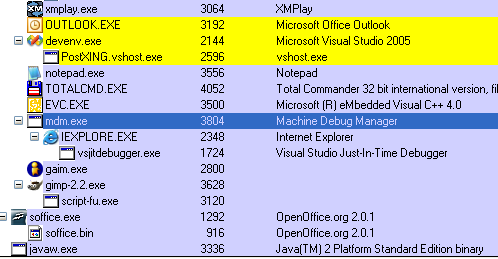
So now Internet Explorer and most programs that rely on it crash
immediately on startup (oddly enough, RSSOwl,
which relies on SWT, which relied on
Internet Explorer, works without a hitch). I immediately suspected some sort of
adware/malware/crapware, but Spybot wouldn't find anything. Now what am I
supposed to do? I hardly think Internet Explorer (which I hardly ever use
anyway) is worth a complete system reinstall.
Warning: Emotional outburst follows
So here I am, working on the latest and greatest version of Microsoft's
flagship messaging and collaboration application (read: the antiquated Outlook
2003 and its bug-riddled back-end). I've switched back to
Outlook after over a year of using the generally excellent Thunderbird. It's
driving me insane.
For starters, despite the fact that Microsoft has had years to
perfect the multilingual - bidirectional text, in particular - support
in its applications, Outlook still suffers from what - in a new product - would
be considered amusing issues that a hotfix will come out for in a couple of
days. Over three years after its release Outlook still manages to completely
mangle plain-text e-mails. Take a normal, Engilsh plain-text e-mail and try to
reply to it. At times (I still haven't been able to find a pattern), although
the e-mail is displayed just fine, replying to it causes the bidi heuristic
engine built into Outlook to decide that this is a right-to-left e-mail, and the
reply is prepared accordingly (quoted lines included). This wouldn't be such an
issue if there was any way at all to change the reading order
without completely mangling the text (Ctrl+A, Ctrl+Left Shift):
Original e-mail (left), Outlook's reply (center)
and after changing the reading order (right)
I showed this to Ilya (a friend and colleague with much experience
in bidi-related issues). His best idea was to write a macro to do the low-level
conversion for me. That's not really a solution; where bidi support in
Thunderbird is merely missing, in Outlook it's outright
broken. Thunderbird allows me to insert arbitrary HTML if I want to; in
Outlook there's simply no way at all to work around this problem.
To add insult to injury, I started using IMAP when working against
one of my mail servers. I was frustrated for a few days becaue the messages
marked as deleted were never actually removed from the server; aside from the
nuisance of seeing old messages displayed strikethrough along with fresh
messages (which can easily be filtered out), I simply could not figure out how
to purge the deleted messages. The most obvious option, "Process Marked
Headers", was completely useless; nor was "IMAP Folders..." of any help.
This has got to be the first time I ever actually used Office's help - a fact I
would normally attribute to a fundamentally impressive UI - only to find
that the option resides under "Edit->Purge Deleted Messages." Obscure
location? I thought so too. But at least the option is there.
It's hard to miss the irony in the fact that the Visual Studio debuggers
are riddled with bugs. As one of the most widely-used programming tools I'd
expect it to be polished beyond reproach, however even in the managed world the
debugger is - to put it mildly - not perfect.
The VS2003/.NET 1.1 debugger is particularly susceptible to threading issues.
It stalls, it barfs, it
lies, and now it even triggers exceptions in your code that aren't even
documented in MSDN - I was getting ThreadStopExceptions on some of my threads
while stepping over instructions. There was no way to know when it might happen
and no way to reproduce it consistently. I was reluctant to blame the debugger
at first, but this thread
provided both the culprit and the solution: close all locals, autos and watch
windows and you should be right as
rain.
Part of a very large project we're working on stopped working oh-so-suddenly
for one of my colleagues. An exception would be thrown on initializing .NET
Remoting - specifically when instantiating a TCP port. Here's part of the
exception content:
System.Net.Sockets.SocketException: Only
one usage of each socket address (protocol/network address/port) is normally
permitted
at
System.Runtime.Remoting.Channels.Tcp.TcpServerChannel.StartListening(Object
data)
at
System.Runtime.Remoting.Channels.Tcp.TcpServerChannel.SetupChannel()
at
System.Runtime.Remoting.Channels.Tcp.TcpServerChannel..ctor(IDictionary
properties, IServerChannelSinkProvider sinkProvider)
at
System.Runtime.Remoting.Channels.Tcp.TcpChannel..ctor(IDictionary properties,
IClientChannelSinkProvider clientSinkProvider, IServerChannelSinkProvider
serverSinkProvider)
... (deleted)
Running netstat -b proved that some process or
another was indeed listening on that particular port, however it failed to say
which process is responsible (just said "System".) Running the excellent SysInternals utility TCPView also
proved futile, as it displayed a prominent <non-existent
process> in the Process column.
As usual, at this point I turned to the 'net; a quick search provided a hypothesis
that IIS was somehow responsible for hogging the port; this didn't seem to make
sense because IIS was not involved (the channel was not hosted in IIS, nor was
it an HTTP channel to begin with) and shutting the IIS services down didn't help
any either. Listing the active services via tasklist
/svc proved useless as well, as did a reboot.
After some serious searching I picked up this
thread in the pgsql.hackers newsgroup; apparently they had similar issues
with broken security (AV, firewall) software not uninstalling properly; a lot of
security-related software products (called Layered Service Providers, or LSPs)
install their own TCP/IP handlers into an appropriate chain in the Windows
TCP/IP stack. Although that wasn't the case here, we figured it can't hurt to
try the solution pointed to by the newsgroup participants; LSP-Fix is a utility that rebuilds the
appropriate registry entries in an effort to restore the handler chain to a
working condition. One reboot later and everything was back to normal.
I'm still not clear on the cause of the issue, but this information might
prove useful up ahead...
There's a recent fashion among blog-savvy developers in looking for the
"ultimate programming font." This has been around as long as programmers, but
the discussion has recently been sparked again by the impending
release of Microsoft's Windows Vista along with its slew of new
fonts. I'm not the early adopter type so I couldn't really be bothered and
stuck with the default fonts, until I got a new monitor at work and figured it
was about time to ditch good ole Courier New try for something with a little
more panache.
A good couple hours later I had a large selection of fonts; the selection is
actually quite overwhelming, however there are very few actually
good fonts (for example, the Proggy fonts are
generally considered some of the best around, but I can't stand looking at them)
and fewer still could actually dethrone the aging but solid Courier New.
At first I actually considered using Consolas, although it's not easily
obtainable. A quick Google Images search provided me with the necessary visual
example of what the font would look like (screenshot courtesy of Jeff
Atwood):
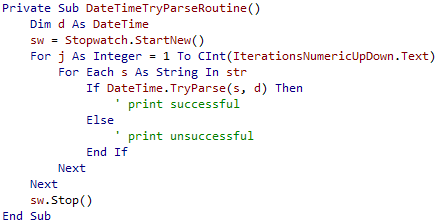
Honestly? The font looks horrible. I find the fuzziness introduced by the
ClearType rendering very hard to swallow (the font looks as though it's
suffering from colour-bleeding, even though it's not). I couldn't be
bothered to even try installing the font.
A casual comment from a reader in one of the blog posts I've read struck me
as brilliantly simple: I've been using OpenOffice.org for quite a while now (give
it a try!), and the default font for Writer is a relatively new font from
Bitstream (via GNOME) called Bitstream
Vera. It originally struck me as an impressively neutral font -
pleasing to both eyes and mind. Apparently a monospace version of the Bitstream
Vera Sans font is included with OOo (and additionally available via the previous
link); it's professional, it's free and it looks great (screenshot shamelessly
stolen from this
place):
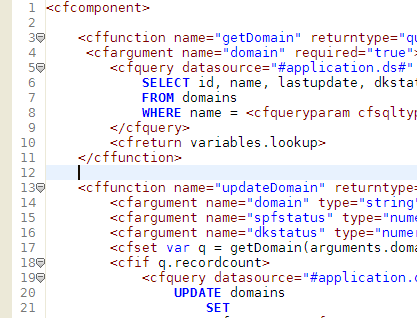
I heartily recommend the Bitstream Vera Sans Mono font for programmers (note
that it takes a bit
of hacking for it to work with Visual Studio 2003, although it works just
fine with 2005).
Finally, if neither of the above fonts suits you, there's a huge list of
programmer fonts here; one
alternatives you should look into is Andale
Mono, which is very slick and functional.
Reading a couple of posts on The
Old New Thing (Raymond Chen's blog) made me realize that compatibility
issues, except for being a general headache, have a lot of nontrivial
repercussions. Take this example of a network
interoperability issue: Samba, the standard Linux implementation of an SMB
server, supports a feature called fast directory queries. Apparently the feature
had been (until recently) broken, and because Windows XP never made use of the
feature this was a non-issue until internal tests with Vista brought it to
light.
A naïve developer would, at this point, assume that Microsoft would let the
responsible party know that they have a bug and move on. Things are obviously
not that simple, but for reasons you wouldn't expect: exactly because
Samba is such a widespread product, any user encountering the bug (assuming
he/she'd even notice something was wrong - the bug in question is not easy to
spot) for the first time would automatically assume a bug in Windows Vista (a
fairly reasonable assumption considering you could never hit that bug with older
versions of Windows). Worse still, although the bug was fixed quickly there is
no guarantee that the fix will actually be installed on the problematic devices.
For starters, there is a chain of responsibility which starts with the
administrator of the offensive device and ends in the product vendor; this means
that in some cases the vendor will not install the bugfix by default and will
void the support contract if a "vigilante" administrator installs it locally.
Second, Samba is often used in embedded devices (such as network attached
storage [NAS] devices) which may or may not be firmware-upgradable by the
user.
Regardless of the solution Microsoft decides on (Raymond is
actively seeking ideas - if you have any, make sure to drop a
comment), some of the proposed solutions have even subtler repercussions
that need to be considered. For example, one of the proposed solutions is to
detect and maintain a list of "bad" servers for which fast queries will be
disabled. Apparently this is a potential security hazard, because a malicious
user can make use of this feature to launch denial of service-like attacks on
the client (it's not obvious how this can be done, so Raymond elaborates
on this point in a follow-up).
One of the disadvantages of working on relatively low-profile software is
that you hardly ever get to tackle security issues such as these, so you
only get food-for-thought by reading articles and blogs. But I guess that's what
the blogosphere is for in the first place, no?
I decided to split my previous
post in the hope that someone googling for this topic might actually get a
straightforward answer (I certainly didn't). Visual Studio 2003 does not let you
use Bitstream Vera Sans Mono by
default. Instead it takes a bit of trickery to get it to work.
- Open Visual Studio 2003; go to Tools->Options->Environment->Fonts
and Colors. You will notice that you can select either Bitstream Vera Sans or
Bitstream Vera Sans Mono Bold. Select the latter like so:
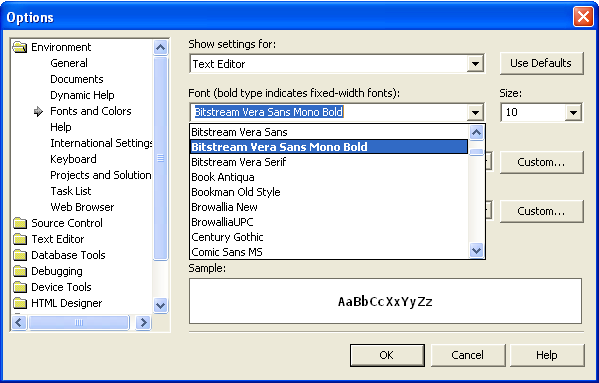
- Click on OK and close Visual Studio 2003.
- Run regedit; click through to the following key: HKCU\Software\Microsoft\VisualStudio\7.1\FontAndColors\{A27B4E24-A735-4D1D-B8E7-9716E1E3D8E0}
(the GUID may be different for you - there aren't many of them, just look
until you find the right value name):
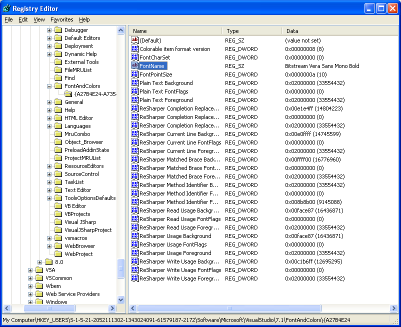
- Change the value of FontName to "Bitstream Vera Sans
Mono" (without the quotes):
- Click on OK, close the registry editor, restart Visual Studio 2003. You're
good to go!
I haven't been working with Visual Studio 2005 that much thus far; the
project I've been working on for the last 8 or so months was launched before
VS2005 came out (around beta 2), and given the relatively schedules between
milestones (first version was to be demoed in about two months) it seemed far
too risky to invest in a codebase around the yet-unproven features
of .NET 2.0.
I still think that was the right decision. I've been doing some work with
Visual Studio 2005 lately, primarily on PostXING and other minor projects, and have
come to the conclusion that Visual Studio 2005 is practically
unusable. The IDE is even heavier than Visual Studio 2003, ridiculously
slow and extremely prone to stalls; it feels like working on a huge solution in
VS2003 with a buggy alpha version of ReSharper. The debugger has an incredibly
annoying tendency to just stall for tens of seconds at a time whenever I step
in/out/over. The IDE feels more like NetBeans than Visual Studio, and is about
as responsive, but while NetBeans can be forgiven as a relatively new - and
partially open source at that - effort, Visual Studio 2005 is an
evolutionary step on a reasonably mature IDE that itself is the 7th version of a
12 or so year-old effort.
Too bad I can't really stick with 2003, it's just not an option - but I would
rather have my trusty old combination of VS2003 and R# (which in itself is not
without issues) than the heap of bugs and unoptimized UI that is VS2005. At
least until VS2005.1 comes along (maybe they'll launch VS2006 with .NET 2.1,
like they did with 2003...)
ReSharper EAP build 222
totally barfed on one of my source files and I was too lazy to reinstall build
219. The result? I was working on this one file for a couple of hours without
any help from R# (no advanced syntax highlighting, static analysis, improved
intellisense etc.)
I would like to reassert my statement that R# is the best thing that happened
to C# programmers since, well, C#. Working with Visual Studio 2003 and without
R# feels a little like trying to use a pen with an amputated
finger.
I've been working with build 219 for about a week now. With Visual Studio 2003 it's perfectly stable (only one exception so far), seems considerably faster and I haven't encountered any major (and very few minor) bugs so far. I haven't worked with Visual Studio 2005 at all over the last week (sorry Chris... project schedules ) so I've nothing to report on that front. I'll keep the ReSharper: New And Improved post up-to-date, as always.
While working on one of our projects at Monfort, we encountered a very
strange problem. The project was dependant on several COM objects, one of which
queries a database according to a predefined interface and returns the results
in an ADO Recordset. Our project is key-signed, so
we had to import the COM objects using the .NET SDK tlbimp utility; everything worked perfectly until we added
the querying logic that receives the Recordset
result object. The class loader would throw an exception on calling the relevant
method (it was invoked dynamically) claiming that the "referenced assembly adodb.dll could not be found." To quote Monty Python: this is, of course, pure
bullshit. The imported ADODB wrapper was right there in the directory. I
couldn't figure out the problem in a reasonably timespan, and finally decided to
ignore it altogether by using the ADODB primary interop assembly distributed
with .NET 1.1. I added a reference to the ADODB PIA and everything compiled and
seem to run fine.
This turns out to have been a mistake. I was absent from work for a few days
getting ready for a test, and came back to find that a colleague has encountered
the same problem but elsewhere; examination of the compiled executable's
references (via ILDASM) revealed that it was in fact
generated with two separate references to ADODB with two different public
key tokens. One of the references was the PIA, which was just peachy, but
the other one (in the hidden namespace ADODB_19 of
all things) referenced a non-existing assembly with the same public key
token we sign our other assemblies with. I concluded that there must be
some sort of problem with the build process - left over dependencies that
weren't compiled properly or something of the sort. Cleaning up the build
directory and rebuilding did not alleviate the issue. In desperation I tried to
manually edit the project files but couldn't find anything.
I then decided that one of the COM object wrappers we created using tlbimp was, for some reason, referencing a non-existing
version of the ADODB wrapper; I went through the wrapper assemblies one by one
and managed to find the offending library. Turns out that tlbimp does not, by default, look for primary interop
assemblies and opts to import ADODB every single time (singing the new wrapper
assembly accordingly). When I deleted what I thought was a redundant ADODB
wrapper assembly, I in fact deleted a version of the wrapper that was referenced
by one the imported COM wrappers. So now all I had to do was add a /reference: directive to the tlbimp call in our build script and voilla - everything
works!
Only it doesn't. Another COM object which references ADODB was still
generated with the mangled assembly reference (i.e. it still referenced the
wrapper with our own public key). I retried all sorts of tricks and couldn't
figure out why it was generated that way; I eventually tried to re-import it
manually with a /strictref directive, which resulted
in the following error message:
C:\Temp>tlbimp SomeComServer.exe
/keyfile:PublicKey.snk /reference:"%PROGRAMFILES%\Microsoft.NET\Primary Interop
Assemblies\ADODB.dll" /strictref
Microsoft (R) .NET Framework Type Library to
Assembly Converter 1.1.4322.573
Copyright (C) Microsoft Corporation
1998-2002. All rights reserved.
TlbImp error: System.ApplicationException
- Type library 'ADODB' is not in the list of references
A fit of confused rage and an hour later I sat at the computer again to try
to figure things out; finally (as usual) it was just a matter of asking Google
the right
question:
The problem was that MyCOMLib.dll was compiled against ADO 2.5 and
the PIA released by MS is registered only for ADO 2.7. I don't have access to
the COM component to recompile it for ADO 2.7, so I had to get a PIA for ADO
2.5.
Further research into this turned out a little
detail most .NET developers are probably unaware of:
Issue 7: You experience problems working with components that
expect ADO 2.8 interfaces
The ADODB PIA that is included with Visual Studio 2005 is the same
component that was included with Visual Studio .NET 2003 and was built by
using the Microsoft .NET Framework 1.1. The ADODB PIA was built to interact
with ADO 2.7 interfaces and has not been updated to work with ADO 2.8
interfaces.
Therefore, attempts to use the ADODB PIA together with components that
expose ADO 2.8 interfaces will fail. This
scenario is not supported with the ADODB PIA.
Oh, great job, Microsoft! You spent so much time on the interop issues with
.NET (of which, by the way, there is an impressively small number), came up with
the concepts for Primary Interop Assemblies, Publisher Policy Files and
everything else that went into .NET in order to prevent DLL hell, you tout
Primary Interop Assemblies as a way for component publishers to guarantee that
their components are usable under .NET, and finally you go on to release a PIA
for one of the most widely used COM objects in Windows which only
supports one version!
So there you are, I hope this might save someone the frustration of having to
figure all of this out on their own.
As a footnote, ILDASM is one of the worst tools
I've ever used. I can't believe how Microsoft managed to wrap a useful debugging
tool with one of the most frustrating and least usable UIs I've ever
encountered. Don't know what I'm talking about? Try double-clicking on a node
(method, manifest, whatever). You can't run a search through the text; worse
still, you can't even Ctrl+A, Ctrl+C then paste into notepad! Only now, days
after I needed it, did it occur to me to rightclick and "select all". I suppose
it's OK if you don't follow the classic usability patterns and guidelines in a
small and esoteric development tool, but please try and exercise a bit of
common sense...
Well not as such, no, but it sometimes feels like way. Particularly today,
when I wasted about 40 minutes on a bug that should've taken me less than 1
minute to work out, simply because of issues with the Visual Studio debugger
(2003, mind you - you'd think after three years it would be a mature
product?)
Check this out, for example:
m_ltInfer is of a class deriving from DictionaryBase. What the hell am I
supposed to understand from this? The fact that I can't see my dictionary is bad
enough, but what's up with those blank spaces? And if that wasn't bad enough,
the immediate window's expression parser - limited to begin with - is flatly
lying to my face:
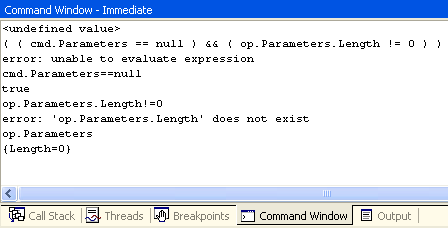
op.Parameters is an array. It has a Length property. The
intellisense displays it. The managed expression parser prints it out as the
default property for arrays. But attempting to access any of the object's
properties, or even its ToString() method, results in a "... does not exist"
error message. What the hell is going on here?
I eventually get fed up with the various ReSharper builds I've been
using for the past 7 months; the stability has been going steadily downhill
since build 208 and performance is yet to improve. 217 originally seemed stable
but turned out to be useless both for VS2003 and VS2005. I've been waiting in
vain for a build as stable as 208 (which was practically beta-ready) but to
no avail.
Eventually I broke down and installed the official 1.5.1 (build 164) for
VS2003; unfortunately there are no official builds for VS2005 as of yet. I must
say working with the official version is a pleasure - it's absolutely stable
and, even more important, fast. So fast, in fact, that it feels just as
responsive as the "regular" VS2003 IDE is, and the only drawback is a small
increase in startup time.
I'm tenacious so I'll probably check the beta builds again when 218 is out,
but in the meantime I can't help but feel pleasure in working with a mature
product.
Back when I used to code demos with friends as a pastime (1995 or so) we
would slave away on three or four PCs, at best interconnected with null-modem or
parallel (a.k.a laplink) cables; whenever someone would have a breakthrough we'd
reconnect the machines and shift sources around (sometimes opting to use
modems or floppies instead). Eventually we'd get to a more or less complete set
of codebases and integrate them into a single production.
That process could best be described as hectic. I'm amazed
we ever managed to get any work done, particularly in the absence of automatic
merge tools such as Araxis
Merge; the number of times we would accidentally overwrite or
modify each other's code, accidentally delete an object file or some other
stupid mistake was astounding. With that baseline in mind, when I was introduced
to SourceSafe back when I was serving in the Israeli army I was appalled. The
concept of a singular repository for sources (with write access to everyone on
the team, no less) seemed incredibly stupid, although in retrospect I couldn't
tell you why. SourceSafe's (severe) problems aside, I'd expect the fundamental
concepts of source control to strike a chord with me immediately, but it took a
while for that to happen; over the years I've developed pretty rigid standards
of working with source control - what should or should not be checked in, how
long is it OK to check out a shared file exclusively (more or less the only
option with SourceSafe...) and how to organize the repository effectively.
Fast forward to 2006. I'm working on a project that has several seperate
components; the project, which is actually version 2.0 of a certain
product, is kept in a central source control repository along with its
dependencies (libraries, documents, installables) and everything seems to be
fine. Only it isn't. The first problem is that the project was originally
developed for an external company which uses Perforce as its source control provider of
choice. We then brought the codebase back to Monfort and set out to rework the existing
components and develop new ones. This means that while large portions of the
code were being worked on, others remained completely untouched - in other
words, some projects were imported into our source control system (Vault) and others were
not. This proved to be very annoying when I had to re-integrate and test
some version 1.0 code today; it's worth noting that Visual Studio is anything
but graceful when it comes to handling unavailable providers or incomplete
bindings:
 So
much for verbosity, but at least I can Work Disconnected...
...
right after I click on OK again.
That was only the first hurdle. The second was an apparent lack of attention
on a certain developer's part (sigh), who forgot to add installations for
certain 3rd party dependencies to the repository. Fast forward another fourty
minutes or so (DevExpress's installers
suck) and I was finally on my way to a working test build.
At that point, a new developer on the project approached me with some
compilation issues. This was pretty rudimentary stuff - installing a
public/private key container, path variables, 3rd party installations etc.,
but the guy couldn't be expected to know how to do any of this
stuff, let alone what needs to be done or where to get the
required files. Which brings me to the conclusion of this here rant:
- When you import a project into your development environment (source
control, build system, back up, etc.) take the time to get (re-)acquainted
with the codebase and make any necessary conversions. It'll pay off in the
long run,
- Always keep all dependencies safely tucked away in your source
control repository. That's as close to a file server as you are going to get,
it's properly backed up (isn't it?) and the files are kept close to
their target audience - developers on that particular project.
- A "Developer Workstation Setup" document is an absolute must-have.
Saves everyone a lot of time and headache.
- Try and maintain behavioural consistency between developers on a given
project. This doesn't have to (and preferably won't) extend to indentation and
code formatting issues, but some sort of check-in, documentation and
dependency resolution policy is important, if not for the project than at
least for your medical bill.
I was doing some research on how to use a certain component we were given as
part of a project. It is a COM object written with ATL; I referenced it via
interop and everything seemed to work perfectly. Until we integrated it
into the main codebase, that is. For some reason the same code would barf on any
call made to a method/property of a legacy ADO Recordset object; an instance of Recordset is passed by reference to the COM object,
which initializes it to certain values. For some reason any call to the Recordset instance after the COM method call would result
in a NullReferenceException being thrown by the
framework.
Oddly enough, tests on the research codebase (on my own machine) now proved
to generate the exact same error; considering I had written and tested the code
merely two days before, I was disinclined to believe the code to be at fault.
Something told me to look into the interop assemblies - we sign every
COM/ActiveX import in the project with our own keyfile using a script which runs
tlbimp/aximp - and reverting to the VS-generated interop
assemblies did indeed resolve the issue. I couldn't find any solution using
Google (a Groups search provided a similar
issue with no solution offered). Finally I stumbled upon the following quote
in this
article:
But
Primary Interop Assemblies have another important use. Interop Assemblies
often need modifications, such as the ones shown in Chapter 7 to be completely
usable in managed code. When you have a PIA with such customizations
registered on your computer, you can benefit from these customizations simply
by referencing the type library for the COM component you wish to use inside
Visual Studio .NET. For example, the PIA for Microsoft ActiveX Data Objects
(ADO), which ships with Visual Studio .NET, contains some customizations to
handle object lifetime issues. If you created your own Interop Assembly for
ADO using TLBIMP.EXE, you would not benefit from these
customizations.
Since the ADO COM object was automatically imported along with our
proprietary objects this got me wondering what sort of "custom optimizations" I
might be missing out on. A quick look in the knowledgebase article on the
ADO PIA
didn't prove very effective (short of a vague statement about "the ADO PIA helps
to avoid certain problems with ADO and .NET COM interoperability") but I decided
to try it out anyway; I removed the preexisting reference from the project,
added "adodb" from the .NET tab in the Add References dialogue (you
could look it up manually in the GAC, but why would you?), fired it up
- problem solved.
As an anecdote, referencing an external library with tlbimp's /reference
command line parameter (particularly the ADODB PIA from the GAC) did not stop it
from generating the imported library anyway. Just go ahead and
delete it.
Or rather, help me to help them I keep filing bugreports (which are usually fixed by the next release) and feature requests, but in order to get attention the feature requests need votes. Have a look at these two feature requests and vote (or comment) if you think they're important. If not, tell me why:
Additionally, build 215 is out.
Every developer has some glaring omissions from his/her toolbox. I just found one of mine: Chris Sells' XmlSerializerPreCompiler. I honestly don't know how I managed without it thus far.
Now that I mention it, here's a short (?) list of tools I constantly use as a developer, at work and elsewhere:
- I've said it once and I'll say it again, JetBrains' ReSharper is absolutely indispensable to any serious .NET developer. It's worth every penny.
- Roy Osherove's The Regulator is so far the best regular expression IDE around. It has its issues, though, so I can't wait for version 3.0. Best of all, it's completely open source!
- My XML IDE of choice is Stylus Studio, which I find preferable to Altova's XmlSpy. Both cost mundo bucks though.
- Enterprise Architect combines the UML powerhouse features of XDE with near-Visio ease-of-use. It's not perfect (not even remotely) but is definitely the best modelling tool I've used to date.
- Cygwin whenever I need anything from the GNU realm (in particular GCC and Unix-oriented open source tools).
- NDoc is the best thing since sliced bread. I use this open-source tool whenever "hardcopy" design/code documentation is required, or whenever I want to provide an MSDN-like reference to an API.
- GhostDoc saves many a pointless keystroke. Just Ctrl+D and you're 50% into your XML documentation. Brilliant in simplicity and absolutely stable. Best of all, it's free...
- Total Commander has replaced Servant Salamander as my Norton Commander clone of choice. I still can't understand how people manage to be productive without an NC-type file manager.
- NUnit comes in handly when writing test and test-driven code. I'm not a big fan of TDD (to be fair, I never got the chance to try TDD hands-on on a large scale project), but whenever it comes up it's practically synonymous to NUnit. Make sure to install TestDriven.NET as well.
- One of the best debugging and reverse-engineering tools around, Ethereal, also happens to be open-source. I can't even begin to count the number of times this tool has saved my ass.
- The single most comprehensive tool I've ever come across is the ubiquitous Google. Make good use of it...
- I use Process Explorer, psexec and pskill from SysInternals about 20 times a day. Mark deserves knighthood (or maybe half the kingdom) for making these tools.
- Any .NET developer would do well to know Lutz Roeder's classic Reflector. It is as indispensable as the .NET framework itself.
- XMPlay and Sennheiser HD600. Music is life.
I hate ugly hacks, but sometimes you're left with no choice. I was hacking away at the XML schema for one of our projects, and eventually settled on a neat solution. Imagine the following scenario: your system stores its configuration in XML format; the configuration defines several types of events that can occur, and all these events share the same actions. What's the most efficient way to go about it?
Borrowing a page from the object-oriented software design book, I decided to create an abstract BaseActionType. It will include some basic self-describing information (lets suppose I'd like to have an action category; I would simply add an element to the base type and override the value in each subclass.) Each subclass would describe a different type of action, for example a SendEmailActionType would extend BaseActionType, override its category with a fixed value and add fields such as server, subject etc.
Unfortunately, it appears that XML Schema only supports one of two modes of derivation: derive by extension or derive by restriction, whereas what I in fact require is a hybrid of the two. xs:extension will not allow you to override values, whereas xs:restriction will not allow you to define new elements. This is a problem I used to encounter all the time when creating XML schemas, and today it finally pissed me off enough to find a solution. I was really stumped for a while, but eventually noticed that one of the examples on the XML Schema specification was:
<xs:complexType name="length2">
<xs:complexContent>
<xs:restriction base="xs:anyType">
<xs:sequence>
<xs:element name="size" type="xs:nonNegativeInteger"/>
<xs:element name="unit" type="xs:NMTOKEN"/>
</xs:sequence>
</xs:restriction>
</xs:complexContent>
</xs:complexType>
It got me thinking: how can they be restricting a type while adding elements? Then it hit me - this is in fact a restriction on an xs:any particle! Here's the solution I came up with:
<xs:complexType name="BaseActionType">
<xs:sequence>
<xs:element name="Category" type="CategoryType" />
<xs:any processContents="strict" minOccurs="0" maxOccurs="unbounded" />
</xs:sequence>
</xs:complexType>
<xs:complexType name="EmailActionType">
<xs:complexContent>
<xs:restriction base="BaseActionType">
<xs:element name="Category" fixed="Synchronous" />
<xs:element name="Server" type="xs:string" />
...
</xs:restriction>
</xs:complexContent>
</xs:complexType>
I reckon developers who are more experienced with XML than I am already knew the answer, but since I've been using XML far more intensively than the average developer and was repeatedly stumped by the same problem I hope someone finds this useful.
Update (January 2nd, 10:26): My technological enthusiasm has an annoying tendency to turn into a display of naïveté. Specifically, the hack above seems to work just fine for Stylus Studio (any maybe other technologies, who knows?) -- but isn't really accepted by the .NET SDK xsd.exe tool. There are two issues here:
- The tool fails to recognize fixed="value" attributes for enumerations ("Schema validation warning: Element's type does not allow fixed or default value constraint.")
- The tool does not recognize restriction of xs:any ("Schema validation warning: Invalid particle derivation by restriction.")
I haven't been able to work around these limitations (yet), nor have I the time at the moment to research into XML Schema and find out if these features are supposed to be supported. In the meanwhile I'm reverting to another solution.
I've been getting into ARM assembler a little bit. The ensuing conversations were amusing in the extreme (I'm Holograph, in case that wasn't obvious):
(11:49:59) Holograph: you mean to tell me that this shit:
(11:50:00) Holograph: str r4, [sp, #-4]!
(11:50:07) Holograph: all it does is basically "push r4"?
(11:50:35) YK: ja
(11:51:53) Holograph: that is FUCKED UP
(11:53:15) YK: not really, thats the normal way of doing things, x86 is fucked up
I rest my case.
Some software-related tidbits (I'll be updating this during the day):
- ReSharper 2.0 EAP build 213 is out (lots of builds since the 210 I have installed on my machine at work). I'll have a go at it and post comments in the ReSharper EAP post as usual.
- GAIM 2.0 beta 1 is also out. I've been using it for the past few hours, it seems pretty stable - there've been a lot of small improvements (away mode handling, account display, preferences) but don't expect a quantum leap in usability.
- Dying to get rid of Windows XP Automatic Update's super-nagging 10-minute interval "Restart Now or Later" dialog? So am I. Luckily, Coding Horror's got the answer.
- There's no avoiding QuickTime these days, but what with all the iTunes hype the player is taking up ridiculous amounts of drive space (the installer itself is over 30MB!) I've installed the latest QuickTime Alternative and never looked back.
As part of an ongoing OpenGL implementation project, I was tasked with implementing the texture environment functionality into the pipeline (particularly the per-fragment functions with GL_COMBINE). To that end I had to read a few sections of the OpenGL 1.5 specification document, and let me tell you: having never used OpenGL, getting into the "GL state of mind" is no easy task to begin with, but made far worse when the specifications are horribly written.
To begin with, there is absolutely no reason why in 2005 a standard that is still widely used should be published solely as a document intended for printing. Acrobat's shortcomings aside, trying to use (let alone implement!) a non-hyperlinked specification of an API is the worst thing in terms of usability I've had to endure in recent years (and yes, I was indeed around when you could hardly get any API spec let alone in print. I don't think it matters). Even Borland knew the importance of hyperlinked help with their excellent IDEs of the early '90s. Why is it that so late into the game I still run across things like the spec for TexEnv2D, which describes only some of the function's arguments and then proceeds to tell you that "the other parameters match the corresponding parameters of TexImage3D"? I can only imagine the consternation of someone trying to figured out the spec from a book having to flip all the way to the index at the end to see that the TexEnv3D function appears on pages 91, 126, 128, 131-133, 137, 140, 151, 155, 210 and 217 (the function definition is at page 126, by the way.)
Hey, SGI! I have a four-letter acronym for you. H-T-M-L. It's been here for a while and is just as portable as PDF (and certainly more lightweight.)
Technical issues aside, the spec itself is simply incomplete; there is no obvious place which tells you where, for example, you have to set the OPERANDn_RGB properties; in fact, if you followed the spec to the letter, the people using your implementation would not be able to set these properties at all because the spec for the TexEnv functions explicitly specifies the possible properties, and those properties are not among them. You have to make educated guesses (it does makes sense that you'd set the texture unit state from TexEnv), do "reverse-lookup" in the state tables at the very end and try to figure out from the get function which set function is responsible for the property or dig up the MESA sources and try to figure out how they did it (because it's most likely to be the right way of doing things. I would go as far as to say that MESA serves as an unofficial reference for the OpenGL API). Ideally you would do a combination of the above just to make sure that you are compliant, but the spec will not be there to help you.
Finally, the spec makes problematic assumptions about your background. I think it's a little naïve to assume that anyone who reads the OpenGL background has a strong background in OpenGL programming, or in developing 3D engines. I actually do have some background in 3D engine development and it still took me a few hours going over the chapter again and again (and trying to infer meanings from code examples on newsgroups) to understand precisely what "Cp and Ap are the components resulting from the previous texture environment" means. In retrospect it seems obvious, particularly in light of some clues littered about, that they were referring to the result of the function on the previous texture unit, however that would only be really obvious to someone in the "GL state of mind," which at the time I was not. Tricky bits of logic should be better explained, examples (and particularly visual aids such as screenshots!) should be given. But the OpenGL spec has absolutely none of that.
So bottom line, specs are absolutely necessary for APIs; make sure you have people who proofread them, and put the developers that are most customer-savvy on the job. It would be the single worst mistake you can make to put a brilliant, productive and solitary developer on the task because you would frustrate them beyond belief and the end-result would be of considerably inferiour quality.
I've updated the remote logging framework with a bugfix; if you're using it (or curious to see how it works/what it can be used for) feel free to download it and have a look.
I've also started hacking away at the PostXING v2.0 sources in my spare time, which unfortunately is very sparse at the moment. If anyone has tricks on how to get through HEDVA (differential/integral mathematics, A.K.A infinitesemal calculus outside the Technion...) successfully without commiting every waking moment, do share.
Despite a lot of work by various people (including, but not limited to, Jeff Atwood at CodingHorror.com and Colin Coller), creating syntax-highlit HTML from code with Visual Studio is still extremely annoying; you don't get the benefit of background colours (as explained by Jeff), you face bizarre issues (try Jeff's plugin on configuration files for instance) and finally, ReSharper-enhanced syntax highlighting can not be supported by either of these solutions.
I've submitted a feature request to the JetBrains bugtracker for ReSharper; since I regard ReSharper as an absolute must-have and it already does source parsing and highlighting, features powerful formatting rules and templates etc., I figure it's the definitive platform for such a feature. Read the FR and comment here; I reckon if it gets enough attention they probably will implement it in one of the next builds.
As a side-note, I'm still keeping the ReSharper 2.0 EAP post up-to-date on the latest builds. Make sure to have a look every now and then.
Introduction
Update (27/11/2005, 15:40): After putting the remote logging framework to use on an actual commercial project I've found that the hack I used for mapping a method to its concrete (nonvirtual) implementation wasn't working properly for explicit interface implementations. One horrible hack (which fortunately never saw the light of day) and a little digging later I've come across a useful trick on Andy Smith's weblog and added some special code to handle interfaces. The new version is available from the download section.
Introduction
As part of the ongoing project I'm working on I was asked to implement a sort of macro recording feature into the product engine. The "keyboard" (as it were) is implemented as an abstract, remotable CAO interface which is registered in the engine via a singleton factory. I figured that the easiest way to record a macro would be to save a list of all remoting calls from when recording begins to when recording ends; the simplest way would be to add code to the beginning of every remote method implementation to save the call and its parameters. Obviously, that is an ugly solution.
About a year ago when I was working on a different project (a web-service back end for what would hopefully become a very popular statistics-gathering service) I faced a similar issue: the QA guys asked for a log of every single Web Service method call for performance and usability analysis. At the time I implemented this as a SOAP extension which infers some details using Reflection and saves everything to a specific log (via log4net). A couple of hours of research, 30 minutes of coding and I was done - the code even worked on the first try! - which only served to boost my confidence in my choice of frameworks for this project. My point is, I figured I would do something along the same lines for this project, and went on to do some research.
If you're just interested in the class library and instuctions skip to instructions or download.
Hurdles ahoy
I eventually settled on writing a Remoting server channel sink to do the work for me. I'll save you the nitty-gritty details; suffice to say that the entire process of Remoting sink providers is not trivial and not in any way sufficiently documented. There are some examples around the internet and even a pretty impressive article by Motti Shaked which proved useful, but didn't solve my problem. I eventually got to the point where I could, for a given type, say which methods on that type were invoked via Remoting and with which parameters, but I couldn't tell the object instance for which they were invoked no matter what. A sink may access the IMethodMessage interface which gives you a wealth of information, including arguments, the MethodBase for the method call etc., but the only indication of which object is actually being called is its URI (the interface's Uri property). Unfortunately I couldn't find any way of mapping a URI back to its ObjRef (something like the opposite of RemotingServices.GetObjectUri), only its type.
After a long period of frustrating research and diving into CLR implementation with the use of Reflector I came to the conclusion that the only way to convert the URI back to an object (outside of messing with framework internals via Reflection) would be to implement ITrackingHandler and maintain a URI-object cache. Another annoying hurdle was that the framework internally adds an application ID to its URIs and forwards the calls accordingly; for example, connecting to a server at URI tcp://localhost:1234/test would in fact connect to the object at local URI /3f4fd025_377a_4fda_8d50_2b76f0494d52/test. It took a bit of further digging to find out that this application ID is available in the property RemotingConfiguration.ApplicationID (obvious in retrospect, but there was nothing to point me in the right direction), which allowed me to normalize the incoming URIs and match them to the cache.
Finally, inferring virtual method implementations and URI server types are relatively costly operations, so I've added a caching mechanism for both in order to cut down on the performance loss. I haven't benchmarked this solution, but I believe the performance hit after the first method call should be negligible compared to "regular" remoting calls.
How to use this thing
Obviously the first thing to do would be to download the source and add a reference to the class library. I've built and tested it with Visual Studio 2003; I'm pretty confident that it would work well with 2005 RTM, and probably not work with 1.0 or Mono (although I would be delighted to find out otherwise, if anyone bothers to check...)
Next you must configure Remoting to actually make use of the new provider. You would probably want the logging sink provider as the last provider in the server chain (meaning just before actual invocation takes place); if you're configuring Remoting via a configuration file, this is very easy:
<serverProviders>
<!-- Note that ordering is absolutely crucial here - our provider must come AFTER -->
<!-- the formatter -->
<formatter ref="binary" typeFilterLevel="Full" />
<provider type="TomerGabel.RemoteLogging.RemoteLoggingSinkProvider, RemoteLogging" />
</serverProviders>
Doing it programmatically is slightly less trivial but certainly possible:
Hashtable prop = new Hashtable();
prop[ "port" ] = 1234;
BinaryServerFormatterSinkProvider prov = new BinaryServerFormatterSinkProvider();
prov.TypeFilterLevel = TypeFilterLevel.Full;
prov.Next = new TomerGabel.RemoteLogging.RemoteLoggingSinkProvider();
ChannelServices.RegisterChannel( new TcpChannel( prop, null, prov ) );
Now it is time to decide which types and/or methods get logged. Do this by attaching a [LogRemoteCall] attribute; you can use this attribute with classes (which would log all method calls
made to instances of that class) or with specific methods:
[LogRemoteCall]
public class ImpCAOObject : MarshalByRefObject, ICAOObject
{
public void DoSomething() ...
}
class ImpExample : MarshalByRefObject, IExample
{
// ...
[LogRemoteCall]
public ICAOObject SendMessage( string message ) ...
}
Next you should implement IRemoteLoggingConsumer:
class Driver : IRemoteLoggingConsumer
{
// ...
public void HandleRemoteCall( object remote, string method, object[] args )
{
Console.WriteLine( "Logging framework intercepted a remote call on object {0}, method {1}",
remote.GetHashCode(), method );
int i = 0;
foreach ( object arg in args )
Console.WriteLine( "\t{0}: {1}", i++, arg == null ? "null" : arg );
}
}
Finally you must register with the remote call logging framework via RemoteLoggingServices.Register. You can register as many consumers as you like; moreover, each consumer can be set to receive notification for all remotable types (for generic logging) or a particular type (for example, macro recording as outlined above).
// Register ourselves as a consumer
RemoteLoggingServices.Register( new Driver() );
Download
Source code and examples can be downloaded here. Have fun and do let me know what you think!
So I found myself in the predicament where a particular class I was using had multiple event sources and I was attempting to fire those events. I encountered two issues, the first of which was that I was trying to invoke the delegates from an outside class, which is impossible even though they're public:
An event can be used as the left-hand operand of the += and -= operators (Section 7.13.3). These operators are used, respectively, to attach event handlers to or to remove event handlers from an event, and the access modifiers of the event control the contexts in which such operations are permitted.
Since += and -= are the only operations that are permitted on an event outside the type that declares the event, external code can add and remove handlers for an event, but cannot in any other way obtain or modify the underlying list of event handlers.
(via MSDN)
This means I had to implement an OnEvent() triger method on the provider class for all events, even though the provider class was intended merely as a container and the events were intended to be fired elsewhere (think of a remotable event container and a seperate execution piepline). This meant I had to provide a lot of boiler-plate code in both consumer and provider classes to make use of these events. I would've written a generic method to handle this which accepts a Delegate parameter; enter the second issue: you'll notice that a non-specialized delegate (Delegate as opposed to, say, an instance of AsyncDelegate) does not have a BeginInvoke method. After a little research I've found some inspiration in Eric Gunnerson and Juval Lowy's classic TechNet presentation on C# best practices, however that particular implementation wasn't convenient for my uses, nor was it compliant with .NET 1.1 specifications (which require that you call EndInvoke on any asynchronous invocation to avoid resource leaks). I eventually went on to write a class that'll do the work for me.
The basic idea is to call the delegate's BeginInvoke and EndInvoke methods via Reflection. To invoke a method via Reflection you (obviously) require an invocation target; this wouldn't be an issue if the target hadn't been an event. Apparently the EventInfo class returned by Type.GetEvent() has no provision for obtaining an actual instance; instead, you have to obtain the event instance as though it were a field. Check out the following code:
// Gather requisite Reflection data
private Type m_handler;
private object m_eventInstance;
...
m_eventInstance = target.GetType().GetField( eventName, BindingFlags.Instance | BindingFlags.NonPublic ).GetValue( target );
m_handler = target.GetType().GetEvent( eventName, BindingFlags.Instance | BindingFlags.Public ).EventHandlerType;
// Call BeginInvoke
m_handler.InvokeMember(
"BeginInvoke",
BindingFlags.Instance | BindingFlags.Public | BindingFlags.InvokeMethod,
null,
m_eventInstance,
paraList.ToArray()
);
You can find a complete AsyncHelper class and associated (very minimal) example code here. Note that at current delegates with out or ref parameters are not supported; these could be inferred by Reflection and added to the EndInvoke method call, but I fail to see how calling such delegates asynchronously in a generic fashion would be useful.
Am I the only one going insane over the time it takes for the average IDE to load these days? It takes Visual Studio 2003 up to ten seconds from click to functionality, and with ReSharper installed (which I consider a must-have) it takes ever longer. In the days of multiple-gigaherz machines with multiple-gigabytes of RAM and souped-up, quad-rate busses, why the hell do I have to wait for my development environment to load?
Mind you, VS2003 is not the worst of the bunch; Eclipse used to be the slowest-starting app I've ever seen up until version 3.1. Now it's more or less on par with VS2003. NetBeans lags behind in the performance department. Looking at the VS2005 beta 2 (I haven't tested the RCs) it looks like Microsoft has improved performance - at least startup performance - drastically. I certainly hope that's the case. Since I usually work with 3 or more instances of VS2003 open concurrently any improvements to its performance or memory footprint would be welcome in the extreme.
A product I'm working on consists of a primary component and two sattelite components. The sattelite components are designed to run remotely and communicate with the primary component via .NET Remoting. The product is currently undergoing a QA cycle, and the QA team had a bizarre issue to report: when the system is configured to run on localhost and the network cable is disconnected while the system is up and running, remoting requests fail (they reported that the primary component fails to notify the satellite component instances to shut down, but it was actually the same with any remote call). My immediate response was "huh?" but subsequent local testing assured me that they weren't smoking anything illegal.
After quite a bit of research (this is a seemingly little-known issue with .NET Remoting) I managed to come some interesting insights into .NET, but only one relevant post I managed to find after playing with Google Groups a bit: apparently when Windows detects a network cable disconnect (via a feature called Media Sense) it "removes the bound protocols from that adapter until it is detected as "up" again". The only workaround I could find was to completely disable Media Sense, which needless to say is a very unwelcome solution.
I suppose the obvious question is "why the hell does Media Sense shut down localhost connections?" I'm often dumbfounded by bizarre design decisions in Microsoft products, but this one may just necessitate adding a really awful hack to our installation procedures on clients' sites, which just sucks.
Seeing that I don't have anything of value to write per se (with the exception of experiences from the LAN party, and Turkey, and a bunch of reviews, and some development-related rants, and some other stuff) I figure I might as well just toss everything I have here. There's quite a bit of development-related stuff so I've split this into two seperate posts:
- Ilya linked me to this newsgroup discussion which is something of a revelation.
- During the QA cycle for a product I'm working on I got a request to limit the logs for just the last 10 days. I use log4net 1.2.9 incubation release, which is an absolute pleasure to use (even the documentation is up to snuff these days); however I've found that there is simply no way to do that using the stock RollingFileAppender when you roll by date (as opposed to by size). Since I didn't have time to research creating scheduled tasks using the godawful Visual Studio 2003 Setup and Deployment Project I just hacked a RollingFileAppender-derivative, only to find that most of its protected methods are not declared virtual - meaning I had to copy the code for the class in its entirety and hack away instead of just inheriting and overriding behavior. If anyone's interested in the hack let me know, but be advised that it's probably not very stable nor particularly elegant.
- I was looking for a way to execute an interactive process remotely (which can't be done easily, certainly not with my original research subject, WMI). Apparently the only practical way to do this under Win32 is to use a remote service with administrative privileges; security was a workable issue in this case, so I was left with having to research and write the service and deal with all the bugs, which given the project schedule was not an option. The first obvious option was to use SysInternals' PsExec tool; this would've been perfect except that PsExec's license forbids redistributing it without a license, which we were very inclined to purchase had there not been easier (and cheaper) options. BeyondExec is an equally solid solution that's distributed as freeware and is therefore useful for commercial purposes. Lastly, Jim Wiese has an interesting article up at The Code Project which might've saved us a great deal of time had BeyondExec proved irrelevant.
- John Wood's SafeInvoke is a very elegant solution to the classic GUI thread invocation issue when programming for Windows Forms. He's not the first to utilize .NET Reflection for that purpose, but his solution is extremely elegant as well as performant (since his helper class caches the generated code, a performance hit is incurred only when a delgate is first used, and System.Reflection is supposed to be dramatically faster in the upcoming CLR 2.0). Two thumbs up.
- One of my favourite writers, Reymond Chen over at The Old New Thing, wrote an insightful little tip on why you should never use sleep(0). The comments are equally informative. On a side note, I've recently become a very big fan of java and C#'s Monitor synchronization primitive along with its signalling capacity (in java it's part of the java.lang.Object API
, which is much more elegant than C#'s Monitor class and its static members).
What the hell were the guys at Microsoft on when they build the Setup and Deployment Project code for VS2003? To say that is sucks would be some of the biggest understatement ever. All I wanted was for my application to delete some intermediate files when it uninstalls. You'd expect to be able to do that from the File System settings of the install project, but you'd be dead wrong; of course, the next logical step is to interject a script of some sort into the uninstall chain. Simple enough.
I wrote a 7-line batch script to do the work for me (batch files are crappy scripting tools, but you'd be surprised what you can do with them with enough patience) only to find out that, well, you can't add bloody batch files as custom actions; you can only add DLLs, EXEs and VBScript/JScript files. So I spent an hour teaching myself the basics of VBScript (I already have a solid handle of VB6, just needed a look at the WSH reference and some turorials about FileSystemObject) and moved on.
Only to find out that the script doesn't work; it's run from a god-knows-which working directory, meaning you have to do some extra fussing around to get to the right directory. After a little reading I found the Session.TargetPath property, which apparently doesn't do the trick. To make a long story short, I found a tutorial on The Code Project which showed me how to do it:
- Add [TARGETDIR] to the CustomActionData property of your custom action
- The property is accessible with Session.Property( "CustomActionData" )
Why the hell is the simplest thing with MSI so goddamn convoluted?
I was writing a relatively small GUI application (more on that later) and was looking for an easy way to add wizards to the application. A quick Google search brought me several options, but eventually I settled for Al Gardner's excellent " Designer centric Wizard control" on The Code Project; it is combination useful, solid and open-source. I highly recommend it, however I did find two caveats:
For starters, this isn't actually the wizard designer's fault, rather Visual Studio's. I designed a moderately complex, 5-step wizard. The way the wizard designer works, all controls on all pages are thrown into the same class file. Since this is parsed and modified by the designer itself this wouldn't be an issue, however the wizard was also localizable. This meant that whenever I saved the wizard or moved from code view to design view and vice versa, the machine would chug for several seconds on regenerating the code. Add to that the usually-tolerable ReSharper parsing phase (I use build 165) and you've got 10-second stalls every couple of minutes, which makes development extremely tedious.
The other issue is that the Cancel event does not work as planned, and I can't figure out way. I added my own handler to the cancellation event with an "are you sure"-type messagebox, but whenever I answered no the wizard would still close. I tracked this down to the cancellation button on the wizard (btnCancel) having its DialogResult property set to DialogResult.Cancel (since I'm running the form instance with ShowDialog this would cause the form to close), however nothing in the application has ever set it to that value. Worse still, when I added the line:
this.btnCancel.DialogResult = DialogResult.None;
To the InitializeComponent method on Wizard, a breakpoint on the cancellation event handler would show that Wizard.btnCancel_Click:
this.FindForm().DialogResult = DialogResult.None;
I tried contacting Al to let him know about this issue, but there is no obvious way to get contact info from The Code Project. Any ideas?
So here I am, banging my head against the table repeatedly (quite
literally, feel free to ask my colleagues) because of a bug so idiotic
I can't even begin to describe it.
I wasted 20 minutes tracking down a bug just to find what Rik Hemsley says best:
?productlistview.Items(0).Selected
True
?productlistview.SelectedItems.Count
0
Hmm?
Apparently, though no-one will tell you this, the selection could fail if you don't have the focus. Make sure you add a call to lstWhatever.Focus() before you mess with selections.
Eli Ofek has published a
5-part (well, 4-part really) series about migrating an actual project
from the classic triad of VS2003/.NET 1.1/VSS to VS2005/.NET 2.0/Team
Foundation Server. I used to be a developer on the "sister team" of the
project he's talking about, and I can tell you that it's a huge project
with an extremely talented and devoted team of developers, so if you're
going to be doing any migration work in the nearby future I highly
recommend you go ahead and do some serious reading on his blog. The
bottom line is that Beta 2 servers aren't stable enough, nor the IDE
performant enough, to do any proper work on. The little experience I
had with the VS2005 was that it was actually very good and the
performance just fine (on my 1.7GHz Dothan laptop w/1GB memory), but I
can't argue with server stability issues.
Regardless, I particularly recommend reading phase 3, which discusses critical language/library differences.
I've updated the article about events and .NET remoting with some source code. Let me know if
you find it useful. That said, I haven't been active on the 'net for
the last few days so I have quite a bit of catching up to do.
A colleague was writing a bit of image processing code in C# while
working under the assumption that a bitwise shift operation by a
negative count (i.e. lvalue >> -2) would result in the opposite shift ( lvalue << 2
in our example). Nevermind the logic behind that assumption, while
helping doing some research I've stumbled upon what might be a
portability issue in the C# language design.
Apprently C# defines the left/right-shift operators as, for example:
int operator >> ( int x, int count );
It goes on to specify the behavioural differences between 32-bit and
64-bit code but gives no indication of what happens if you shift by a
negative value (which is possible given that count is of type int); this is left undefined. This leaves certain behavioural aspects of applications up to the VM; what probably happens is (for Intel processors anyway) that the JIT compiler generates something which looks like:
mov ecx,[count]
and ecx,0x1f
shl [eval],ecx ; or sal, if x is uint...
If count is negative, this will result in a mask of the two's complement, so for -2 this would be 11110
- or a shift-left by 30. I'm not sure what prompted Tal to make the
assumption regarding negative shifts, but the fact of the matter is
that his code compiled without warning. If the default operators were
declared with uint count,
at the very least we'd get a "possible signed-unsigned mismatch"
compiler warning. Most people would slap themselves and correct their
erroneous code.
I couldn't find any reference of this with a Google search and would
be more than interested in hearing corrections, explanations or just
opinions...
Update (September 7th, 10:16): As per Eli Ofek's advice I started a discussion thread
on the MSDN forums which already proved useful. A guy calling himself
TAG suggested that the reason why the operators are defined with signed
shift count is that unsigned types are not CLS- (common language
specification-) compliant. This could very well be the case, however I
am adamant that the language specification should reflect this; also,
the fact that the CLS does not support unsigned types is nontrivial
(and not easily found), which could potentially mean a lot of projects,
open source and commercial, are in fact nonportable because they make
use of unsigned types.
I always enjoy researching languages (a passion that's only intensified since I cowrote our internal C#->java source-level compiler), so when a colleague approached me with an issue he had while creating a design in C# I was immediately intrigued.
Consider the following scenario:
class a1
{
public virtual int ret()
{
return 1;
}
}
class a2 : a1
{
public override int ret()
{
return 2;
}
}
Now, suppose I want to create another class, a3, which overrides ret but instead of implementing it on its own, it calls the a1 implementation - effectively skipping two generations of inheritence. If I wanted to call a2's implementation I could write a simple base.ret() call, so for a1 it's a simple case of base.base.ret(), right?
Quite wrong. Apparently the C# language specification defines the base keyword in a way that simply does not allow this. I was curious of this is the case with java as well, and lo and behold: java doesn't support super.super.member constructs either.
While researching the issue, I've come across two particularly interesting notes: Mads Torgersen, the new Microsoft program manager on C# Compiler and Language, has this to say in an interview:
Q: why only the first immediate base class is allowed in c#? e.g. cant do base.base.ToString()
A: The behaviour of your base class is determined by the writer of that class. It would open up a hole for breach of contract if you could bypass this and access something that this writer has decided to hide from you.
I'm not sure I'm convinced by this; it assumes the person who writes the instance class is not the same person who wrote the base class, which is not always the case. Other people around the 'net have said that this is a sort of "OOP no-no"; I can't say I've ever thought about this particular issue very deeply so I'll have to do some more thinking. If anyone has any references (no books, please - they're expensive and difficult to get) I would be very interested in hearing about it.
Brian Maso, posting to a similar discussion regarding java, suggests that this limitation derives from the java virtual machine design:
"super" is not an object reference. It's a Java language fiction. It
basically indicates to the compiler that the target method call uses the
"invokespecial" bytecode, not the usual method invocation bytecode
"invokevirtual". This is as opposed to "this", which is an actual object
reference variable.
If that is indeed the case, I can imagine the CLR shares similar design limitations, however this is research I'll leave for another time. For the time being suffice to say that the only way to do this is to use reflection, which is a sloppy solution which hinders performance, readability and safety. Imagine accessing runtime information, creating class instances (generating additional work for the GC in the process) etc. instead of a simple vtable indirection - it's not even funny!
I was implementing a watchdog system over a certain system's XML configuration repository using System.IO.FileSystemWatcher. Annoyingly, changes to the file (such as saving it with Notepad) would often result in the change event being fired twice. The system is designed so that whenever the file is changed, it is reloaded and several parts of the system are suspended (via thread synchronization) while the information is being re-cached. This in itself wouldn't be a problem since changes to the XML files are manual and rare, the XML schemas and serialization metadata are already cached etc. so the reloading operation shouldn't take more than 100-200ms (and the lock itself is only obtained at the very end of said process) - however there is a drain on CPU time and memory resources which I certainly wouldn't want doubled.
While it seems I wasn't the only one to encounter this behaviour, I've yet to see a proper solution to it; in the meanwhile I settled for a small hack where an update to the XML file are only processed if n seconds (2 in my case) have elapsed since the last update. Does anyone know of a cleaner way to solve this?
I came across a fairly unusual situation today, where a referenced
assembly contained XML schemas as embedded resources. The schemas may
(and do) contain <xs:include> and <xs:import>
directives, which could not be resolved when I was trying to compile
the schema: the schemas were including other schemas by relative URI
(for example, SystemConfig.xsd has an <xs:include schemaLocation="Base.xsd" /> directive), and when the schemas are loaded from a resource there are no URIs to speak of.
After a bit of reading I settled down to write a custom implementation of XmlResolver. It's used like so:
Assembly container = typeof( anyTypeFromTheResourceAssembly ).Assembly;
XmlResourceResolver resolver = new XmlResourceResolver( container );
schema = XmlSchema.Read( stream, new ValidationEventHandler( schemaValidationEventHandler ) );
schema.Compile( new ValidationEventHandler( schemaValidationEventHandler ), resolver );
Grab it here, and do let me know if you find this useful or have any comments/questions!
Update (18:58 GMT+2): Interesting. Apparently a developer called Jay Harlow wrote a similar class
a while ago; his is VB.NET, mine is C#, but the similarity is
staggering. So if you're looking for a VB.NET version of the class,
there you are
I've been using NDoc a lot over the last couple of weeks and have found it invaluable. There is, however, one major hurdle I've encountered: it doesn't seem to support documenting of events. At all. Now I'm trying to generate documentation for one of our interfaces (which consists mostly of events) but can't :-(
I couldn't find anything relevant on the web (via Google or Google Groups). Ideas?
I was about to download log4net
1.2 beta 8, which I've been using for almost two years now, only to
find that the project's been moved from SourceForge to Apache and an
incubation release it out.
1.2.9 beta looks extremely impressive and I will report my comments on the subject as I become more experienced with it.
From the list of features the ones that impressed me the most are:
- The new logging contexts; NDCs was always thoroughly useful
(never found any use for MDCs though) and an extensible, scoped NDC
should indeed prove useful.
- PatternLayout customization; combined with the new logging contexts
this seems to be an incredibly powerful tool (consider: conditional
object state dumps with no little or no code overhead/clutter!)
- .NET formatting syntax. Trivial but necessary.
- Customizable levels for finer debug message granularity.
- Per-appender security contexts: 'nuff said.
- Pluggable file locking for FileAppender; I'm not readily sure where this would be useful, but I bet I'll find it before long...
I'm always impressed by open source goodness
.NET Remoting is a pretty nice piece of technology. It theoretically
allows you to tear out a class from the server code and use it remotely
from a client; it features all sorts of nice features like SAO and CAO,
lifetime leasing and sponsors, pluggable protocols and provider chains
etc. But in order to effectively use it there are quite a few things
the programmer should take into account: the obvious ones
(serialization, object lifetime, state) and the less-obvious ones
(object construction [for CAOs], security [e.g. typeLevelFilter]).
Today I'd like to discuss one these less-obvious issues,
specifically the usage of events in remotable classes. For clarity,
lets assume the following scenario: a Server has a singleton SAO
factory for client registration. The CAO class is called IProvider. Suppose it has the following structure:
public delegate void ServerEventHandler( string message );
public interface IProvider
{
void ClientMessage( string message );
event ServerEventHandler OnServerMessage;
}
And suppose the client were to register itself to the event like so:
p.OnServerMessage += new ServerEventHandler( p_OnServerMessage );
What happens behind the scene is a little less trivial. Delegates
themselves are value types which hold a reference to their target. So
in other words, we are sending the server an object which holds a
reference to our client class, in itself a MarshalByRefObject derivative. What happens when an object is marshalled by reference? Answer: a proxy is created on the remote machine. What happens, in effect, is that the server is trying to create a proxy of the client object, which requires the assembly containing the client object's type. A naïve implementation like the one above would result in the following error (click for a larger image):
The solution is something of a hack I originally found in this article;
the general idea is that for every delegate defined in your shared
interface you create a shim object. This object acts as an intermediary
between the client and server, passing events from one side to the
other; the shim itself is defined in the shared assembly, which means
it is always recognized by both client and server. This way the server
does not need to recognize the client object type:
The actual shim implementation is ugly but trivial. Here's one example of how to do this for the ServerEventHandler delegate:
public class ServerEventShim : MarshalByRefObject
{
ServerEventHandler target;
private ServerEventShim()
{
}
public void DoInvoke( string message )
{
target( message );
}
public static ServerEventHandler Wrap( ServerEventHandler handler )
{
ServerEventShim shim = new ServerEventShim();
shim.target = handler;
return new ServerEventHandler( shim.DoInvoke );
}
Now all that's left is to slightly modify the way the client registers itself for the event:
p.OnServerMessage += ServerEventShim.Wrap( new ServerEventHandler( p_OnServerMessage ) );
Be advised: the client is now effectively also a .NET Remoting
server, which means you have to register a channel for it (you should
use 0 for port; this instructs Remoting to use whatever available
incoming port.) You are also serializing custom types here, which means
you must also set typeLevelFilter=true for this incoming channel.
Finally, to be honest I'm a little astonished that the .NET Remoting
team didn't realize this shortcoming and found a more reasonable way to
do this (anonymous, automatically generated shim classes? Why not -
there are anonymous, automatically generated proxy classes...) Oh well,
another few hours down the drain.
Update (August 29th 09:45 GMT+2): As per the request of Peter Gallati, here's some source code demonstrating the technique. Feel free to drop me a line if you need any further help.
New ReSharper 2.0 beta (via Roy Osherove), available via JetBrains early public access.
Will report on features, stability etc. soon.
Update (17:41 GMT+2): I've been using ReSharper 2.0 build 201 for a few hours now, and have come to the following conclusions:
- It is drastically slower than 1.5 (build 162) I've been using for a while now.
- Despite claims to the contrary,
the preprocessor still sucks big-time; large parts of the codebase I'm
currently working on heavily depend on preprocessor directives (mostly #if, #else, #elif) and ReSharper goes haywire parsing them. This also leads to:
- Extremely buggy autocompletion behavior, to the point where it
completely fails to display some superclass members, where in 1.5
(despite preprocessing issues) it worked perfectly.
- Takes an inordinate amount of memory.
- Crashes repeatedly.
- Bottom line, removed in favor of 1.51 (beta build 165); I'll try updated builds as they come out and report.
Update (August 1st, 10:42 GMT+2):
I've been using the newer build 202 for a few hours now, and it does
seem quite a bit faster and certainly more stable; it's still not as
fast as 165 (particularly as far as initialization time is concerned)
and I've encountered a few quirks here and there (at one time ReSharper
quite simply refused to recognize the referenced assemblies - even
.NET-intrinsic ones) and some minor usability issues,
but it's a major improvement over 202. Some of the improvements over
165 are also marked, in particular the 'error/warning bar' on the right
feels more robust and the code formatting template is far more
customizable (although admittedly I haven't looked at this since 152, I
could be wrong - and anyway it's not yet as impressive as Eclipse's). Can't wait for 203, I've no idea where I would be
without ReSharper...
Update (August 3rd, 17:43 GMT+2):
Tried installing build 203; the RFE I filed
has apparently been taken seriously and sorted out, however the new
build
completely screwed up the intrinsic Visual Studio shortcuts; Ctrl+Tab
and Ctrl+F4, for example, wouldn't work with 203. I tried removing
ReSharper and installing anew, created a new keyboard profile from the
defaults etc., but it was all in vain and the absolutely necessary
shortcuts I mentioned would not function. Eventually in desperation I
went back to 202 and filed a bug report (which doesn't seem to show up,
but nevermind that). Hope this gets sorted out quickly. I've also found
that the default Shift+F6 shortcut for renaming items has been changed
to F2; I'm not sure which was the first version to feature this change
(202 does though), but changing default key bindings suddenly after
years of sticking with the same profile is a nasty thing to do.
Update (August 11th, 15:37 GMT+2):
During the last few days I've been working intensely with three
seperate development machines. The main machine at work had ReSharper
build 202 on it, the other two build 165, so basically for a couple of
days I went back to 1.5. My conclusions? 2.0 is much better
feature-wise (better refactoring capabilities, improved UI, parsing and
code reformatting), but it is currently dramatically slower in both
boot and runtime performance. Also, at some point build 202 simply went
haywire, refusing to recognize namespaces in referenced assemblies even
for new Visual Studio-generated WinForm applications. In frustration I
removed it and went back to 165. In the meanwhile the shortcut bug I
reported for build 203 was fixed (although 204 isn't out yet...), and I've also reported a usability issue.
Update (August 12th, 15:21 GMT+2):
I've been using build 204 for a couple of hours now. It seem to have
solved the keyboard issue and is also a bit faster, however the problem
I reported with 202 going haywire is even more pronounced in this
build. I've filed a bug report and hope to see it resolved soon
(because currently it's almost impossible to work with it for new
projects where you keep adding/changing references).
Update (August 16th, 15:41 GMT+2):
After using build 204 intensely for a couple of days I've come to the
conclusion that it simply isn't fast/stable enough for proper
development and am revering to 165. I'll keep testing 204 at home (and
include, at JetBrains' request, Visual Studio 2005 in my tests),
hopefully I'll be able to help them track down the external reference
bug. That said, a usability bug
I've filed a week or so ago remains open; if you have anything to add
it might help the ReSharper guys reach a better/quicker decision about
it.
Update (August 21st, 11:30 GMT+2): Build 205 is out. They've fixed a couple of bugs I filed (including public ovveride and immediate window autocompletion issues). No news about the external references issue
(partially my fault because I still haven't tested VS2005, but I still
don't see what 2005 has to do with it...). I'll try it out this morning
and post updates.
Update (September 8th, 16:56 GMT+2):
I've been testing build 206 for a few hours now. For the first couple
of hours it felt a lot faster and more solid than any of the earlier
builds, and the inclusion of a multiple-entry clipboard handler (Ilan Asayag's RFE)
should be very useful although I haven't tested it; however, there is a
major bug in the new parser which completely barfs on one of the
projects I work on and simply hangs Visual Studio 2003 on 100% CPU
utilization endlessly. I've filed a bug and we'll see what happens; in
the meantime I'm reverting back to 165 (in whose parsing engine I've
also found and filed a bug - it does not process lock statements properly).
Update (September 26th, 12:13 GMT+2):
Initial impressions from build 207: it is a lot faster and a lot more robust than the previous builds, however it still barfs on the source file I mentioned on 206. I'll get in touch with JetBrains and try to find out what's up.
Update (November 2nd, 16:49 GMT+2):
I've been working with 208 for a while now but couldn't find the time to post anything about it. Let's skip to 209 then: I've replaced 208 in a production environment with 209. Yes, 208 has already been stable enough to work on real code with; in fact it's so far been a pleasure. The guys at JetBrains are doing very impressive work on this product. Now that most of the bugs are squashed, though, they should get to work on optimizing the codebase a little bit; VS2003 startup times are noticeably slower with ReSharper 2.0 installed (not that they aren't horrible to begin with) but text editing can at times grind to a crawl even on a decent system. I'll try to find a way to shout out so that this request is heard. Please do the same; Eugene and the other guys at JetBrains really do listen to customers, so if enough people request it I reckon they'll get the hint.
Update (December 7th, 18:24 GMT+2):
210 has been out for a couple of weeks now and seems quite stable. I do have a couple of issues with it, though: first, performance hasn't improved at all since 208, and I have a bizarre issue where R# hogs the Ctrl+D shortcut (which I have permanently assigned to GhostDoc), and reassigning it to GhostDoc doesn't seem to work. R# is worth more to me (productivity-wise) than GhostDoc so I'm willing to suck it up for now in hopes that the guys at JetBrains sort it out by the next release.
Update (December 25th, 18:02 GMT+2):
Skipped right to build 213. It seems that there are few differences between versions on VS2003, because although Ayende reports it to be horribly buggy with VB.NET (presumably with VS2005), I've encountered no new issues. R# doesn't seem to handle source control providers properly though - we use Vault at work and R# chokes whenever I edit a file that hasn't been checked out yet (update December 28th, 12:40: apparently JetBrains fixed the bug for build 214, I'm looking forward to it).
Update (January 3rd, 20:42 GMT+2):
Lost some more work when my ISP went down and Firefox's bizarre clipboard issues popped up again. I'll have to file a bugreport on that as well. Anyways a quick recap of what was in the earlier (lost) update: bug #14980: Problematic integration with source-control not yet solved (was supposed to have been fixed but I reopened it). Bug #15702: Highlighting options not retained vanished in the new build, although it's not officially fixed. Bug #13866: ReSharper does not relinquish keyboard shortcuts? appears not to have been a bug (see link for explanation) but bug #10851: Can't use Enter on "override" autocomplete popped up again. The asynchronous startup doesn't seem to work (either that or it's not supported in VS2003) although I'm not sure what to look for, so it's not a bug per se. Finally I've filed a few feature requests, go ahead and vote.
Update (January 4th, 12:39 GMT+2):
Build 214 is off my machine. It has way too many bugs to be really useful; at some point the project I was working on started exhibiting odd static code errors which didn't seem to make sense; after a while the build 214 parser went completely haywire and refused to recognize namespaces even local to the project. Deleting the caches etc. didn't do any good so I eventually reinstalled 213. Additionally I've finally started using VS2005 at work, hopefully I'll have more insight into R# now (I'll start a new post regarding R# on VS2005 when I have something to report).
Update (January 29th, 19:38 GMT+2): Been using build 215 for a little while now. It's a great deal more stable than 214 and also fixes a few bugs, but isn't nearly as stable as 213; exceptions are in abundance and sometimes it just seems to "flip out", requiring a restart of the IDE to return to normality. I'm not sure what's changed since 210, but since there are no major new features obviously some rewrite or another caused some severe regression issues. I'm this close to going back to 213, I'll give it a few more days and if 216 isn't out by then I'll do just that. Update (February 12th, 16:42 GMT+2): Skipped 216 and went right to build 217. It fixes a lot of issues I had with 215 (far less exceptions, for starters, but there are still issues and bug #15702 still isn't fixed). It also feels a lot more responsive, but it's difficult to judge since I changed to a considerably faster workstation at work. I've also started using VS2005 along with VS2003, which makes these reports a little more useful (I think?). Update (February 12th, 19:52 GMT+2): The initial impression of stability was apparently misplaced. A certain exception keeps popping up all over the place after an hour or so of use (a parser bug by the look of it); I would rate this as a show-stopper bug and recommend you keep away from this build. I'll try downgrading to 216, and if all else fails 215, but I do hope they fix this as soon as possible because this is an otherwise excellent version. Update (March 2nd, 2006, 22:13 GMT+2): While builds 217 and 218 were disappointing, 219 is so far a pleasure to work with. It's very stable and seems to have got rid of most of the annoying bugs (in particular #14980). Also, feel free to vote or comment on any of the open issues I posted (#16662, #10855 , #18447,
#18660,
#12531). Update (March 2nd, 2006, 22:23 GMT+2): Bah, as usual, I spoke to soon. Be very careful with 219 if you do any editing on XML schemas; for me it went haywire with exceptions all over the place and eventually crashed Visual Studio 2003 entirely. Update (March 7th, 2006, 17:10 GMT+2): Tested build 220 for about two hours. It's riddled with bugs; I've filed at least four different exception reports in that period of time. Back to 219 for the moment. Update (March 9th, 2006, 15:32 GMT+2): Build 221 is not perfect, but for the most part is very usable. I've encountered a couple of odd exceptions (in fringe cases); generally speaking it's not as stable nor as fast as 219, so if you have that installed I suggest you stick with it. Update (March 12th, 2006, 14:46 GMT+2): I've been heavily developing with 222 for a few hours now and it's very buggy. I've been getting random exceptions (and even exceptions from the bug submission service!) and although it feels faster than 221 stability is lackluster. I would recommend to stick with 219 for now. Update (March 14th, 2006, 11:39 GMT+2): Build 223 is quite usable, although a far cry from the stability of build 219. I've already encountered numerous exceptions and there's a certain source file which throws the parser into an infinite loop. JetBrains could use some more regression testing, but I guess that's what the EAP's all about. Update (April 10th, 2006, 17:02 GMT+2): Been a while and ten builds since my last update. I'm happy to say that I've been working with 232 with both Visual Studio 2003 and 2005 and it's been almost rock stable so far (I've only encountered one bug with an intermittent "can't edit read-only file" issue I've already reported to JetBrains). I'll update to 233 and post my experiences with that build soon.
Usually I don't mind HTML one bit, but posting the code bits today made me realize something: HTML sucks for pre-indented text. Apparently there are only three options for white-space preservation in HTML/CSS: pre and nowrap:
- normal
- This value directs user agents to collapse sequences
of whitespace, and break lines as necessary to fill line boxes.
Additional line breaks may be created by occurrences of "\A" in
generated content (e.g., for the BR element in HTML).
- pre
- This value prevents user agents from collapsing sequences
of whitespace. Lines are only broken at newlines in the source, or
at occurrences of "\A" in generated content.
- nowrap
- This value collapses whitespace as for 'normal', but suppresses
line breaks within text except for those created by "\A" in generated
content (e.g., for the BR element in HTML).
normal certainly isn't appropriate, because that would not preserve the indentation. pre is almost appropriate, however it disallowes the rendering engine to insert line-breaks, which means the div section the code is in may extend in width arbitrarily. nowrap is obviously inappropriate as well.
What I really need is something close to pre but which allows automatic line-breaks; problem is, to my knowledge there simply isn't anything of the sort!
If anyone has some good advice on how to add indented, syntax-highlit code blocks to my blog painlessly I would be much obliged. I know there are tools out there - I've tried one or two - but none gave me the sort of flexibility I require. I may just break up and write a parser/colorizer with a bit more customizability than what Drazen did (impressive though it is).
I was reading through a bunch of documents I had lying around, and
found one that might be of interest to developers out there. A team in
a previous workplace encountered a strange issue: they were trying to
authenticate against a Windows domain (Active Directory-based domain
server) using ADSI via .NET's System.DirectoryServices, and in some
cases (particular users and particular machines) their login code would
bomb with a "Domain Not Found" error or somesuch.
Turns out they were trying to bind to ldap://domain_name, where domain name was programmatically derived from System.Environment.UserDomainName;
in some cases said property would return, instead of the logged on
user's domain name, the local computer name. Thing is, you would expect
a property in System.Environment to return the value of an evironment variable, presumably USERDOMAIN, which we verified contained the appropriate value.
Digging around in the documentation didn't help, so I turned to ye olde Reflector:
public static string get_UserDomainName()
{
byte[] array1;
int num1;
StringBuilder builder1;
int num2;
int num3;
bool flag1;
int num4;
new EnvironmentPermission(1, "UserDomainName").Demand();
array1 = new byte[1024];
num1 = array1.Length;
builder1 = new StringBuilder(1024);
num2 = builder1.Capacity;
flag1 = Win32Native.LookupAccountName(null, Environment.UserName, array1, &(num1), builder1, &(num2), &(num3));
if (!flag1) {
num4 = Marshal.GetLastWin32Error(); if (num4 == 120)
{ throw new PlatformNotSupportedException(Environment.GetResourceString("PlatformNotSupported_Win9x"));
}
throw new InvalidOperationException(Environment.GetResourceString("InvalidOperation_UserDomainName"));
}
return builder1.ToString();
Note the function call in bold; a quick look in MSDN revealed the following information:
BOOL LookupAccountName(
  LPCTSTR lpSystemName,
  LPCTSTR lpAccountName,
  PSID Sid,
  LPDWORD cbSid,
  LPTSTR ReferencedDomainName,
  LPDWORD cchReferencedDomainName,
  PSID_NAME_USE peUse
);
Parameters
- lpSystemName
- [in] Pointer to a null-terminated character string that specifies the
name of the system. This string can be the name of a remote computer.
If this string is NULL, the account name translation
begins on the local system. If the name cannot be resolved on the local
system, this function will try to resolve the name using domain controllers
trusted by the local system. Generally, specify a value for
lpSystemName only when the account is in an untrusted domain and the
name of a computer in that domain is known.
- lpAccountName
- [in] Pointer to a null-terminated string that specifies the account
name.
Use a fully qualified string in the domain_name\user_name format to
ensure that LookupAccountName finds the account in the desired
domain.
Note the part marked in red: Environment.UserDomainName does indeed pass null for lpSystemName,
so if the machine contains a local user by the same name as the domain
user, the local machine name will be returned instead of the domain.
This behavior is apparently by design, although I can't figure out how that makes any sense what-so-ever.
There are two easy ways to avoid this issue:
string userDomain = Environment.GetEnvironmentVariable( "USERDOMAIN" );
string userDomain = System.Security.Principal.WindowsIdentity.GetCurrent().Name.Split( @'\' )[ 0 ];
Have fun.
I was reading some API documentation and came upon the following sentence: "... and is necessary to successfully login... before envoquing the other components.".
'nuff said.
Senthil Kumar found out another interesting bit of C# trivia: apparently C# does not do compile-time type safetly checks for interface casts! C# is usually very strict in the kind of stuff it allows you to do (unless you use objects all the time, in which case you deserve to die anyway). This has to be one of the very few cases I've found C++ (as a language) to be superiour to C# - I prefer simplicity and strictness, and while C# certainly provides the former, C++ evidently provides better compile-time checks.
Been busy doing absolutely nothing of value over the last few days including, but not limited, to: going to the kinneret for a Saturday afternoon, watching Batman Begins (seperate post on that later), finishing Half Life 2 again (review coming up), going to a pub, watching Who Framed Roger Rabbit and almost finishing King Rat (will probably blog a bit on that at a later date too).
I also blogged practically nothing interesting/useful for the past
couple of weeks, so here's a collection of stuff I have in my "context"
file (sort of a geek's to-do list):
- Apparently I've managed to thoroughly miss the whole Annoying Thing revolution; I've always known the source to be DengDeng but apparently it's evolved and is now officially out of control. Here's an interesting read.
- If you have any inclination towards industrial and/or goth music, check out In Strict Confidence.
Of particular note are Zauberschloss and Engelsstaub (in German) and
the terrific Love Will Never Be The Same (English). I've also given
good listening time to Massive Attack's Mezzanine. On the web radio front I still listen to a lot of Nectarine radio.
- RMS has another thought-provoking artlce
about software patents. RMS's usually extremist opnions aside, I'm
finding what I see around me less and less to my taste, and as a
software developer for a relatively small company I occasionally feel
the results of software patents on my flesh, and it scares me. Patents
are a necessary evil, but leglislators must be extremely careful in
maintaining the balance between protecting innovators and stiffling
innovation. I'll probably write a proper post about this soon.
- Get your own, before they run out!
- Ever had trouble remembering what a toilet in a particular computer game looks like? This site should alleviate your concerns.
- These are really cool. Too bad they probably sound like crap.
- Ho-lee shit.
- Evidently the Israeli customs office does not believe in free software (Hebrew only). Fortunately the story ends happily.
And here are some development-related tidbits:
- A couple of interesting articles on the BCL team blog: this one elaborates on which language features cannot be expressed using CodeDOM (including .NET 2.0), and this one
explains why parsers aren't included with CodeDOM (which would've saved
me a hell of a lot of time on the C# to java source-level compiler I
wrote a few months ago).
- BCL team's libcheck is an immensely useful tool if your team provides public APIs to other teams or customers (via Roy Osherove's ISerializable).
- Balanced matching with regular expressions: apparently the .NET regex implementation allows you to create
"stack"-style expressions (so you can parse, for example, mathematical
expressions with parentheses, C-style comments etc.). The syntax is
somewhat convoluted and tricky to use though (via Roy Osherove's ISerializable).
- I've been asked how to create windows services in .NET on numerous occasions; it is, in fact, incredibly easy. Enter another great post from the BCL team, which will hopefully save me some hours of repeating the same explanations. Thanks, Dave!
- These seem like incredibly useful tools, though (seeing that my
development focus has changed over the last few months) I haven't yet
been able to try out: ComTrace hooks the COM system calls and gives you a filtered view, which is definitely handy for debugging COM issues. Conversely, the PINVOKE.NET add-in is a front-end for the PINVOKE.NET wiki - a respository for unmanaged API P/Invoke signatures and best practices.
- I always thought overhyped, powerful language features can be dangerous in the hands of the uninspired, but this is just ridiculous (thanks, Kuperstein).
The vector engine saga continues!
One of the features required by the host application is for the vector engine to create a snapshot of the viewport at a given size. The current API implementation returns an HBITMAP for use by the client app and uses GDI (through MFC) for rendering the viewport. This in itself was OK, but since the viewport size is declared by the host application and the background for the vector engine is usually a bitmap the rendering engine copies the bitmap onto the viewpoint via GDI, which means the bitmap gets rescaled by GDI. This is a big nono because GDI rescaling is both horribly slow and looks like crap (na?ve rescaling, no nearest-neighbor or bicubic).
Bottom line, I had to rewrite the background rendering to utilize DirectDraw; luckily I've already done this for the actual rendering routines in the engine, and the snapshot generation uses that code. I just had to create a DirectDraw off-screen surface, render to its DC instead of the current compatible DC created from the screen surface, create a bitmap from the off-screen surface and return it.
It took very little time to write the rendering code (particularly after finding a couple of tutorials), but the copied bitmap wouldn't save properly; the resulting BMP file had a black rectangle instead of the rendered image, and when I tried to copy the bitmap to the clipboard I couldn't display it (got a "can't copy data from clipboard" error message from mspaint, and clipbrd wouldn't display anything). It took an additional several hours of beating around the proverbial GDI bush to find a solution, and I still can't figure out why it works:
- Create a DirectDraw surface
- Render image
- Create a compatible DC for the surface (bmpDC)
- Create a compatible bitmap for the surface
- Select the compatible bitmap into bmpDC
- Blit the surface DC onto bmpDC
- Here comes the cinch: call ::GetDIBits to fill a BITMAPINFO structure, then to get the bitmap bits (note: make sure to negate the bitmap height, or you'll get an inverted bitmap)
- Delete the original bitmap
- Recreate the bitmap using ::CreateBitmap with the info from the previous step
- Clean up
- Return the newly created bitmap
What really baffles me is that what I'm doing is effectively creating a device-dependant bitmap (DDB) out of the previously created compatible DDB. If that is the case, why is the newly created bitmap functional (that is, I can save from it and copy it to the clipboard properly)? Why was the original bitmap behavior different? And why, when I tried to ::CreateDIBitmap instead, I consistently got an error where the documentation specifically states the only possibly error is an invalid parameter (there were none that I could find)?
I'm completely baffled by this; the solution outlined above is (aside from being ugly) not supposed to work. Has anyone any idea?
Slava, one of my colleagues, asked me to help him out on a strange
issue: he's integrating an old 2D vector engine (written in C++/MFC)
into a new .NET 1.1 WinForms application. The vector engine exposes an
API through a native DLL export, along with a bunch of structures. The
issue was with unmarshalling one of the native structures: everything
seemed to be unmarshalling correctly except for the double values (we got things like 2.53e-250 - uuh, not likely).
Slava's already managed to consume the same DLL successfully from
Delphi, and upon reviewing the two we couldn't find any difference.
What we managed to miss at first was that the Delphi marshalled
structure was declared with a {$a-} prefix, which means "ignore alignment" - otherwise Delphi might assume that the structure might be in some way memory-aligned.
Figuring that our .NET woes might be due to the same issue, a quick look around MSDN revealed to us that the StructLayoutAttribute(LayoutKind.Sequential) declaration also relied on the "pack"
member of the same class, which "controls the alignment of data fields
of a class or structure in memory." My logical conclusion as a
programmer would be that creating a sequential structure would default
to a straighforward memory representation - i.e. no alignment - but
apparently it's misguided; .NET defaults to 8-byte alignment for
managed structures. We set the alignment size to 4 and voila - problem
solved.
This only goes to prove that even the simplest and subtlest of
programming challenges can baffle even experienced developers, and both
Slava and I wasted quite a bit of time on this issue. The moral? There
isn't one, really; just expect to be baffled now and then no matter
what you've seen or been through.
It took me ages to understand the fundamentals of internationalization,
(man-) language interoperability etc. In fact, only after working on
MFC software over a year I encountered a problem so fundamentally
accute I couldn't for the life of me figure it out, and it took a
bitchslap from my friend Ilya (Konstantinov) to make me halt and figure
the problem out properly.
Internationalization is hard. Perhaps its hardest aspect is
support for the various languages; each language has its own character
set, and although most widely-used languages derive from the basic
latin alphabet there are still subtle differences. German makes
extensive use of accented characters (é and ü for example); Czech makes
use of the relatively unknown caron (č) and that's just the tip of the
iceberg. Imagine the thoroughly different requirements of Arabic and
Hebrew: complex script languages that are not only written
right-to-left, but employ a completely seperate alphabet with different
requirements. For example, did you know there are two ways to write
several letters in the Hebrew alphabet, depending on their location
(middle or end of a word), but those versions of the same letter have
the same semanthics? Or maybe you've run into the latin letter Eth (Ð),
which to my knowledge only exists today in Icelandic?
Finally, to the point: if you've ever received an e-mail with
question marks instead of words, entered a website in your native
language but got gibberish instead or perhaps (for the more astute)
wondered how it is possible to display text from so many different
languages on one document (web site...), you're not alone. Most
programmers are completely unaware of these fundamental issues, and
cause massive headaches to users and fellow programmers alike. I've
come across an article Joel Spolsky wrote
back in 2003 with an absurdly long name; no matter: finally someone
(certainly with more credability than myself) has taken it upon himself
to write a thorough introduction to the subject for people - developers
in particular, but the technically savvy among you might also be
entertained - who do not realize its importance. Please, please please go and read it before you go on with your daily lives.
I've been developing Exchange and Outlook-centric applications for the
last 4 years or so, and now I can tell you that I have absolutely no
nerve endings in my forehead as a result (try bashing your head against
the table, keyboard or wall repeatedly for four or so years and you'll
see what I mean).
Developing applications for Outlook is an impossibly frustrating
task; from the lackluster documentation (MAPI documentation is scarce,
not to mention obfuscated and outdated) to unexpected behaviour
(Outlook COM API shutdown events never occur) to missing features in
high-level APIs (CDO is missing a lot of functionality, and Extended
MAPI can only be used from C++ code) to depracated critical features
(the password parameter for CDO.Session.Login is ignored outright). All
that if you readily ignore proper bugs (CDO session logoff taking
between 30 and 180 seconds, instead of - say - 0.02), COM Threading
Apartment issues (CDO can only be used from STA threads - say goodbye
to convenient remoting or web services) and the ghastly Outlook Object
Model guard which made creating an entirely new Extended MAPI wrapper necessary to write the simplest code even for secure enterprises. Are you getting my drift here?
I distinctly recall doing some Outlook add-in work for a guy on Rent A Coder; what was originally intended as an Outlook add-in template on which the guy can build his own code turned into a fully-fledged commercial application, because the buyer simply could not afford to learn Outlook/MAPI basics.
The good news for me was that the years of suffering resulted in my
becoming something of an Exchange/Outlook expert and that this kind of
knowledge pays very well indeed; the bad news are that it's literally
impossible to do an Outlook project without reducing your life
expectancy considerably (all you cardiologists must be really damn
pleased about that).
Anyways I just read that according to Eric Carter I must despair no more!
Apparently the new VSTO (Visual Studio Tools for Office) 2005,
currently in beta, includes a proper managed API for Outlook. Hurray!
Huzzah! Finally Microsoft delivers something for Outlook/Exchange
programmers that might not utterly suck. Break out the champagne, everyone - our torment is over!
NOT. Unfortunately the managed API for Exchange is nowhere in sight
(mind you, I've been promised an alpha version by a Microsoft premier
representative back in September 2003 or so), and Exchange/MAPI
programming is still a major hassle (what with the Exchange OleDB
provider not functioning under ADO.NET, CDO being STA-only requiring
workarounds, WebDAV being slow and often times irrelevant if Custom
Forms are used, TNEF specs few and far between etc.) All in all I'd
still rather choke than write an Exchange-based service. Fortunately it
still pays well enough for me to afford a guy sitting behind me
constantly, ready to invoke the Heimlich maneuver at any given moment.
One of the most useless, slow and annoying features in Visual
Studio.NET (2003 included) is its crappy "dynamic help" feature. It
cripples the IDE performance, adds horrendous I/O overhead, pops up on
top of the property sheet constantly and is completely useless to boot.
Gladly Fabrice managed to Come up with a way to get rid of it completely! Good riddance to bad rubbish. (Note that the registry change should be made in HKCU and not HKLM)
Update: Alternatively, go ahead and download VSTweak. It does the above and other things as well.
I tried to help a colleague analyze an issue with an ASP.NET 1.1
application. The application was installed and worked properly on both
an on-site server and a local mirror, in both cases under Windows 2000
Server with Windows 2000 SP3. The on-site administrator installed SP4
on the server, after which the application promptly stopped working
properly: it didn't crash, it didn't register any errors what-so-ever
and it didn't even time out, the client (in our case Internet Explorer)
simply remained waiting for a response from the web server. My
colleague attempted to install SP4 on the local server with the exact
same result.
Oddly enough switching the application to ASP.NET 1.0 resolved the
issue (but obviously is not an acceptable solution), so we tried
re-registering ASP.NET 1.1 with aspnet_regiis.exe -i which had no effect. Obviously server restarts and iisreset had absolutely no effect either.
Eventually through trial and error we devised the following solution:
- Remove the .NET framework 1.0 and its service packs (so that only 1.1 remains)
- Reinstall .NET 1.0
- Make sure to have a cup of coffee next to the machine at this stage (very important!)
- Switch the application to 1.0
- Test the application
- Get another cup of coffee, make sure it's between 20cm and 1m from the development machine
- Switch the application back to 1.1
- Test again
This seems to have consistently resolved the issue with both local
and on-site servers, but is obvious not a stable (nor acceptable)
solution. It is also very non-scientific, because we haven't measured
the volume of coffee in the mugs (mind you, neither was mine - I hardly
ever drink coffee).
In short it's goddamn voodoo. I'm used to that kind of crap
from Windows, but programming .NET has been impressively voodoo-free so
far. I couldn't find anything similar with Google searches; has anyone
ever seen (even better, solved) this issue before?
Yes, CSS2 is very cool, but apparently way more problematic than I
originally thought. It seems even minor details are the cause of much
consternation, giving headaches to programmers and designers alike.
The whole thing started when I noticed that the blog title
("banner") was not displayed properly on my grandfather's machine
(Internet Explorer 6); it appeared as though the text class wasn't
handled properly. Give or take 20 minutes later I found out that I
accidentally used a class="banner" declaration where in the CSS it was defined as A.Banner. Apparently Mozilla was misbehaving in ignoring the case. At first I thought Microsoft finally got something
right with Internet Explorer 6, then figured I might as well delve a
little deeper into it and figure out which behaviour is right.
Enter the CSS2 specifications, specifically section 4.1.3 Characters and case,
where it is clearly stated that CSS is assumed to be case-insensitive
"except for the parts that are not under the control of CSS". This a
very subtle distinction, which apparently goes on to include the "...
values of the HTML attributes "id" and "class"".
Now, seeing that I love to be standards-compliant, I naturally included the correct <!DOCTYPE> declaration in the beginning of my blog template, putting Internet Explorer in standards-compliant mode;
unfortunately I did not read the CSS2 specifications carefully enough
and therefore did not properly understand the case-sensitivity issue.
Therefore I will quote what I perceive is a very good piece of advice from Zen and the Art of Website Maintenance:
Last but not least, let me touch on the issue of case
sensitivity. CSS selectors are not, by definition, case-sensitive.
However, if the page language within which they are used is
case-sensitive, then they become case-sensitive. HTML is not
case-sensitive [HTML 4.01 is, though, so take care! -TG], so
CSS is not when used within it. But XHTML and XML are case-sensitive
and so, therefore, is any CSS used within it. Given this, the only
sensible choice is to regard all CSS as case-sensitive: this will save
you from considerable pain in the future.
And to sum the whole thing up: yes, Microsoft seem to have done
something right for a change, and Mozilla does indeed misbehave
(unless, which is just as likely, I've missed another subtle but
important issue...)
I've updated the blog's design to something a little more to my taste. I hope you like it, and would very much welcome comments!
I've been mucking about for a few hours with dasBlog themes, CSS2
and relevant technologies and learned a great deal. CSS2 is so damn
cool! Back in the day - what,
four years ago? - I used to have a bunch of perl scripts to do the
style/content seperation for me utilizing a bunch of macros. Nowadays
it's not only a great deal easier to seperate the content, CSS2 also
helpes you avoid a lot of HTML hacking and HTML bloat: no more hacking
tables where design elements go. It kicks ass!
That said, there are a few things that are nontrivial with CSS2. For
example, check out the blog title; notice how the horizontal line stops
next to the text. The border itself is easy enough (see next section
though), but it took me a little while to figure out how to make it
'stop'. Eventually I settled for the following hack:
- A <div> section acts a container for the entire blog title and contains two additional <div> sections
- Both sections have the exact same content. The first section
maintains the appropriate flow and layout for the page but is not
itself visible (it has style="visibility: hidden")
- The second section floats over the entire container (style="float: left")
- This is where it gets interesting. The lower part of the
second section must cover the lower border of the container; originally
I did this with a <br&rt; tag, but as I suspected this proved problematic when the client text size was changed. Eventually I settled for an additional padding-bottom: 2px; style for the second section, which solved the issue nicely.
- Finally we want the horizontal border to stop before it hits the text; the solution couldn't be simpler: just add padding-right: npx (in my case I used 5) and you're good to go.
Next stage is to find out how to gradient the border when it gets
close to the cell. Also, the whole thing might've been easier with a
table and a couple of columns, but not nearly as fun
Finally, I have to rant: Microsoft IE programmers are a bunch of
shitcocks. Even in standard-compliant mode (why in the hell do I have
to, as an author, worry about IE modes anyway? Why isn't it
standards-compliant to begin with?) the damn thing just doesn't process
CSS properly. In my case it turns out that dotted borders simply do not work
in Internet Explorer (except for Mac IE version 5.5 or something
bizarre of the sort); if you're reading this post using Internet
Explorer you're probably seeing a solid border around the post itself.
This is NOT the correct behavior. IE displays dashed borders instead of
dotted ones; this looked aweful, so I used a couple of hacks
to get IE to display solid borders instead. And this is just one of
myriad bugs. I wonder if they'll get fixed in IE7, but would advocate a
move to Firefox regardless.
I am not a regular reader of Jackie Goldstein's blog, but I make sure to catch up every now and then; today I encountered an interesting post in which he discusses a long-overdue improvement to ADO.NET: the ability to specify a batch size
for a DataAdapter.Update statement. One of the stupidest shortcomings
of ADO.NET 1.0 and 1.1 was that it would make a round-trip for each
changed row, which in the case of large updates or over high-latency
networks results in horrible performance.
Apparently ADO.NET 2.0 includes the ability to specifiy the batch
size, however there are some things worth knowing about this behaviour
(specifically, less commands issued to the database do not necessarily
equate less round-trips on the network; also, as Jackey puts it,
"creating batches of different commands every time would wreak havoc on
the query plan cache." Jackie goes on to link to a post in Pablo Castro's (the ADO.NET Program Manager) blog, which explains these issues in a little more detail.
An interesting read, certainly.
Apparently you can't readily sniff IP packets looped back to localhost
in Windows (examples can be found here and
here). MicroOLAP (with their PSSDK) and Tamos's CommView
both claim to be able to sniff localhost traffic under Windows, however
these are commercial products that cost mundo bucks.
Does anyone know a free/opensource tool that can do this? With Linux
(and most UNIX-derivatives) it's a simple question of tcpdump -i lo (or
lo0, depending on the system), figures it'll be that much more
difficult in Windows...
|