Wednesday, April 12, 2006

There's a recent fashion among blog-savvy developers in looking for the "ultimate programming font." This has been around as long as programmers, but the discussion has recently been sparked again by the impending release of Microsoft's Windows Vista along with its slew of new fonts. I'm not the early adopter type so I couldn't really be bothered and stuck with the default fonts, until I got a new monitor at work and figured it was about time to ditch good ole Courier New try for something with a little more panache.

A good couple hours later I had a large selection of fonts; the selection is actually quite overwhelming, however there are very few actually good fonts (for example, the Proggy fonts are generally considered some of the best around, but I can't stand looking at them) and fewer still could actually dethrone the aging but solid Courier New.

At first I actually considered using Consolas, although it's not easily obtainable. A quick Google Images search provided me with the necessary visual example of what the font would look like (screenshot courtesy of Jeff Atwood):
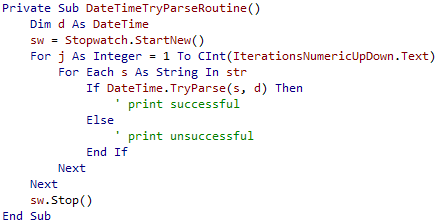
Honestly? The font looks horrible. I find the fuzziness introduced by the ClearType rendering very hard to swallow (the font looks as though it's suffering from colour-bleeding, even though it's not). I couldn't be bothered to even try installing the font.

A casual comment from a reader in one of the blog posts I've read struck me as brilliantly simple: I've been using OpenOffice.org for quite a while now (give it a try!), and the default font for Writer is a relatively new font from Bitstream (via GNOME) called Bitstream Vera. It originally struck me as an impressively neutral font - pleasing to both eyes and mind. Apparently a monospace version of the Bitstream Vera Sans font is included with OOo (and additionally available via the previous link); it's professional, it's free and it looks great (screenshot shamelessly stolen from this place):
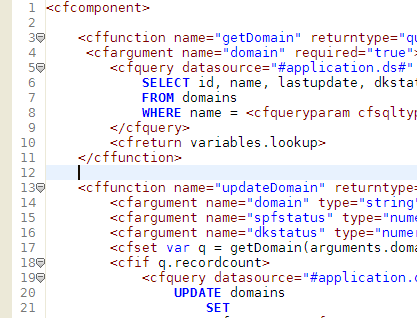
 

I heartily recommend the Bitstream Vera Sans Mono font for programmers (note that it takes a bit of hacking for it to work with Visual Studio 2003, although it works just fine with 2005).

Finally, if neither of the above fonts suits you, there's a huge list of programmer fonts here; one alternatives you should look into is Andale Mono, which is very slick and functional.

Wednesday, March 22, 2006 4:10:27 PM (Jerusalem Standard Time, UTC+02:00)
Actually, fonts rendered using ClearType _DO_ suffer from color bleeding. The technology works by taking account the fact that the the red, blue and green components are physically seperate. It then pretends that these are pixels it can use. It takes into account the type of monitor, since the arrangement of RGB components is different. Then ClearType antialiases the font using a larger resolution than your monitor. The result is, in fact, color bleeding, since the smoothed areas are now not completely black.
The effect may be especially pronounced on CRT monitors where the pixel positions isn't fixed, or if your LCD monitor has strange pixel arrangement.

http://www.grc.com/ctwhat.htm
Mugga!
Thursday, April 27, 2006 11:49:00 PM (Jerusalem Standard Time, UTC+02:00)
I think monospace fonts are less than ideal for code. You can make out some individual symbols more easily, but modern code involves more words than symbols. Monospace fonts are also good for lining up equal signs and such, but time is better spent on other matters.

I prefer Garamond at 11pt or 12pt for coding. The proportional spacing is easier on the eyes, and it makes the overall code more readable.

Another nice thing about Garamond is the small x-height makes capitals stand out. This makes it easier to parse the words that make up camelCase or PascalCase names.
Friday, April 28, 2006 2:17:35 PM (Jerusalem Standard Time, UTC+02:00)
I looked into Garamond and it's a very slick font, but in a world where indentation and whitespace tell you more about a program's structure than the actual code I simply can't do without monospace fonts.

I also disagree that the time it takes to align equal signs (or any type of indentation/formatting for that matter) is better spent on code - properly (and I use the term loosely) aligned and formatted code is a hundred times easier to maintain than a mass of (relatively) unformatted code. The projects I've maintained varied a lot in both code quality and attention to (visual) detail, and I find that even the most complex code is that much easier to digest if it's written in a highly formatted and consistent manner.
Name
E-mail
Home page

Comment (Some html is allowed: a@href@title, b, blockquote@cite, em, i, strike, strong, sub, super, u) where the @ means "attribute." For example, you can use <a href="" title=""> or <blockquote cite="Scott">.  

Live Comment Preview