.NET Remoting is a pretty nice piece of technology. It theoretically
allows you to tear out a class from the server code and use it remotely
from a client; it features all sorts of nice features like SAO and CAO,
lifetime leasing and sponsors, pluggable protocols and provider chains
etc. But in order to effectively use it there are quite a few things
the programmer should take into account: the obvious ones
(serialization, object lifetime, state) and the less-obvious ones
(object construction [for CAOs], security [e.g. typeLevelFilter]).
Today I'd like to discuss one these less-obvious issues,
specifically the usage of events in remotable classes. For clarity,
lets assume the following scenario: a Server has a singleton SAO
factory for client registration. The CAO class is called IProvider. Suppose it has the following structure:
public delegate void ServerEventHandler( string message );
public interface IProvider
{
void ClientMessage( string message );
event ServerEventHandler OnServerMessage;
}
And suppose the client were to register itself to the event like so:
p.OnServerMessage += new ServerEventHandler( p_OnServerMessage );
What happens behind the scene is a little less trivial. Delegates
themselves are value types which hold a reference to their target. So
in other words, we are sending the server an object which holds a
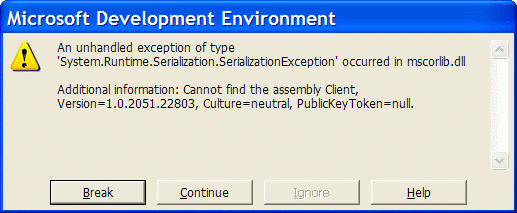
reference to our client class, in itself a MarshalByRefObject derivative. What happens when an object is marshalled by reference? Answer: a proxy is created on the remote machine. What happens, in effect, is that the server is trying to create a proxy of the client object, which requires the assembly containing the client object's type. A naïve implementation like the one above would result in the following error (click for a larger image):
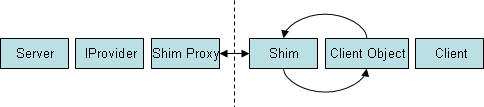
The solution is something of a hack I originally found in this article;
the general idea is that for every delegate defined in your shared
interface you create a shim object. This object acts as an intermediary
between the client and server, passing events from one side to the
other; the shim itself is defined in the shared assembly, which means
it is always recognized by both client and server. This way the server
does not need to recognize the client object type:
The actual shim implementation is ugly but trivial. Here's one example of how to do this for the ServerEventHandler delegate:
public class ServerEventShim : MarshalByRefObject
{
ServerEventHandler
target;
private ServerEventShim()
{
}
public void DoInvoke(
string message )
{
target( message );
}
public static ServerEventHandler
Wrap( ServerEventHandler handler )
{
ServerEventShim shim = new ServerEventShim();
shim.target = handler;
return new ServerEventHandler( shim.DoInvoke );
}
Now all that's left is to slightly modify the way the client registers itself for the event:
p.OnServerMessage += ServerEventShim.Wrap( new ServerEventHandler( p_OnServerMessage ) );
Be advised: the client is now effectively also a .NET Remoting
server, which means you have to register a channel for it (you should
use 0 for port; this instructs Remoting to use whatever available
incoming port.) You are also serializing custom types here, which means
you must also set typeLevelFilter=true for this incoming channel.
Finally, to be honest I'm a little astonished that the .NET Remoting
team didn't realize this shortcoming and found a more reasonable way to
do this (anonymous, automatically generated shim classes? Why not -
there are anonymous, automatically generated proxy classes...) Oh well,
another few hours down the drain.
Update (August 29th 09:45 GMT+2): As per the request of Peter Gallati, here's some source code demonstrating the technique. Feel free to drop me a line if you need any further help.