Tomer Gabel's annoying spot on the 'net RSS 2.0
# Tuesday, January 16, 2007

Update (1 July 2007): The newer versions no longer exhibit this problem (tested on beta 12.0.1183.516). Just make sure you chose "None" for the image borders.

Looking back at my post on Windows Live Writer dating back to August, it seems that I either missed a very significant fact about the product or perhaps something has changed in one of the betas. The short story is that Windows Live Writer sucks at handling images; whenever I embed an image it goes on to severely reduce the image quality:
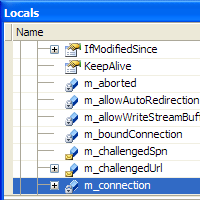

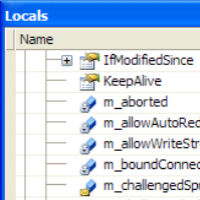
You be the judge: on the left, the original. On the right, the "improved" version

Not only does WLW upscale my image for some unknown reason, it also does this via an extremely low quality scaler. In the case of simple images such as the one above, this will also result in larger file sizes (this example  demonstrates a 400% increase in file size - from under 21KB to a little over 104KB).

This reminds me of the old image pasting problem with Microsoft Outlook, and what kills me is that I can't think of any conceivable reason why anyone would develop this "feature". To add insult to injury, the only feedback link I could find (via this post in the Windows Live Writer blog) is an MSN Groups page that requires registration. The registration process itself asks you about a hundred completely personal questions that Microsoft has absolutely no business asking.

I'll try and get in contact with the WLW team since I do want to keep using the tool, but this particular issue is starting to cost me a lot of time and effort.

Tuesday, January 16, 2007 4:01:29 PM (Jerusalem Standard Time, UTC+02:00)  #    Comments [5] -
Software
Tuesday, January 16, 2007 8:37:14 PM (Jerusalem Standard Time, UTC+02:00)
Thanks for commenting on this issue, it really helps us prioritize issues to address. I've been rather surprised we haven't seen more complaints about this issue. We've actually already fixed this issue for our next rev, so problems with image fuzzyness and size should be solved.

Screenshots are actually the most problematic of images because any scaling artifacts are instantly visible in rendered text. Selecting to use the original image with no borders (or image effects) is the best way to minimize manipulation to the screenshot image. In the current version of Writer this may still cause a little blurriness, but in the next version it won't.
Spike Washburn (Writer Dev Team)
Wednesday, January 17, 2007 10:57:55 AM (Jerusalem Standard Time, UTC+02:00)
Thanks for the response - I've been trying to find a way to contact you guys for a few days now! I'm looking forward to the next version, then. Maybe you should consider nightly builds? This tool is in beta anyway - plenty of people (myself included) would love to help testing it.

Anyway it's good to know that WLW isn't left to stagnate, it's just too good a tool. Thanks a bunch!
Wednesday, January 17, 2007 11:30:45 AM (Jerusalem Standard Time, UTC+02:00)
At least you CAN upload images using WLW. My blog is on Blogger, and WLW doesn't know how to upload images to Blogger at all (with or without scaling). The even more upsetting bit is that it tells you that only when you are actually trying to publish the post, after you're done writing and editing. I would at least expect WLW to let me know when I first try to load an image that it wont be able to upload it to Blogger. Although, of course, with such a widely used blogging site, I would expect it to support images in Blogger seemlessly...
Wednesday, January 17, 2007 11:31:36 AM (Jerusalem Standard Time, UTC+02:00)
Can't you work around it with FTP access or something?
Friday, January 19, 2007 11:40:17 PM (Jerusalem Standard Time, UTC+02:00)
From what I've observed, Outlook (or any other Office application, for that matter) only resizes images when their DPI does not match the display's DPI (96DPI).
For example, an image with a DPI field set to a value higher than 96 will appear smaller when pasted into any office application.

I'm not sure if the default Outlook email editor also exhibits this behavior (I only use the Word-based one, which behaves the same way as Word does).

When I need to insert an image to a document and I don't care about the DPI field (not planning on printing it out, etc), then I just reset the image's DPI field to 96 DPI (I use IrfanView, but pretty much every image editor out there lets you fiddle around with that stuff).
Tal
OpenID
Please login with either your OpenID above, or your details below.
Name
E-mail
Home page

Comment (Some html is allowed: a@href@title, b, blockquote@cite, em, i, strike, strong, sub, super, u) where the @ means "attribute." For example, you can use <a href="" title=""> or <blockquote cite="Scott">.  

Live Comment Preview
Me!
Send mail to the author(s) Be afraid.
Archive
<July 2009>
SunMonTueWedThuFriSat
2829301234
567891011
12131415161718
19202122232425
2627282930311
2345678
All Content © 2009, Tomer Gabel
Based on the Business theme for dasBlog created by Christoph De Baene (delarou)